
Mazda CX-5 Service & Repair Manual: Precaution
Intermittent Concern Troubleshooting
Vibration method
-
If a malfunction occurs or becomes worse while driving on a rough road or when the engine is vibrating, perform the following steps.
NOTE:
-
There are several reasons why vehicle or engine vibration could cause an electrical malfunction. Inspect the following:
-
Connectors not fully seated.
-
Wiring harnesses not having full play.
-
Wires laying across brackets or moving parts.
-
Wires routed too close to hot parts.
-
An improperly routed, improperly clamped, or loose wiring harness can cause wiring to become pinched between parts.
-
The connector joints, points of vibration, and places where wiring harness pass through the firewall, body panels and other panels are the major areas to be inspected.
Inspection method for switch and/or sensor connectors or wires
1. Connect the M-MDS to the DLC-2.
2. Turn the ignition switch to the ON position (engine off).
NOTE:
-
If the engine starts and runs, perform the following steps at idle.
3. Access PIDs for the switch you are inspecting.
4. Turn the switch on manually.
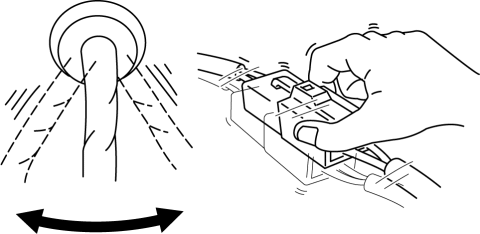
5. Slightly shake each connector or wiring harness vertically and horizontally while monitoring the PID.
-
If the PID value is unstable, inspect for poor connection.
Inspection method for sensors
1. Connect the M-MDS to the DLC-2.
2. Turn the ignition switch to the ON position (engine off).
NOTE:
-
If the engine starts and runs, perform the following steps at idle.
3. Access PIDs for the switch you are inspecting.
4. Vibrate the sensor slightly with your finger.
-
If the PID value is unstable or a malfunction occurs, inspect for poor connection and/or poorly mounted sensor.
Connector terminal inspection method
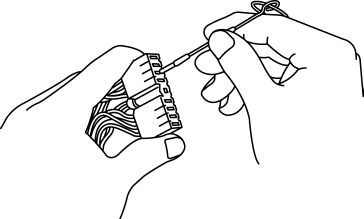
1. Inspect the connection of each female terminal.
2. Insert the male terminal to the female terminal and inspect the female terminal for looseness.
 General Procedures (Steering)
WARNING:
Always inspect the steering component carefully for any shock or impact which
may have occurred during a collision or servicing operation. If a damaged part
or a part suspected ...
 Steering Abbreviations
AAS
Active Adaptive Shift
ABS
Antilock Brake System
ABDC
After Bottom Dead Center
ACC
Access ...
Other materials:
Corner Plate Installation [Panel Replacement]
Symbol Mark
Installation Procedure
1. When installing new parts, measure and adjust the body as necessary to conform
with standard dimensions.
2. Drill holes for the plug welding before installing the new parts.
3. After temporarily installing new parts, make sure the related parts fit p ...
Passenger Side Air Bag Module [Standard Deployment Control System]
Purpose
When the passenger-side air bag module receives an impact from a frontal
or frontal offset collision, the operation (deployment) of the air bag mediates
the impact to the head and face of the front passenger.
Function
When the passenger-side air bag module receives ...
Bumper Bracket Removal [Panel Replacement]
Symbol Mark
Removal Procedure
1. Rough cut area locations indicated by (A).
2. Grind the 6 locations indicated by (B) shown in the figure.
CAUTION:
When grinding 6 locations indicated by (B) shown in the figure and the front
side frame is damaged, there is a possibility that ...
