
Mazda CX-5 Service & Repair Manual: General Procedures (Steering)
WARNING:
-
Always inspect the steering component carefully for any shock or impact which may have occurred during a collision or servicing operation. If a damaged part or a part suspected of being damaged is used, it could result in an unexpected accident due to the steering mechanism being inoperative. Always replace the damaged part or part suspected of being damaged.
-
If the steering mechanism is turned from lock to lock continuously or the steering rack terminal limit is reached repeatedly, such high-load steering action increases the temperature of the steering column (to approx. 85 В°C {185В°F}), causing severe burns. Be careful when handling the steering column.
-
If the steering column is dropped, the EPS CM could be damaged internally causing the steering mechanism to become inoperative, which could result in an unexpected accident. Always replace the steering column if it has been subjected to an impact.
CAUTION:
-
If the steering column is stored in a humid place, the EPS system may not operate properly when installed to the vehicle. Store the steering column in a suitable place.
-
Be careful when handling the steering column because it weighs approximately 10 kg {22 lb} and it could fall off and be damaged while servicing.
-
If the intermediate shaft is connected to the steering gear (pinion) before installing the steering column to the dashboard member, the weight of the steering column could cause damage to the intermediate shaft slider/bush/yoke. Always follow the procedure in the Workshop Manual.
-
The universal joint could be damaged if subjected to an impact when the intermediate shaft (pinion) is disconnected. Perform the servicing carefully avoiding impact when disconnecting the intermediate shaft from the steering gear (pinion).
-
Do not release the lock of the adjusting lever when handling the steering column unless it is securely installed to the dashboard member. If the adjusting lever is unlocked with the steering column not securely installed, the steering column and other parts could be damaged.
-
A new steering column is shipped in a pre-set condition. Maintain this condition until the steering column is completely installed to the dashboard member so as to avoid damage during transportation and installation.
-
When removing/installing the steering column, keep the wiring harness away from the steering column installation area so as to prevent the steering column from being caught in the wiring harness and damaged.
NOTE:
-
When installing a replacement part, be careful not to rotate the steering shaft until the installation has been completed.
-
In order to completely interrupt the EPS system power supply, disconnect the battery for 20 s
or more after the ignition switch is turned off.
-
Do not replace the steering column (EPS system) with that of another vehicle even if they are the same model.
Wheel And Tire Installation
1. When installing the wheels and tires, tighten the wheel nuts in a criss-cross pattern to the following tightening torque.
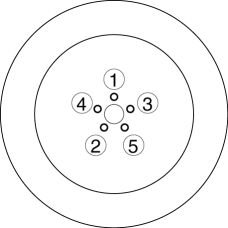
-
Tightening Torque
-
108—147 N·m {12—14 kgf·m, 80—108 ft·lbf}
Connectors disconnection
1. Disconnect the negative battery terminal before performing any work that requires handling of connectors..
Suspension Links Removal/Installation
NOTE:
-
To prevent the bushings from being twisted or pinched, perform the procedures with no passengers or luggage aboard the vehicle.
1. For the joint sections with rubber bushings, raise the vehicle using a lift and temporarily tighten the installation nuts and bolts. Afterwards, tighten to the specified torque with the wheels on the ground.
EPS Related Parts
CAUTION:
-
If the EPS CM configuration is not completed, the EPS will not operate properly.If the steering column component or EPS CM is replaced, always carry out the automatic configuration so that the EPS operates properly.
1. Make sure that there are no DTCs in the EPS memory after working on EPS related parts.If there are any DTCs in the memory, go to the applicable DTC diagnostic procedure..
 General
...
 Precaution
Intermittent Concern Troubleshooting
Vibration method
If a malfunction occurs or becomes worse while driving on a rough road or
when the engine is vibrating, perform the following steps.
...
Other materials:
Rear Body Control Module (Rbcm) Removal/Installation
CAUTION:
If configuration is not performed when the rear body control module (RBCM)
is replaced with a new one, the vehicle specification information is not stored
in the rear body control module (RBCM) and the system will not operate normally.
When performing configuration, it ...
Rear Side Marker Light Bulb Removal/Installation
1. Disconnect the negative battery cable..
2. Insert a tape-wrapped flathead screwdriver into the service hole in the position
shown in the figure.
3. Move the flathead screwdriver in the direction of the arrow (1) shown in the
figure, pull out the service hole cover, and detach the serv ...
Oil Pump Removal/Installation [Skyactiv G 2.0]
WARNING:
Hot engines and engine oil can cause severe burns. Turn off the engine and
wait until it and the engine oil have cooled.
A vehicle that is lifted but not securely supported on safety stands is dangerous.
It can slip or fall, causing death or serious injury. Never work ...
