
Mazda CX-5 Service & Repair Manual: Power Steering Malfunction Indicator Light
Purpose
-
The power steering malfunction indicator light warns the driver that there is a malfunction with the electric power steering (EPS) system.
Function
-
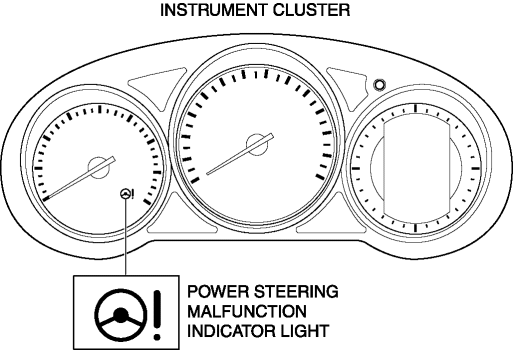
If there is a malfunction in the EPS system, the power steering malfunction indicator light illuminates.
-
If the EPS system and CAN lines are normal, it illuminates when the ignition is switched ON (engine off), and turns off after the engine is started.
Construction
-
The power steering malfunction indicator light is built into the instrument cluster.
Operation
-
EPS system malfunction detection
-
If the EPS control module (CM) detects a system malfunction, it sends a power steering malfunction indicator light illumination on request signal to the instrument cluster via CAN.
-
The instrument cluster illuminates the power steering malfunction indicator light when it receives a power steering malfunction indicator light illumination on request signal.
-
Initial check
-
If the EPS system and CAN lines are normal, it illuminates when the ignition is switched ON (engine off), and turns off after the engine is started. If there is a system malfunction, the power steering malfunction indicator light illuminates.
Fail-safe
-
Function not equipped.
 Panel Light Control Indicator Alarm
Purpose
The panel light control indicator alarm notifies the driver that the panel
light brightness is either at maximum or minimum.
Function
If the panel light control switch i ...
 Seat Belt Warning Alarm
Purpose
The seat belt warning alarm warns occupants that a seat belt is not fastened.
Function
The instrument cluster sounds the seat belt warning alarm based on the following
C ...
Other materials:
Taillight Bulb Removal/Installation
1. Disconnect the negative battery cable..
2. Insert a tape-wrapped flathead screwdriver into the service hole in the position
shown in the figure.
3. Move the flathead screwdriver in the direction of the arrow (1) shown in the
figure, pull out the service hole cover from the liftgate, a ...
ABS Wheel Speed Sensor And ABS Sensor Rotor
Purpose/Function
The ABS wheel-speed sensor and ABS sensor rotor detect the rotation condition
of each wheel and transmit this information to the DSC HU/CM.
The signal from the ABS wheel-speed sensor is the primary signal that the
DSC HU/CM uses when carrying out control.
...
Driving In Flooded Area
WARNING
Dry off brakes that have become wet by driving slowly, releasing the accelerator
pedal and lightly applying the brakes several times until the brake performance
returns to normal:
Driving with wet brakes is dangerous. Increased stopping distance or the vehicle
pulling to one side whe ...
