
Mazda CX-5 Service & Repair Manual: Back Up Light Bulb Removal/Installation
1. Disconnect the negative battery cable..
2. Insert a tape-wrapped flathead screwdriver into the service hole in the position shown in the figure.
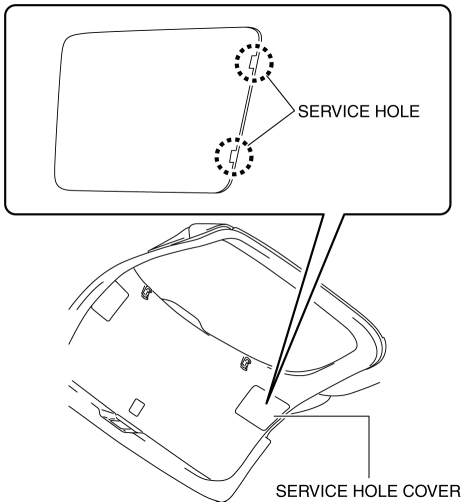
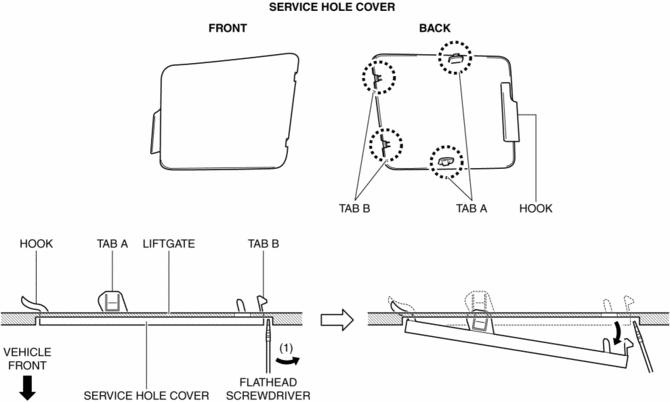
3. Move the flathead screwdriver in the direction of the arrow (1) shown in the figure, pull out the service hole cover from the liftgate, and detach the service hole cover tabs and liftgate connections.
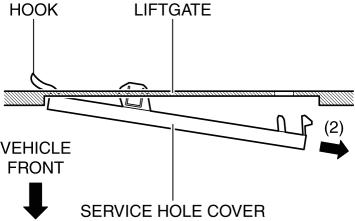
4. Pull out the service hole cover in the direction of the arrow (2) shown in the figure and pull out the service hole cover hook from the liftgate.
5. Remove the service hole cover.
6. Rotate the socket in the direction of the arrow (3) shown in the figure and remove it from the liftgate light in the direction of the arrow (4) shown in the figure.
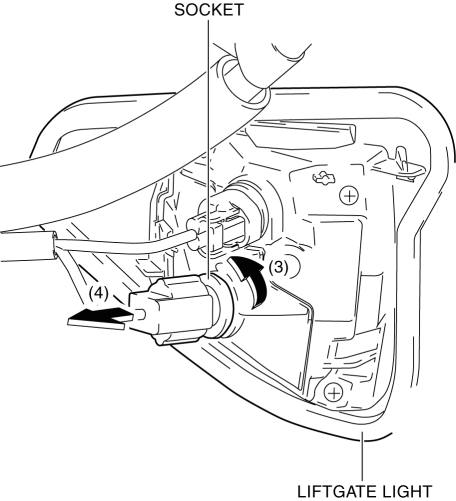
7. Remove the back-up light bulb.
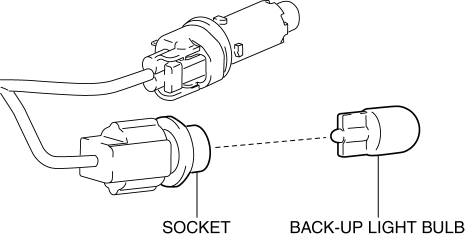
8. Install in the reverse order of removal.
 Afs (Adaptive Front Lighting System) Control Module
Purpose
The AFS control module calculates the target optical axis based on the vehicle
height signal and outputs the target optical axis signal to the headlight leveling
actuator.
F ...
 Brake/Taillight Bulb Removal/Installation
1. Disconnect the negative battery cable..
2. Insert a tape-wrapped flathead screwdriver into the service hole in the position
shown in the figure.
3. Move the flathead screwdriver in the di ...
Other materials:
Rear Washer Hose Removal/Installation
1. Disconnect the negative battery cable..
2. Remove the front over fender..
3. Remove the mudguard (RH)..
4. Disconnect the rear washer hose A from the washer motor.
5. Remove the rear washer hose A from the washer tank hook.
6. Remove the rear washer hose A from clips A and B.
7. Disco ...
Front Door Trim Disassembly/Assembly
Driver-side
1. Disassemble in the order shown in the figure.
1
Switch panel cover
2
Power window main switch
(See Power Window Main Switch, Power Window Subswitch And Lock Switch
Removal Note.)
3
Fastener
...
Barometric Pressure (Baro) Sensor
Purpose/Function
Detects the BARO as basic information for mainly determining the fuel injection
amount.
Detects the BARO and inputs it to the PCM as a BARO signal.
Construction
Built into the PCM.
A piezoelectric element has been adopted for detecting th ...
