
Mazda CX-5 Service & Repair Manual: Power Steering Malfunction Indicator Light
Purpose
-
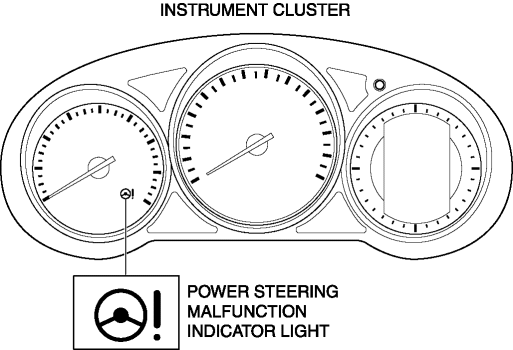
The power steering malfunction indicator light warns the driver that there is a malfunction with the electric power steering (EPS) system.
Function
-
If there is a malfunction in the EPS system, the power steering malfunction indicator light illuminates.
-
If the EPS system and CAN lines are normal, it illuminates when the ignition is switched ON (engine off), and turns off after the engine is started.
Construction
-
The power steering malfunction indicator light is built into the instrument cluster.
Operation
-
EPS system malfunction detection
-
If the EPS control module (CM) detects a system malfunction, it sends a power steering malfunction indicator light illumination on request signal to the instrument cluster via CAN.
-
The instrument cluster illuminates the power steering malfunction indicator light when it receives a power steering malfunction indicator light illumination on request signal.
-
Initial check
-
If the EPS system and CAN lines are normal, it illuminates when the ignition is switched ON (engine off), and turns off after the engine is started. If there is a system malfunction, the power steering malfunction indicator light illuminates.
Fail-safe
-
Function not equipped.
 Oil Control Valve (OCV) [Skyactiv G 2.0]
Purpose, Function
The OCV switches the oil passage to the hydraulic variable valve timing actuator
to control the opening/closing period of the exhaust valve.
Construction
The O ...
 Pressure Control Valve Inspection [Skyactiv G 2.0]
1. Remove the pressure control valve assembly..
CAUTION:
Do not apply a pressure 36 kPa {0.37 kgf/cm2, 5.2 psi} or more. Doing so
will damage the pressure control valve and evaporative ho ...
Other materials:
Seat Weight Sensor Control Module Removal/Installation [Two Step Deployment
Control System]
CAUTION:
When the seat weight sensor control module is replaced with a new one, perform
the seat weight sensor calibration using the M?MDS..
1. Switch the ignition to off.
2. Disconnect the negative battery cable and wait for 1 min or more..
3. Disconnect the connectors.
...
TCM Configuration [Fw6 A EL, Fw6 Ax EL]
NOTE:
The TCM is built into the control valve body.
1. Verify TCM configuration implementation necessity for replacement parts.
Replacement part
Configuration necessity
Control valve body replacement
Necessary
...
Oil Seal (Side Gear) Replacement
1. Remove the drain plug and the drain differential oil into a container.
2. Install a new washer and the drain plug, and tighten.
3. Remove the rear drive shaft..
4. Remove the clip from the drive shaft.
CAUTION:
Wrap the end of a screwdriver with cloth to prevent scratches to the i ...
