
Mazda CX-5 Service & Repair Manual: Oil Control Valve (OCV) [Skyactiv G 2.0]
Purpose, Function
-
The OCV switches the oil passage to the hydraulic variable valve timing actuator to control the opening/closing period of the exhaust valve.
Construction
-
The OCV is installed to the exhaust camshaft cap (No.1).
-
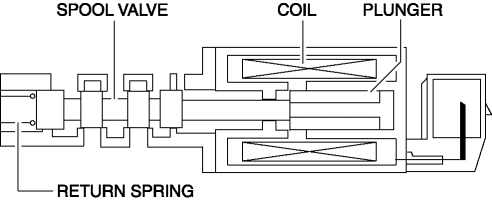
The OCV consists of a spool valve which switches the engine oil passage and a plunger, coil, and return spring which operate the spool valve.
Operation
At retard
-
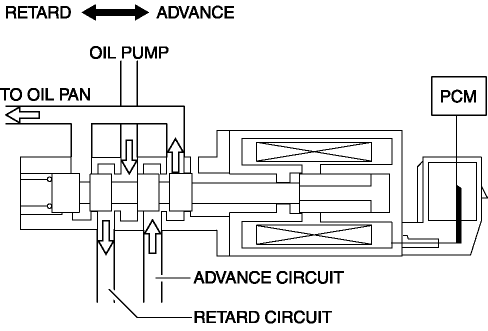
The spool valve is moved to the retard side by the signal from the PCM and engine oil is lead to the retard oil passage of the exhaust camshaft.
At advance
-
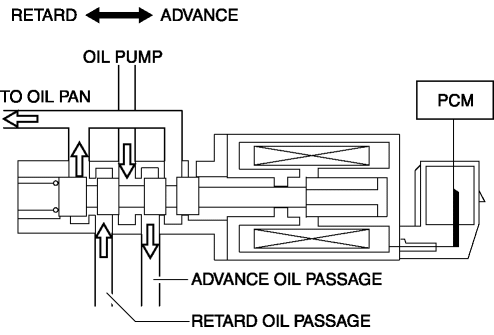
The spool valve is moved to the advance side by the signal from the PCM and engine oil is lead to the advance oil passage of the exhaust camshaft.
Middle point maintenance
-
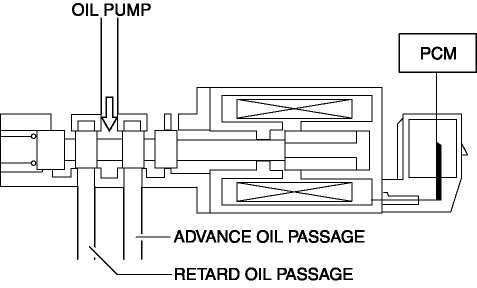
The spool valve is moved to the closed position of the oil passage to the exhaust camshaft by the signal from the PCM.
-
The construction is designed to supply a small amount of oil to the advance oil passage even while the middle point is maintained, improving holding stability while at low oil pressure.
Fail-safe
|
DTC |
Fail-safe |
|
P0014:00 |
|
|
P0015:00 |
|
|
P2090:00 |
|
|
P2091:00 |
|
 Oil Control Valve (OCV) Removal/Installation [Skyactiv G 2.0]
WARNING:
A hot engine can cause severe burns. Turn off the engine and wait until it
is cool before servicing.
1. Disconnect the negative battery cable..
2. Remove the plug hole plat ...
 Power Steering Malfunction Indicator Light
Purpose
The power steering malfunction indicator light warns the driver that there
is a malfunction with the electric power steering (EPS) system.
Function
If there is a malfunc ...
Other materials:
Radiator Removal/Installation
WARNING:
Never remove the cooling system cap or loosen the radiator drain plug while
the engine is running, or when the engine and radiator are hot. Scalding engine
coolant and steam may shoot out and cause serious injury. It may also damage
the engine and cooling system.
Tu ...
Resistor [Manual Air Conditioner]
Purpose
The resistor controls the blower motor rotation speed.
Function
The resistor controls the supply voltage to the blower motor according to
the fan switch operation, and adjusts the fan rotation speed (airflow volume).
Construction
The resistor is installed ...
Air Fuel Ratio (A/F) Sensor Removal/Installation
WARNING:
A hot engine and exhaust system can cause severe burns. Turn off the engine
and wait until they are cool before removing the exhaust system.
CAUTION:
Do not allow flammable objects such as the taping for bundling wiring harness
to come into contact with the exhau ...
