
Mazda CX-5 Service & Repair Manual: Tire Pressure Monitoring System Set Switch Inspection
1. Remove the TPMS set switch..
2. Verify that the resistance between the TPMS set switch terminals B and C is as indicated in the table.
-
If not as indicated in the table, replace the TPMS set switch.
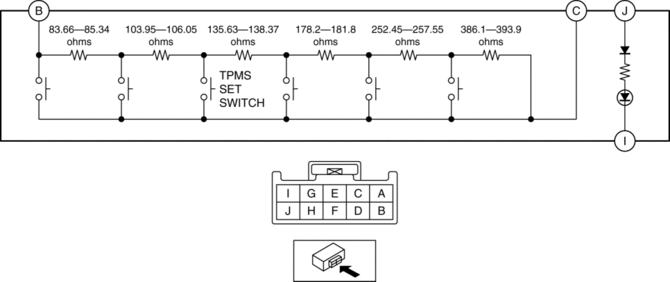
TPMS set switch specification
|
Terminal |
Test condition |
Resistance (ohms) |
|
B—C |
Switch pressed |
187.61—191.39 |
|
Switch released |
1139.99—1163.01 |
3. Apply battery voltage to TPMS set switch terminal J, and connect terminal I to ground.
4. Verify that the LED illuminates.
-
If there is any malfunction, replace the TPMS set switch.
 Tire Pressure Monitoring System Set Switch
Purpose
The tire pressure monitoring system set switch is used to initialize the
tire pressure monitoring system.
Construction, Operation
The tire pressure monitoring syst ...
 Tire Pressure Monitoring System Set Switch Removal/Installation
NOTE:
The tire pressure monitoring system (TPMS) set switch is integrated with
the cluster switch.
Refer to SWITCH PANEL REMOVAL/INSTALLATION to remove the cluster switch.
...
Other materials:
Oil Pressure Switch [Fw6 A EL, Fw6 Ax EL]
Purpose/Function
The oil pressure switch detects the engagement pressures of the low clutch,
2-6 brake, R-3-5 brake, and the high clutch.
The oil pressure switch signal is used for automatic shift control, manual
shift control, TCC control, line pressure control, direct electric ...
Lumber Support Motor Removal/Installation
WARNING:
Handling a side air bag improperly can accidentally operate (deploy) the
air bag, which may seriously injure you. Read the service warnings/cautions
in the Workshop Manual before handling the front seat (side air bag integrated)..
If the sliding mechanisms on both side ...
Clock Spring Removal/Installation [Two Step Deployment Control System]
CAUTION:
If the disc on the combination switch is deformed or has foreign material
adhering to it, performance of the steering angle sensor may be reduced, causing
abnormal operation. When handling the clock spring, be careful not to deform
the disc and make sure there is no foreign ...
