
Mazda CX-5 Service & Repair Manual: Master Cylinder Removal/Installation
1. Remove the battery..
2. Remove in the order indicated in the table.
3. Install in the reverse order of removal.
4. After installation, add brake fluid, bleed the air, and inspect for fluid leakage..
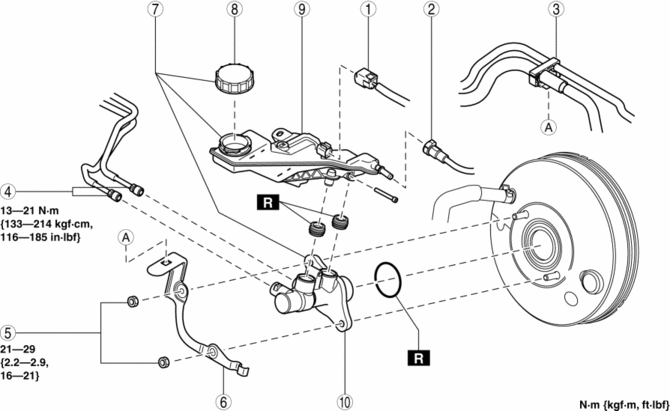
|
1 |
Brake fluid level sensor connector |
|
2 |
Clutch reserve hose (MTX) (See Clutch Reserve Hose Removal Note (MTX).) (See Clutch Reserve Hose Installation Note (MTX).) |
|
3 |
Hose holder |
|
4 |
Brake pipe |
|
5 |
Nut |
|
6 |
Bracket |
|
7 |
Master cylinder |
|
8 |
Cap |
|
9 |
Brake fluid reserve tank |
|
10 |
Cylinder component |
Clutch Reserve Hose Removal Note (MTX)
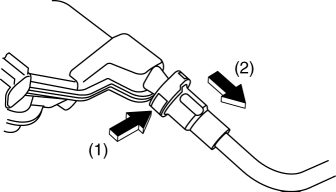
1. Disconnect the clutch reserve hose in the order shown in the figure.
Clutch Reserve Hose Installation Note (MTX)
1. Insert the clutch reserve hose to the master cylinder.
2. Pull the clutch reserve hose to verify that it does not come off, and reinsert it completely.
 Master Cylinder
Purpose/Function
With the adoption of the master cylinder having an enlarged diameter (20.64
mm {0.8126 in}), brake pedal operability has been improved.
For vehicles with DSC, the di ...
 Power Brake Unit
Purpose/Function
A 9.8-inch, single diaphragm type power brake unit has been adopted, achieving
compatibility between high braking performance and excellent brake feeling.
Construction ...
Other materials:
Repairable Range Of Polypropylene Bumpers [Plastic Body Parts]
The three types of damaged bumpers shown below are considered repairable. Although
a bumper which has been damaged greater than this could also be repaired, it should
be replaced with a new one because such repair would detract from the looks and
quality of the bumper. In addition, such repair ...
Auxiliary Jack/Usb Port Removal/Installation
1. Disconnect the negative battery cable..
2. Remove the upper console..
3. While pressing the auxiliary jack/USB port. tabs in the direction of the arrows
(1) shown in the figure, press the auxiliary jack/USB port. in the direction of
the arrow (2) to detach the auxiliary jack/USB port. tab ...
Front Door Garnish Removal/Installation
WARNING:
Using a utility knife with bare hands can cause injury. Always wear gloves
when using a utility knife.
1. Using a tape-wrapped fastener remover, remove clips A in the direction of
arrow (1), (2) shown in the figure.
2. Remove the double-sided adhesive tape in the positi ...
