
Mazda CX-5 Service & Repair Manual: Low Fuel Warning Light
Purpose
-
The low fuel warning light warns the driver that the remaining fuel level is low.
Function
-
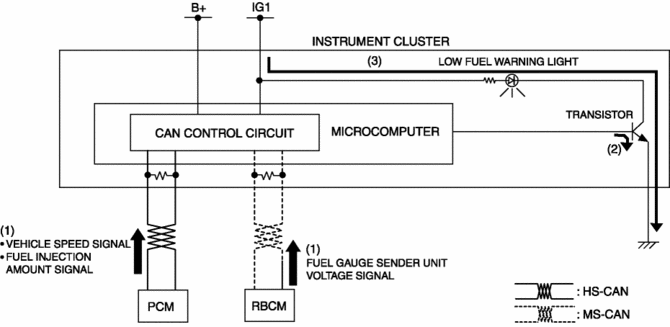
The instrument cluster calculates the fuel quantity based on the following CAN signals, and if a remaining fuel amount of approx. 10 L {2.6 US gal, 2.2 Imp gal} (fuel gauge displays remaining two segments) is detected, the low fuel warning light illuminates.
-
Fuel gauge sender unit voltage signal sent from rear body control module (RBCM)
-
Fuel injection amount signal, vehicle speed signal sent from PCM
Construction
-
The instrument cluster microcomputer controls the low fuel warning light illumination on/off based on the remaining fuel amount calculation that is calculated by the instrument cluster.
-
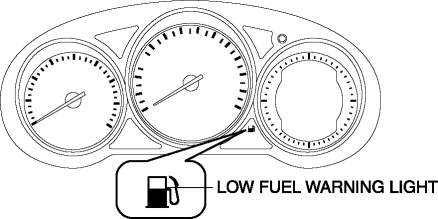
The low fuel warning light is set in the instrument cluster.
Operation
-
When the ignition is switched ON (engine off or on) the instrument cluster receives (1) the fuel gauge sender unit voltage signal from the rear body control module (RBCM), and the fuel injection amount signal from the PCM.
-
The instrument cluster turns the transistor on (2) if the calculated remaining fuel amount based on each signal is approx. 10 L {2.6 US gal, 2.2 Imp gal}.
-
When the transistor turns on, a ground circuit with the low fuel warning light is established and the low fuel warning light illuminates (3).
Fail-safe
-
Function not equipped.
 High Pressure Fuel Pump
Purpose, Function
Applies pressure to fuel sent from the fuel pump equipped on the fuel tank,
and then pumps it to the fuel delivery pipe.
Fuel is sectioned and pumped by the up and ...
 No.27 Fuel Refill Concerns
27
FUEL REFILL CONCERNS
DESCRIPTION
Fuel tank does not fill smoothly.
POSSIBLE CAUSE
...
Other materials:
Starting the Engine
WARNING
Radio waves from the key may affect medical devices such as pacemakers: Before
using the key near people who use medical devices, ask the medical device manufacturer
or your physician if radio waves from the key will affect the device.
NOTE
• The key must be carried because the
ke ...
Keyless Beeper
Purpose, Function
Notifies the user that the lock/unlock operation of the advanced keyless
entry system is completed, and warns if the system is operated incorrectly.
Construction, Operation
Installed inside the cowl grille.
The keyless beeper operates based on the LF ...
Rear Window Glass Installation
WARNING:
Using a utility knife with bare hands can cause injury. Always wear gloves
when using a utility knife.
CAUTION:
Proper installation of the glass may be difficult if sealant is cracked or
the glass is pushed out by air pressure when a door is opened/closed with al ...
