
Mazda CX-5 Service & Repair Manual: Liftgate Upper Trim Removal/Installation
1. Take the shaded area shown in the figure, detach tab A while pulling the liftgate upper trim in the direction of the arrow (1) shown in the figure, then detach clips B, clip C and pin D while pulling in the direction of the arrow (2).
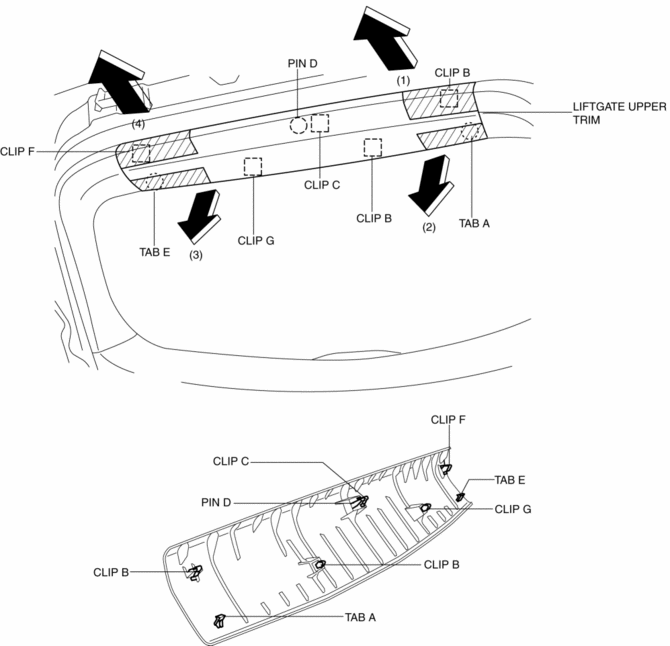
2. Take the shaded area shown in the figure, detach tab E while pulling the liftgate upper trim in the direction of the arrow (3) shown in the figure, then detach the clip F, clip G while pulling in the direction of the arrow (4).
3. Install in the reverse order of removal.
 Liftgate Side Trim Removal/Installation
1. Remove the liftgate upper trim..
2. Remove the fastener A.
3. Take the shaded area shown in the figure, and pull the liftgate side trim
in the direction of the arrow (1) while detaching clips ...
 Meter Hood Removal/Installation
1. Disconnect the negative battery cable..
2. Remove the upper column cover.
3. Using a phillips screwdriver, remove fasteners.
NOTE:
When pulling up the shaft of fasteners using a phill ...
Other materials:
Tcs/DSC Indicator Light
Purpose/Function
The TCS/DSC indicator light, built into the instrument cluster, informs the
driver of the following vehicle conditions.
TCS is operating. (Drive wheel is slipping.)
DSC is operating. (Vehicle side-slip condition.)
Roll over mitigation (RO ...
Vacuum Pump Inspection
1. Pinch open the clamp using pliers and disconnect the vacuum hose from the
vacuum pump..
2. Install the vacuum gauge as shown in the figure, then check the vacuum.
3. Warn up the engine.
If the pressure is less than the specification, inspect for the following.
Malf ...
Front Beltline Molding Removal/Installation
CAUTION:
Affix protective tape to the position shown in the figure.
1. Fully open the front door glass.
2. Insert a tape-wrapped flathead screwdriver and then detach clips A in the
direction of arrow (1) shown in the figure.
3. Pull up the front side of front beltline molding ...
