
Mazda CX-5 Service & Repair Manual: DSC HU/CM Removal/Installation
WARNING:
-
If the DSC HU/CM configuration is not completed, it could result in an unexpected accident due to the DSC being inoperative. If the DSC HU/CM is replaced, always use the automatic configuration function so that the DSC operation conditions are correct.
-
If the DSC related parts sensor initialization procedure is not completed, the DSC will not operate properly and it might cause an unexpected accident. Therefore, after replacing or removing the DSC HU/CM, make sure to perform the DSC related parts sensor initialization procedure to insure proper DSC operation.
CAUTION:
-
The internal parts of the DSC HU/CM could be damaged if dropped. Be careful not to drop the DSC HU/CM. Replace the DSC HU/CM if it is subjected to an impact.
NOTE:
-
When the ignition is switched to ON or the engine is started after the DSC HU/CM have been replaced, the DSC CM reads data from the instrument cluster via CAN communication to perform automatic configuration.
-
The DSC HU/CM prior to replacement stores the vehicle specification information.
-
A new DSC HU/CM does not store any vehicle specification information.
1. Remove the plug hole plate..
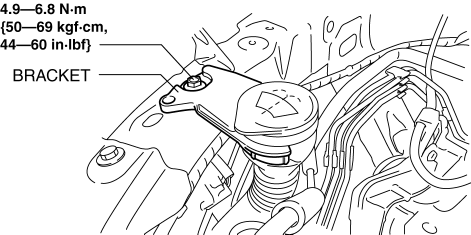
2. Remove the bracket..
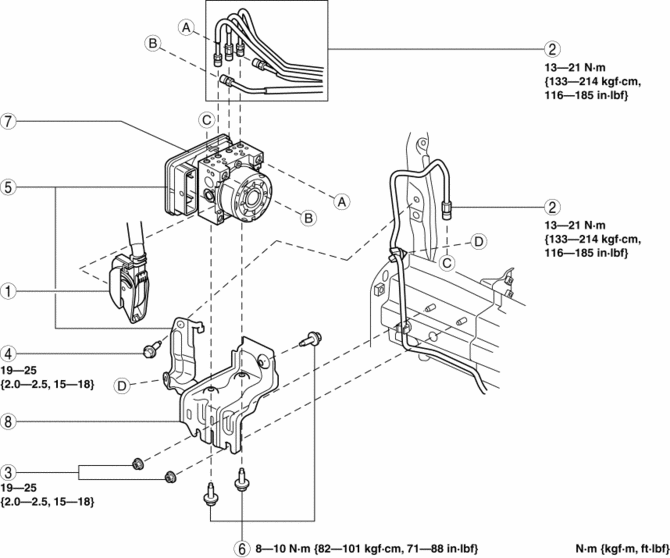
3. Remove in the order indicated in the table.
4. Install in the reverse order of removal.
5. After installation, add brake fluid, bleed the air, and inspect for fluid leakage..
6. Perform the following procedure to implement the DSC HU/CM automatic configuration.
a. Switch the ignition ON (engine off) and wait for 10 s or more
.
b. Switch the ignition to off and wait for 3 s or more
.
c. Switch the ignition ON (engine off) and wait for 3 s or more
.
d. The automatic configuration procedure is completed.
7. Perform the DSC related parts sensor initialization procedure..
8. Perform the tire pressure monitoring system initialization procedure..
9. Clear the DTCs from the memory..
|
1 |
DSC HU/CM connector (See DSC HU/CM Connector Removal Note.) (See DSC HU/CM Connector Installation Note.) |
|
2 |
Brake pipe (See Brake Pipe Removal Note.) (See Brake Pipe Installation Note.) |
|
3 |
Nut |
|
4 |
Bolt |
|
5 |
DSC HU/CM component |
|
6 |
Bolt |
|
7 |
DSC HU/CM |
|
8 |
Bracket |
DSC HU/CM Connector Removal Note
1. Pull the lock lever down in the direction of the arrow while pressing the tab of the connector cover.
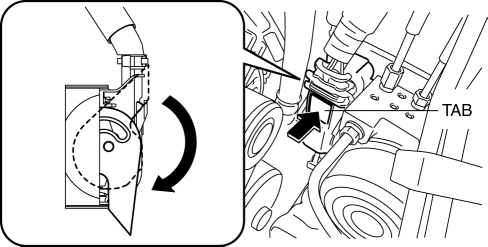
2. Pull the connector toward the vehicle rear and remove it.
Brake Pipe Removal Note
1. Place an alignment mark on the brake pipe and DSC HU/CM.
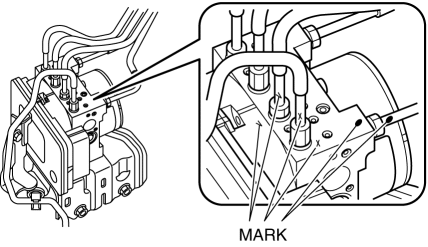
2. Apply protective tape to the connector to prevent brake fluid from entering.
3. Disconnect the brake pipes.
Brake Pipe Installation Note
1. Align the marks made before removal and install the brake pipe to the DSC HU/CM and brake pipe joint referring to the figure.
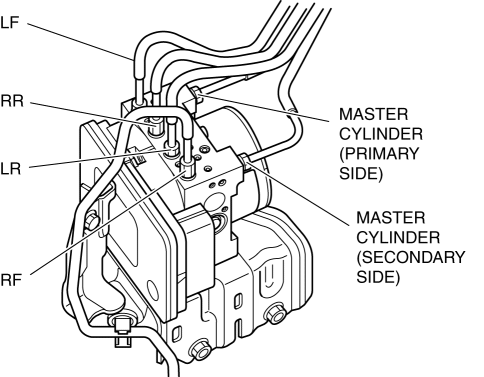
2. Tighten the brake pipe to the specified torque using the commercially available flare nut wrench.
DSC HU/CM Connector Installation Note
1. Connect the connector and pull the lock lever up in the direction of the arrow.
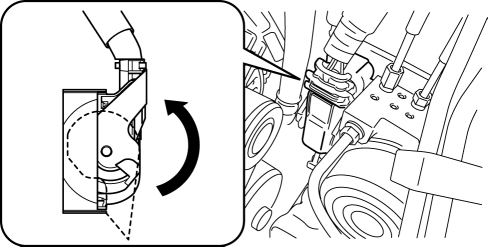
2. After connecting the connector, verify that the connector cover is completely pushed in.
 DSC HU/CM Inspection
1. Disconnect the DSC HU/CM connector..
2. Connect the negative battery cable..
3. Attach the tester lead to the DSC HU/CM wiring harness-side connector and
inspect voltage, continuity, or resis ...
 DSC Related Parts Sensor Initialization Procedure
WARNING:
If the initialization procedure is not completed, the DSC will not operate
properly and it might cause an unexpected accident. Therefore, after replacing
or removing the DSC HU/ ...
Other materials:
Odometer/Tripmeter
Purpose
The odometer/tripmeter notifies the user of the total travel distance or
the traveled distance over a specific interval.
Function
The instrument cluster calculates the traveled distance based on the traveled
distance signal from the PCM and displays it.
The ...
Front Seat Back Trim Removal/Installation
WARNING:
Handling a side air bag improperly can accidentally operate (deploy) the
air bag, which may seriously injure you. Read the service warnings/cautions
in the Workshop Manual before handling the front seat (side air bag integrated)..
If the sliding mechanisms on both ...
Extractor Chamber Removal/Installation
1. Disconnect the negative battery cable..
2. Remove the following parts:
a. Rear splash shield.
b. Rear combination light.
c. Rear bumper.
3. Insert a tape-wrapped flathead screwdriver shown in the figure and remove
clips in the direction of arrow (1).
4. Remove the extractor cham ...
