
Mazda CX-5 Service & Repair Manual: Hazard Warning Switch Inspection
1. Disconnect the negative battery cable..
2. Remove the decoration panel..
3. Verify that the continuity between the hazard warning switch terminals is as indicated in the table.
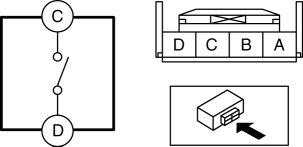
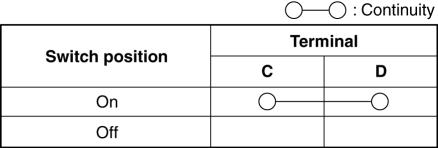
-
If the continuity is as indicated in the table, go to the next step.
-
If not as indicated in the table, replace the hazard warning switch.
4. Apply battery voltage to hazard warning switch terminal A, and connect terminal B to ground.
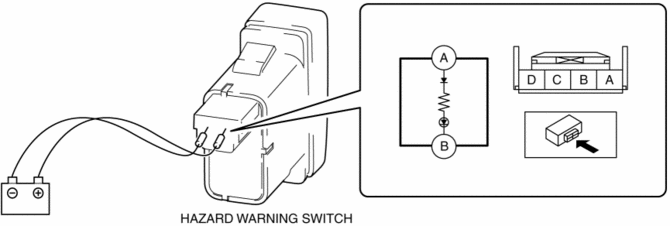
5. Verify that the LED illuminates.
-
If the LED does not illuminate, replace the hazard warning switch.
 Front Fog Light Switch Inspection
1. Disconnect the negative battery cable..
2. Remove the column cover..
3. Remove the light switch..
4. Verify that the continuity between the light switch terminals is as indicated
in the tab ...
 Hazard Warning Switch Removal/Installation
1. Disconnect the negative battery cable..
2. Remove the decoration panel..
3. While pressing the hazard warning switch tab in the direction of the arrow
(1) shown in the figure, press the hazar ...
Other materials:
Side Air Bag Module [Standard Deployment Control System]
Purpose
When a side air bag module receives an impact from a lateral collision, the
operation (deployment) of the air bag mediates the impact to the chest, stomach,
and waist of the driver and front passenger.
Function
When a side air bag module receives an impact from a la ...
Steering Gear And Linkage Disassembly
CAUTION:
To prevent damage to the steering gear, secure it to the vise using a copper
plate or clean cloth.
1. Disassemble in the order indicated in the figure.
1
Dust cover
2
O-ring
3
Tie-rod end ...
Front Wheel Hub Bolt Replacement
1. Remove the brake calliper component from the steering knuckle and suspend
it out of the way using a cable.
2. Remove the disc plate.
3. Remove the wheel hub bolt using the SST as shown in the figure.
4. Place a new wheel hub bolt in the wheel hub.
5. Install the wheel hub by placi ...
