
Mazda CX-5 Service & Repair Manual: Front Fog Light Switch Inspection
1. Disconnect the negative battery cable..
2. Remove the column cover..
3. Remove the light switch..
4. Verify that the continuity between the light switch terminals is as indicated in the table.
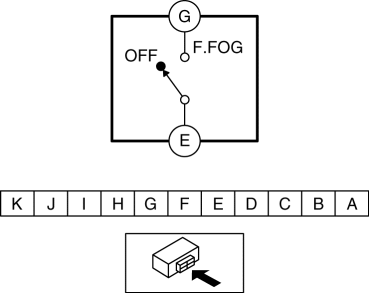
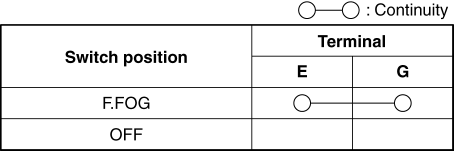
-
If not as indicated in the table, replace the light switch.
 Bsm Indicator Light Flashes While Not Under Bsm Indicator Light Flashing Conditions
(No Combination Switch Operation (Turn Signal Switch)) [Blind Spot Monitoring (Bsm)]
Bsm Indicator Light Flashes While Not Under Bsm Indicator Light Flashing Conditions
(No Combination Switch Operation (Turn Signal Switch)) [Blind Spot Monitoring (Bsm)]
Description
BSM indicator light flashes while not under BSM indicator light-flashing
conditions (no combination switch operation (turn signal switch)
...
 Hazard Warning Switch Inspection
1. Disconnect the negative battery cable..
2. Remove the decoration panel..
3. Verify that the continuity between the hazard warning switch terminals is
as indicated in the table.
...
Other materials:
Restraints SST
49 H066 002
Deployment tool
49 B066 004
Adapter harness
49 L066 002
Adapter harness
49 G066 003
Adapter harness
49 N088 0A0
Fuel and Thermometer checker
...
Fuel Injector Relay [Skyactiv G 2.0]
Purpose, Function
Supplies power to the PCM for the fuel injector and spill valve control solenoid
valve operation.
Construction
The fuel injector relay is installed in the relay and fuse block.
Operation
When the ignition is switched ON, the battery voltage ...
Auxiliary Jack/Usb Port Removal/Installation
1. Disconnect the negative battery cable..
2. Remove the upper console..
3. While pressing the auxiliary jack/USB port. tabs in the direction of the arrows
(1) shown in the figure, press the auxiliary jack/USB port. in the direction of
the arrow (2) to detach the auxiliary jack/USB port. tab ...
