
Mazda CX-5 Service & Repair Manual: Front Door Trim Removal/Installation
1. Disconnect the negative battery cable..
2. Remove the inner garnish..
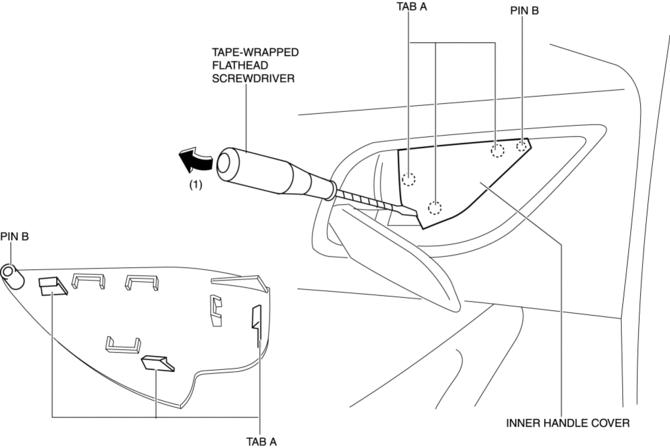
3. Insert a tape-wrapped flathead screwdriver in the position indicated by the arrow (1) in the figure and remove the inner handle cover while detach tabs A, pin B.
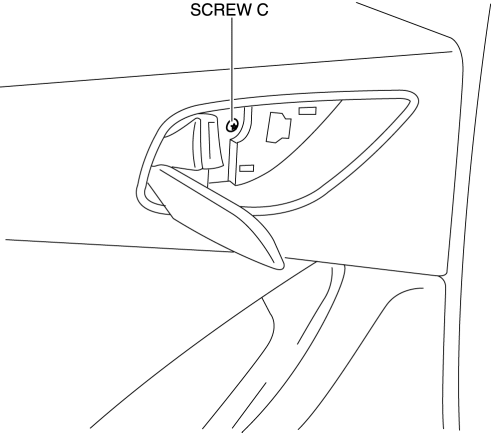
4. Remove the screw C.
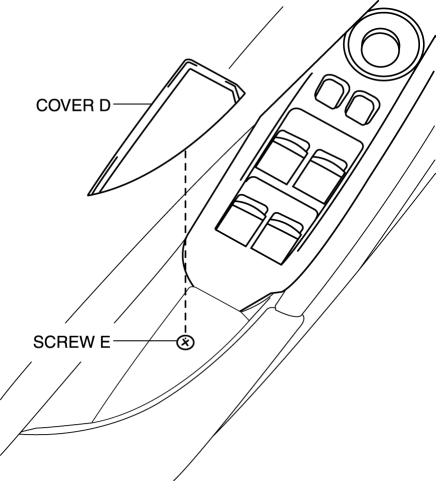
5. Remove the cover D, then remove the screw E.
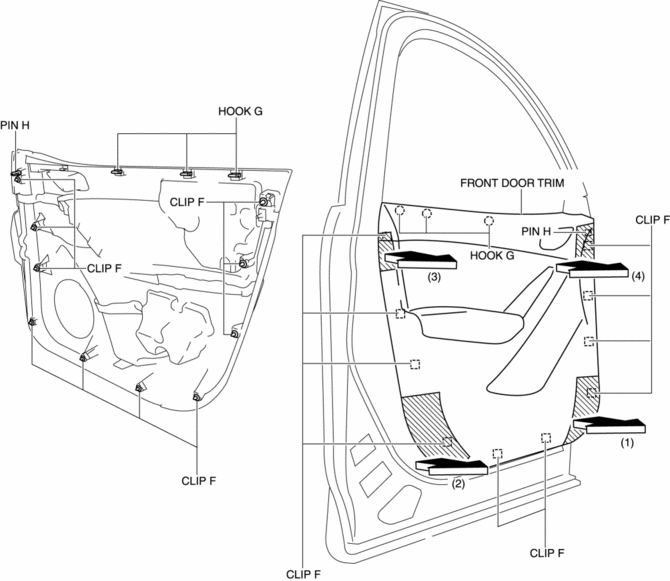
6. Take the shaded area shown in the figure, and pull the front door trim in the direction of the arrow in the order of (1), (2), (3), (4) while detaching clips F, hooks G and pin H.
CAUTION:
-
If the front door trim is removed in the same way as past vehicles by pulling it upward, it could damage clips F, hooks G and pin H. When removing the front door trim, always pull it in the direction of the arrow shown in the figure.
7. Remove the tab I in the direction of the arrow (5) shown in the figure.
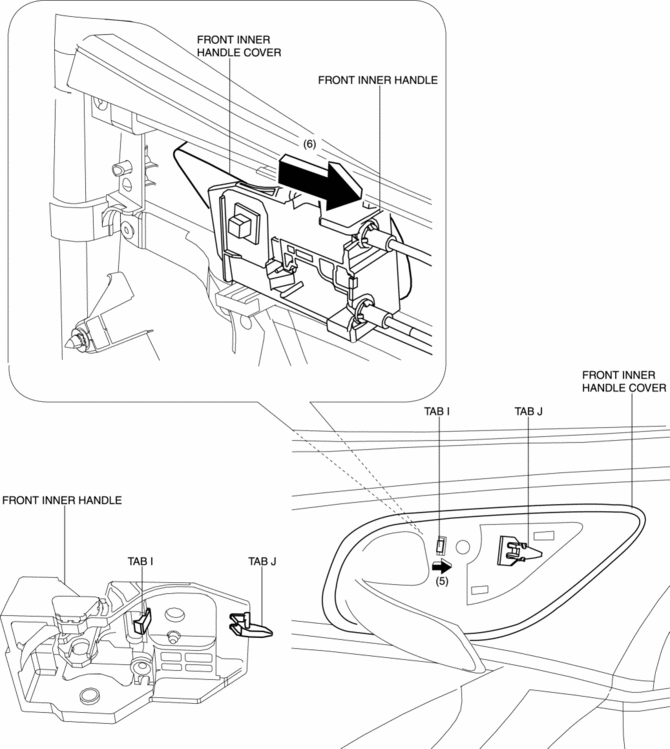
8. Remove the front inner handle in the direction of the arrow (6) shown in the figure while detaching the tab J.
9. Disconnect the power window main switch connector (driver-side) or power window subswitch connector (passenger-side).
10. Install in the reverse order of removal.
 Front Door Trim Disassembly/Assembly
Driver-side
1. Disassemble in the order shown in the figure.
1
Switch panel cover
2
Power window main switch
(See Power Window Main Switch ...
 Front Sash Molding Installation
WARNING:
Using a utility knife with bare hands can cause injury. Always wear gloves
when using a utility knife.
NOTE:
Double-sided adhesive tape has already been attached to t ...
Other materials:
Taillight Bulb Removal/Installation
1. Disconnect the negative battery cable..
2. Insert a tape-wrapped flathead screwdriver into the service hole in the position
shown in the figure.
3. Move the flathead screwdriver in the direction of the arrow (1) shown in the
figure, pull out the service hole cover from the liftgate, a ...
Wheel Apron Component Removal [Panel Replacement]
Symbol Mark
Removal Procedure
1. Drill the 14 locations indicated by (A) from the front wheel housing side
shown in the figure.
2. Drill the 11 locations indicated by (B) shown in the figure.
3. Drill the 4 locations indicated by (C) shown in the figure.
NOTE:
When drilling t ...
Evaporator
Purpose
The evaporator cools the passing air.
Function
The evaporator vaporizes the atomized refrigerant flowing internally, and
the air passing through the evaporator is cooled by the release of latent heat.
The moisture in the air is condensed at this time and dehumidifie ...
