
Mazda CX-5 Service & Repair Manual: Assist Handle Removal/Installation
Removal
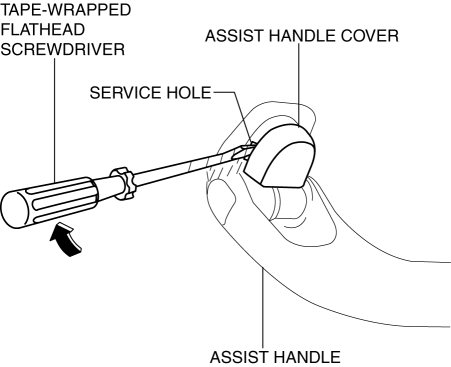
1. Insert a tape-wrapped flathead screwdriver into the service hole and remove the assist handle covers.
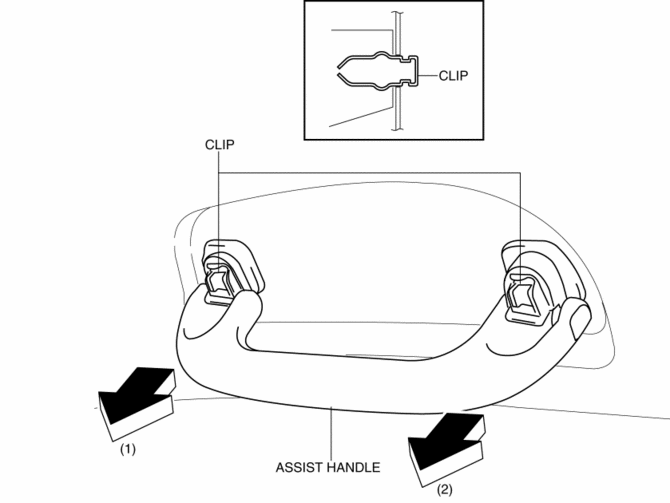
2. Remove the assist handle in the direction of the arrow (1) and (2), while detach clips.
NOTE:
-
Remove the assist handle by shaking it up and down.
Installation
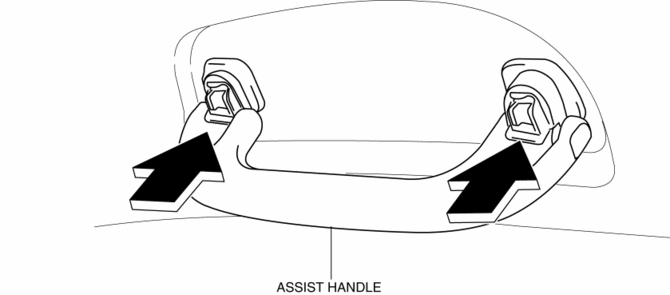
1. Push the assist handle in the direction of the arrow shown in the figure.
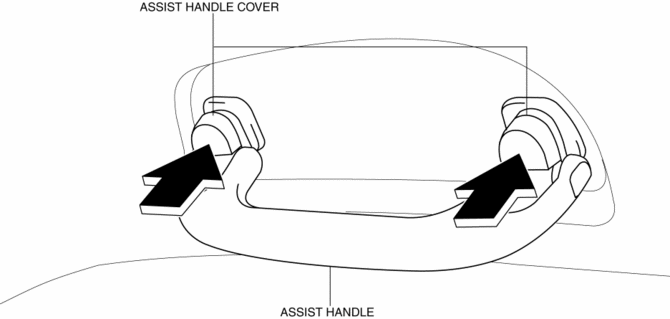
2. Push the assist handle cover assembled to install the assist handle.
 Amenities
...
 Front Console Box Removal/Installation
NOTE:
Affix protective tape to the position shown in the figure.
1. Insert a tape-wrapped flathead screwdriver in the position indicated by the
arrow in the figure and detach cl ...
Other materials:
Jacking Positions, Vehicle Lift (2 Supports) And Safety Stand (Rigid Rack) Positions
Jacking Positions
WARNING:
Improperly jacking a vehicle is dangerous. The vehicle can slip off the jack
and cause serious injury. Use only the correct front and rear jacking points
and block the wheels.
CAUTION:
Use safety stands to support the vehicle after it has been ...
Shift Solenoid No.3 [Fw6 A EL, Fw6 Ax EL]
Purpose/Function
Shift solenoid No.3 adjusts the hydraulic pressure in the R-3-5 brake circuit
based on the current demand from the TCM according to the vehicle conditions.
Construction
Shift solenoid No.3 is installed to the solenoid control valve body.
Shift solenoid ...
Clutch Pedal Inspection [C66 M R]
NOTE:
For the clutch pedal inspection, note the following and measure each inspection
location.
Measure the center of the upper surface of the pedal pad for each inspection.
If the distance from the pedal pad to the floor covering is measured,
measure the short ...
