
Mazda CX-5 Service & Repair Manual: Front Door Key Cylinder Switch Inspection
1. Perform the front door glass preparation..
2. Disconnect the negative battery cable..
3. Remove the following parts:
a. Inner garnish.
b. Front door trim.
c. Front door key cylinder.
d. Front door glass.
e. Front door module panel.
f. Front door latch and lock actuator.
Front Door Key Cylinder Switch Lock-Side Inspection
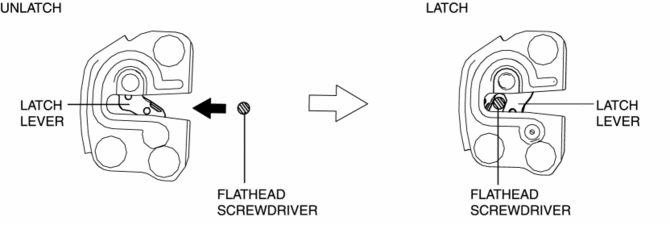
1. Press in the latch lever of the front door latch and lock actuator using a flathead screwdriver, and set it to the latched condition.
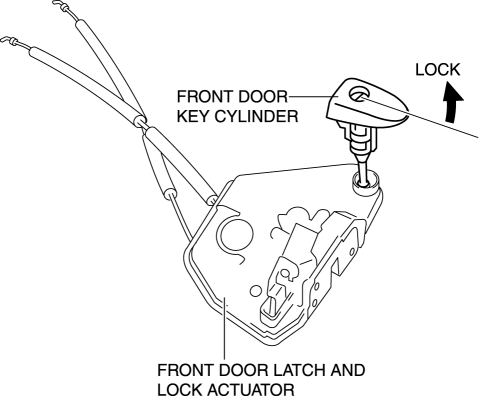
2. Rotate the front door key cylinder in the direction of the arrow until it stops to set the front door key cylinder switch to the locked condition.
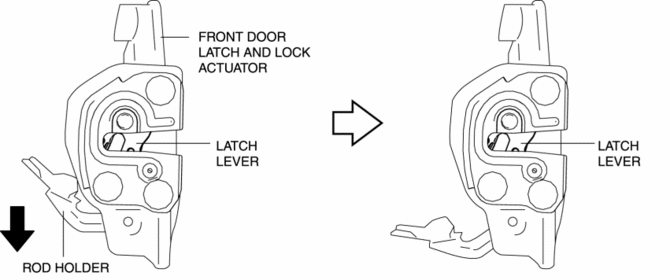
3. To verify that the switch is in the locked position, press down the rod holder in the direction of the arrow and verify that the latch lever does not move.
NOTE:
-
If the latch lever moves, the front door key cylinder switch is not in the locked position. Repeat the procedure from Step 1.
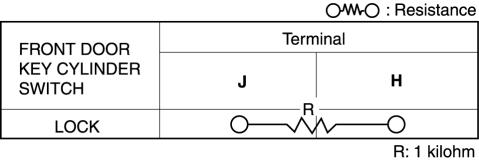
4. Verify that the continuity of the front door key cylinder is as indicated in the table.
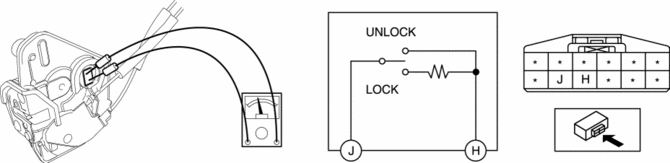
-
If not as indicated in the table, replace the front door latch and lock actuator.
Front Door Key Cylinder Switch Unlock-Side Inspection
1. Press in the latch lever of the front door latch and lock actuator using a flathead screwdriver, and set it to the latched condition.
2. Rotate the front door key cylinder in the direction of the arrow until it stops to set the front door key cylinder switch to the unlocked condition.
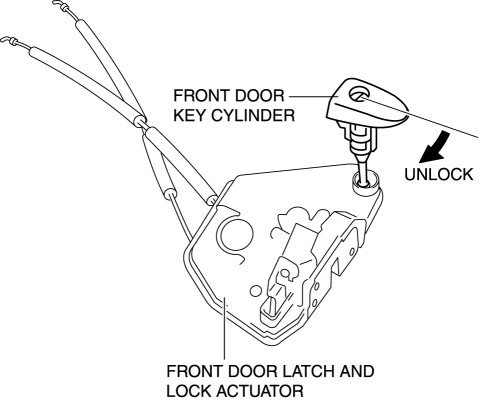
3. To verify that the switch is in the unlocked position, press down the rod holder in the direction of the arrow and verify that the latch lever moves.
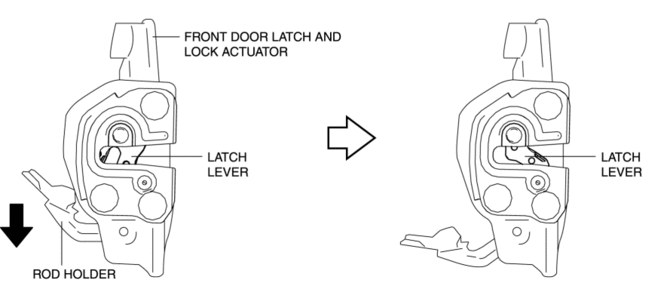
NOTE:
-
If the latch lever does not move, the front door key cylinder switch is not in the unlocked position. Repeat the procedure from Step 2.
4. Verify that the continuity of the front door key cylinder is as indicated in the table.
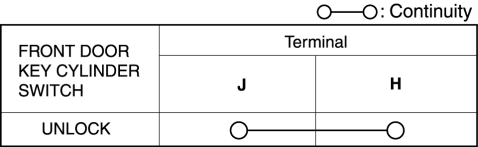
-
If not as indicated in the table, replace the front door latch and lock actuator.
 Front Door Key Cylinder Removal/Installation
1. Disconnect the negative battery cable..
2. Remove the service hole cover.
3. Detach the screw from the front door key cylinder.
NOTE:
The screw cannot be removed because the f ...
 Front Door Latch And Lock Actuator Inspection
The following actuator and switches are integrated with the front door latch
and lock actuator.
From the actuator/switch name and operation in the following table, select
the a ...
Other materials:
Auxiliary Jack/Usb Port Inspection
Auxiliary jack inspection
1. Disconnect the negative battery cable..
2. Remove the following parts:
a. Upper console.
b. Auxiliary jack/USB port.
3. Connect a commercially-available plug to the external input unit.
4. Verify that the continuity between the external input unit terminal ...
Bsm Indicator Light Does Not Flash While Under Bsm Indicator Light Flashing
Conditions (With Combination Switch Operation (Turn Signal Switch)) [Blind Spot
Monitoring (Bsm)]
Description
BSM indicator light does not flash while under BSM indicator light-flashing
conditions (with combination switch operation (turn signal switch))
The BSM indicator light does not flash or illuminate continuously,
but the cond ...
Seat Warmer Control Unit Inspection
WARNING:
Handling a front seat (with built-in side air bag) improperly can accidentally
operate (deploy) the air bag, which may seriously injure you. Read the service
warnings/cautions before handling a front seat (with built-in side air bag)..
CAUTION:
After removing a f ...
