
Mazda CX-5 Service & Repair Manual: Front Beltline Molding Removal/Installation
CAUTION:
-
Affix protective tape to the position shown in the figure.
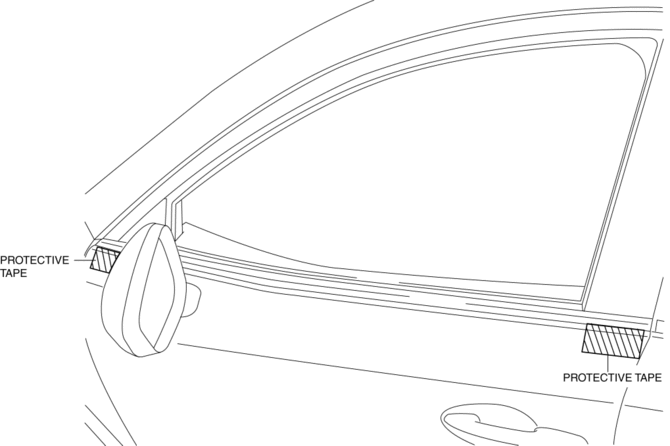
1. Fully open the front door glass.
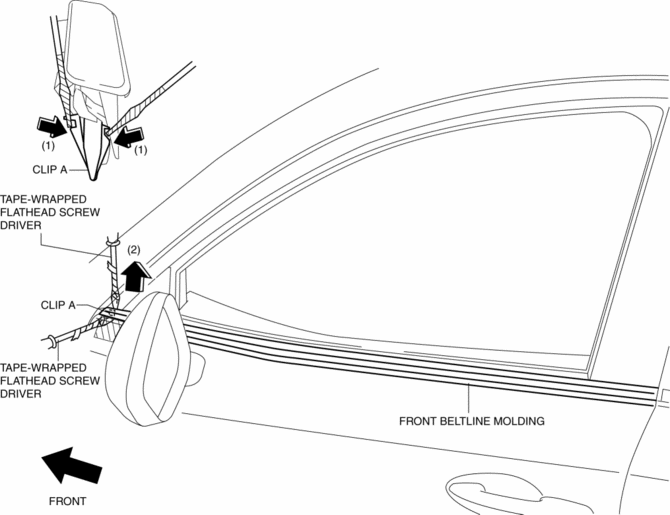
2. Insert a tape-wrapped flathead screwdriver and then detach clips A in the direction of arrow (1) shown in the figure.
3. Pull up the front side of front beltline molding in the direction of arrow (2) shown in the figure.
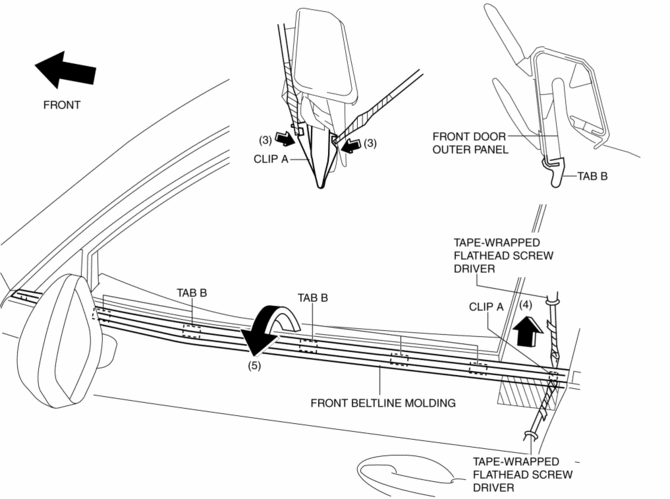
4. Insert a tape-wrapped flathead screwdriver and then detach clips A in the direction of arrow (3) shown in the figure.
5. Pull up the rear side of front beltline molding in the direction of arrow (4) shown in the figure.
6. Rotate the front beltline molding in the direction of the arrow (5) shown in the figure and remove it while detaching tabs B.
7. Install in the reverse order of removal.
 Floor Under Cover Removal/Installation
1. Lift up the vehicle.
2. Remove bolts A.
3. Remove fasteners B.
4. Remove the floor under cover No.1.
5. Remove nuts C.
6. Remove fasteners D.
7. Remove bolts E.
8. Remove the ...
 Front Bumper Disassembly/Assembly
1. Disassemble in the order indicated in the table.
1
Rivet
2
Grille bracket
3
Front bumper retainer
...
Other materials:
Clock Spring Removal/Installation [Two Step Deployment Control System]
CAUTION:
If the disc on the combination switch is deformed or has foreign material
adhering to it, performance of the steering angle sensor may be reduced, causing
abnormal operation. When handling the clock spring, be careful not to deform
the disc and make sure there is no foreign ...
Main Fuse
Purpose
If electric current of the specified value or more flows to each fuse, the
fuse melts due to heat generation to protect the systems and parts downstream
of the fuse.
Function
If electric current to each fuse is the specified value or more, the fuse
melts due to h ...
Ignition Switch
Push Button Start Positions
The system operates only when the driver is in the vehicle or within operational
range while the key is being carried.
Each time the push button start is pressed, the ignition switches in the order
of off, ACC, and ON. Pressing the push button start again from ON sw ...
