
Mazda CX-5 Service & Repair Manual: Front Accessory Socket Removal/Installation
1. Disconnect the negative battery cable..
2. Remove the front console..
3. Insert a tape-wrapped flathead screwdriver into the gap between the cap tab and socket.
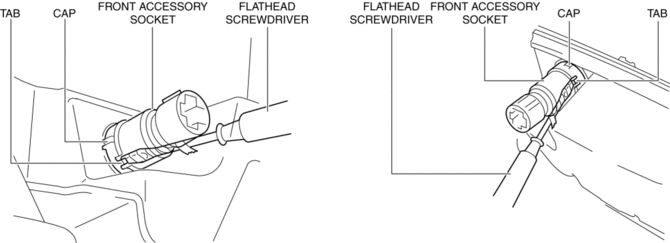
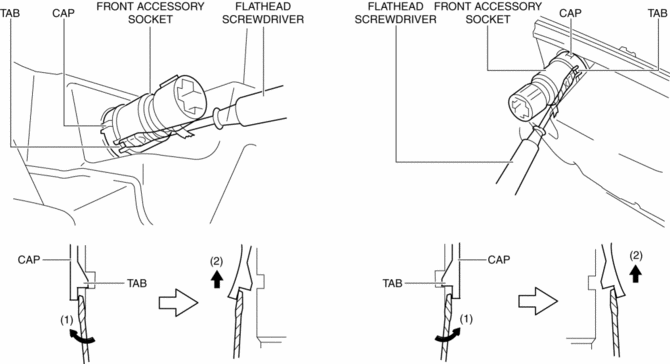
4. Move the flathead screwdriver in the direction of the arrow (1) shown in the figure, press the front accessory socket in the direction of the arrow (2) shown in the figure, and detach the cap tab from the socket.
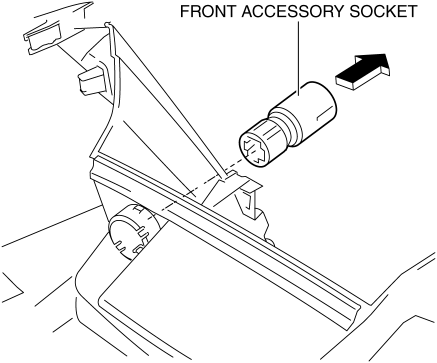
5. Pull the front accessory socket in the direction of the arrow shown in the figure and remove it.
6. While pressing the cap tabs in the direction of arrows (3) shown in the figure, press the cap in the direction of arrow (4) to detach the cap tabs from the front console.
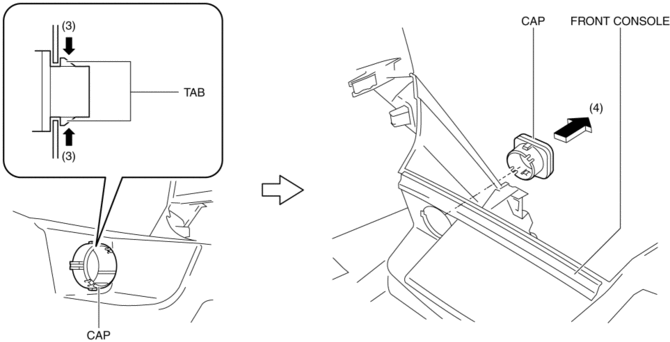
7. Remove the cap.
8. Install in the reverse order of removal.
 Front Accessory Socket Inspection
1. Remove the front accessory socket..
2. Connect the tester probe to the position shown in the figure and verify that
there is continuity.
If it cannot be verified, replace the front ...
 Rear Accessory Socket Inspection
1. Remove the rear accessory socket..
2. Connect the tester probe to the position shown in the figure and verify that
there is continuity.
If it cannot be verified, replace the rear ac ...
Other materials:
Throttle Position (TP) Sensor Inspection
Voltage Inspection
CAUTION:
The inspection cannot be performed with this method correctly if there is
a malfunction of the APP sensor or throttle valve actuator. Verify that no DTCs
related to the APP sensor or throttle valve actuator are stored before the inspection.
NOTE:
...
Rear Seat Cushion Removal/Installation
CAUTION:
When removing or putting in the rear seat cushion, contact with the surrounding
areas of the vehicle could cause scratches and damage. When removing or putting
in the rear seat cushion, always use two or more persons to perform the work
and be careful not to scratch or dama ...
Passenger Compartment Temperature Sensor Inspection [Full Auto Air Conditioner]
1. Measure the temperature around the passenger compartment temperature sensor
and measure the resistance between passenger compartment temperature sensor terminals
A and B.
If the characteristics of the passenger compartment temperature sensor are
not as shown in the graph, replace t ...
