
Mazda CX-5 Service & Repair Manual: Decoration Panel Removal/Installation
CAUTION:
-
Affix protective tape to the position shown in the figure.
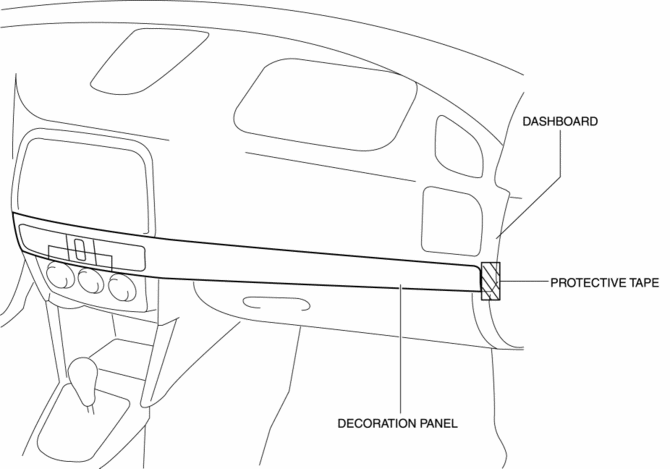
1. Disconnect the negative battery cable..
2. Open the glove compartment.
3. Insert a tape-wrapped flathead screwdriver in the position indicated by the arrow (1) in the figure and detach clip A.
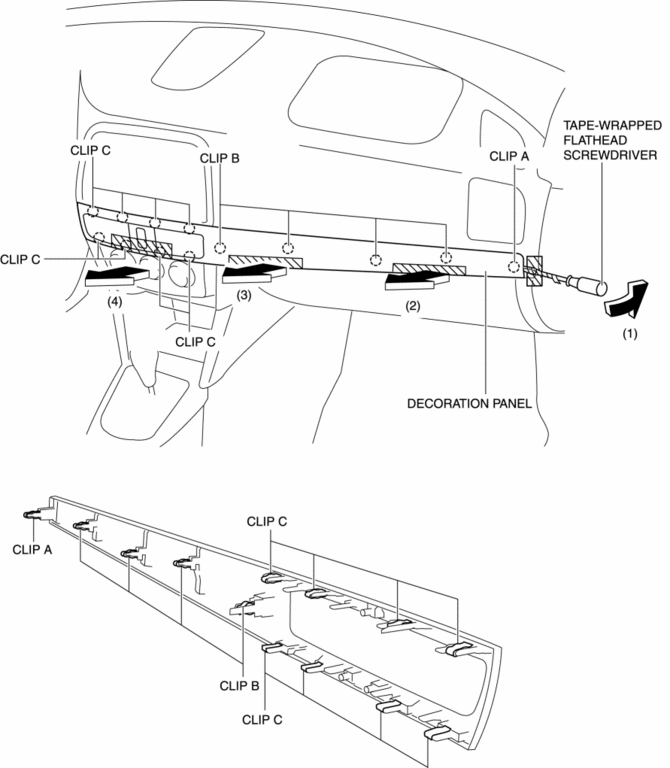
4. Take the shaded area shown in the figure, and remove the decoration panel in the direction of the arrow in the order of (2), (3), (4) while detaching clips B, clips C.
5. Disconnect the hazard switch connector.
6. Install in the reverse order of removal.
 Dashboard Under Cover Removal/Installation
1. Detach hooks A in the direction of arrow (1) shown in the figure.
2. Pull the dashboard under cover in the direction of arrow (2) while detaching
pins B.
3. Remove the dashboard under cov ...
 Floor Covering Removal/Installation
1. Disconnect the negative battery cable..
2. Remove the following parts:
a. Front scuff plate.
b. Front side trim.
c. Rear scuff plate.
d. B-pillar lower trim.
e. Rear seat cushion.
f. ...
Other materials:
Rear Lower Arm Removal/Installation
WARNING:
Be careful not to allow the coil spring to fly off when removing/installing
the coil spring. Otherwise, the coil spring could fly off and cause serious
injury or death, or damage to the vehicle.
1. When working on the left side of the vehicle, disconnect the auto lev ...
Keyless Entry System
This system uses the key buttons to remotely lock and unlock the doors and the
liftgate.
The system can start the engine without having to take the key out of your purse
or pocket.
It can also help you signal for attention.
Operating the theft-deterrent system is also possible on theft-deterr ...
Charcoal Canister Removal/Installation
U.S.A. And CANADA
1. Disconnect the negative battery cable..
2. Remove the floor under cover..
3. Remove in the order indicated in the table.
1
Quick release connector
(See QUICK RELEASE CONNECTOR (EMISSION SYSTEM) REMOVAL/INSTALLATION [SKYACTIV-G
2.0].)
...
