
Mazda CX-5 Service & Repair Manual: Dashboard Under Cover Removal/Installation
1. Detach hooks A in the direction of arrow (1) shown in the figure.
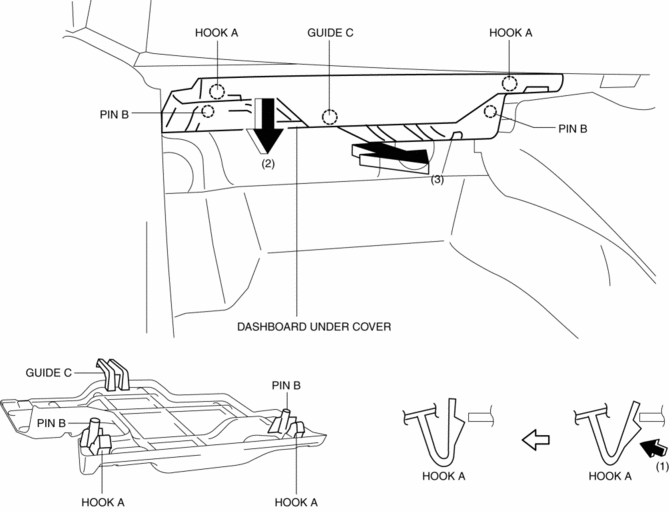
2. Pull the dashboard under cover in the direction of arrow (2) while detaching pins B.
3. Remove the dashboard under cover in the direction of the arrow (3) shown in the figure while detaching the guide C.
CAUTION:
-
If hooks A and pins B is removed forcefully, guide C may be damaged. Carefully remove hooks A and pins B so as not to damage guide C.
4. Install in the reverse order of removal.
 Dashboard Removal/Installation
1. Disconnect the negative battery cable..
2. Remove the following parts:
a. Windshield wiper arm and blade.
b. Cowl grille.
c. Windshield wiper motor.
d. Front scuff plate.
e. Front side ...
 Decoration Panel Removal/Installation
CAUTION:
Affix protective tape to the position shown in the figure.
1. Disconnect the negative battery cable..
2. Open the glove compartment.
3. Insert a tape-wrapped flathead ...
Other materials:
Instrumentation/Driver Info.
Outline
An LCD has been adopted to the instrument cluster which displays the ambient
temperature, trip computer, and odometer/tripmeter.
A blind spot monitoring (BSM) system has been adopted which notifies the
driver of vehicles approaching from behind on the left or right adjac ...
ABS Wheel Speed Sensor And ABS Sensor Rotor
Purpose/Function
The ABS wheel-speed sensor and ABS sensor rotor detect the rotation condition
of each wheel and transmit this information to the DSC HU/CM.
The signal from the ABS wheel-speed sensor is the primary signal that the
DSC HU/CM uses when carrying out control.
...
Turn And Hazard Indicator Alarm
Purpose
The turn and hazard indicator alarm notifies the driver that a turn light
or the hazard warning lights are flashing.
Function
When the instrument cluster receives the turn signal/hazard warning indicator
light illumination request signal sent from the front body con ...
