
Mazda CX-5 Service & Repair Manual: Center Accessory Socket Removal/Installation
1. Disconnect the negative battery cable..
2. Remove the upper console..
3. Insert a tape-wrapped flathead screwdriver into the gap between the cap tab and socket.
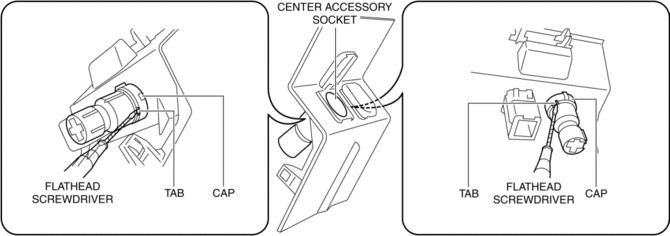
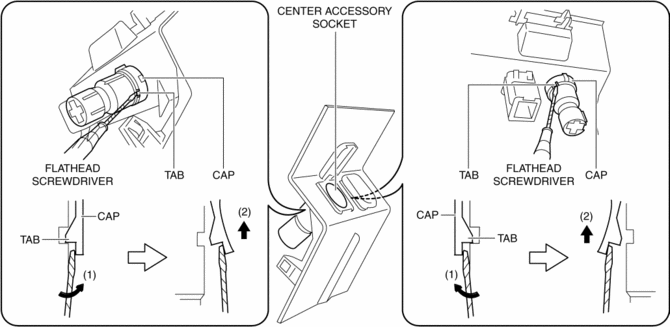
4. Move the flathead screwdriver in the direction of the arrow (1) shown in the figure, press the center accessory socket in the direction of the arrow (2) shown in the figure, and detach the cap tab from the socket.
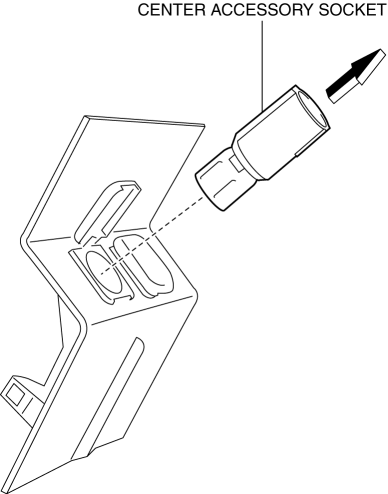
5. Pull the center accessory socket in the direction of the arrow shown in the figure and remove it.
6. While pressing the clip tabs in the direction of arrows (3) shown in the figure, press the cap in the direction of arrow (4) to detach the cap tabs from the upper console.
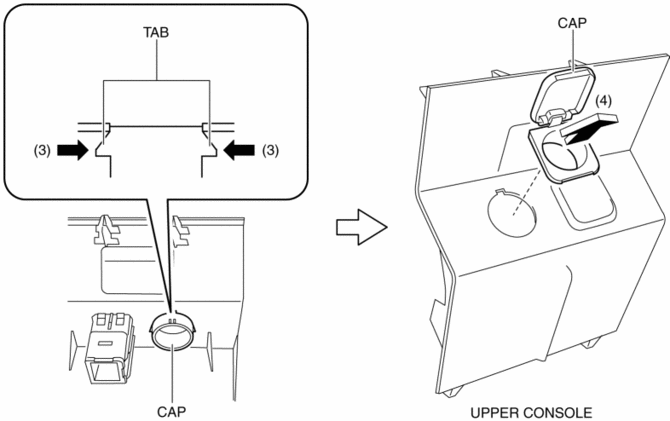
7. Remove the cap.
8. Install in the reverse order of removal.
 Center Accessory Socket Inspection
1. Remove the center accessory socket..
2. Connect the tester probe to the position shown in the figure and verify that
there is continuity.
If it cannot be verified, replace the cente ...
 Front Accessory Socket Inspection
1. Remove the front accessory socket..
2. Connect the tester probe to the position shown in the figure and verify that
there is continuity.
If it cannot be verified, replace the front ...
Other materials:
Brake Fluid Air Bleeding
CAUTION:
Brake fluid will damage painted surfaces. Be careful not to spill any on
painted surfaces. If it is spilled, wipe it off immediately.
NOTE:
Keep the fluid level in the brake fluid reserve tank at 3/4 full or more
during the air bleeding.
Begin air bleedin ...
Quarter Window Glass Installation
WARNING:
Using a razor with bare hands can cause injury. Always wear gloves when using
a razor.
CAUTION:
If a door is opened or closed when all the window glass is closed, the resulting
change in air pressure could cause the sealant to crack preventing the proper
insta ...
Rear Drive Shaft Inspection
1. Inspect each connecting part for looseness.
Tighten or replace parts if necessary.
2. Inspect the dust boot on the drive shaft for cracks, damage, leaking grease,
and looseness in the boot band.
3. Inspect the drive shaft for bends, cracks, and wear in the joints or splines. ...
