
Mazda CX-5 Service & Repair Manual: Afs (Adaptive Front Lighting System)
Outline
-
The AFS is a system which enhances the range of visibility when the headlights are turned on by pointing the optical axis of the headlights in the direction in which the vehicle is advancing according to the steering operation.
Function
-
The AFS is controlled by the AFS control module.
-
The AFS control module controls the auto leveling function to adjust the headlight optical axis up or down in response to changes in load and passenger conditions..
Swivel function
-
The AFS control module changes the optical axis to the direction in which the vehicle is travelling according to the steering wheel operation and vehicle speed while the headlights are turned on.
-
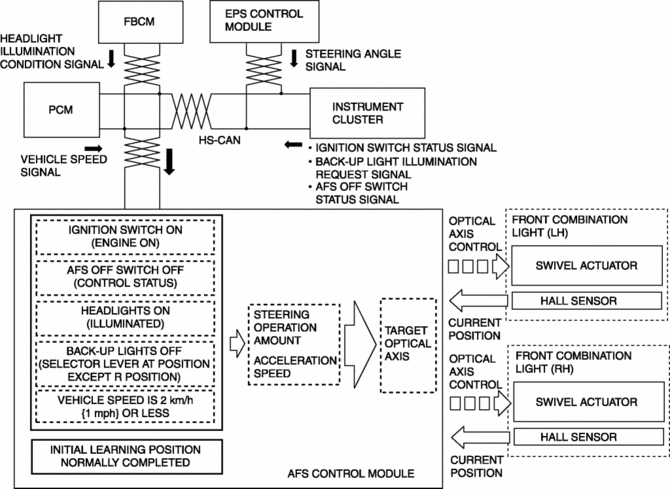
The AFS control module controls the swivel function based on the following CAN signals.
|
CAN signal sending module |
Signal name |
|
EPS control module |
Steering angle signal |
|
PCM |
Vehicle speed signal |
|
Instrument cluster |
Ignition switch status signal |
|
Back-up light illumination request signal |
|
|
AFS OFF switch status signal |
|
|
Front body control module (FBCM) |
Headlight illumination status signal |
Initial position learning function
-
When the ignition is switched ON (engine on) at a vehicle speed of 0 km/h {0 mph}, the AFS control module calculates the initial position of the swivel actuator for left/right operation, and the headlight optical axis stops at the front position.
-
The AFS control module controls the initial position learning function based on the following CAN signals.
|
CAN signal sending module |
Signal name |
|
PCM |
Vehicle speed signal |
|
Instrument cluster |
Ignition switch status signal |
Structural view
-
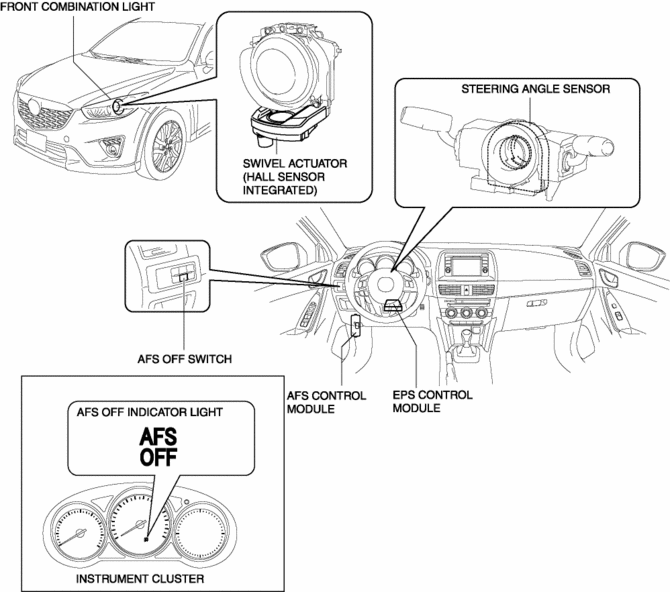
The AFS consists of the following parts:
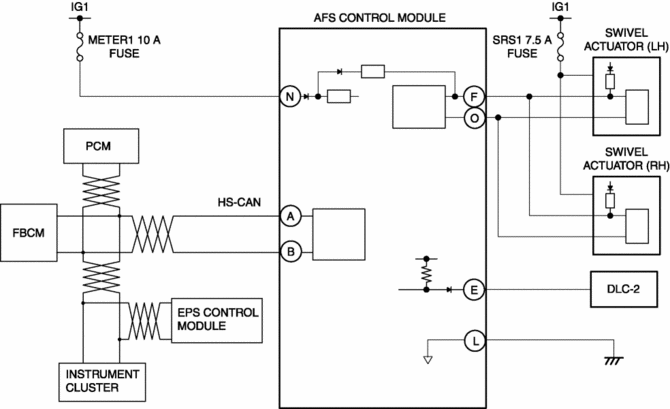
System wiring diagram
Construction
-
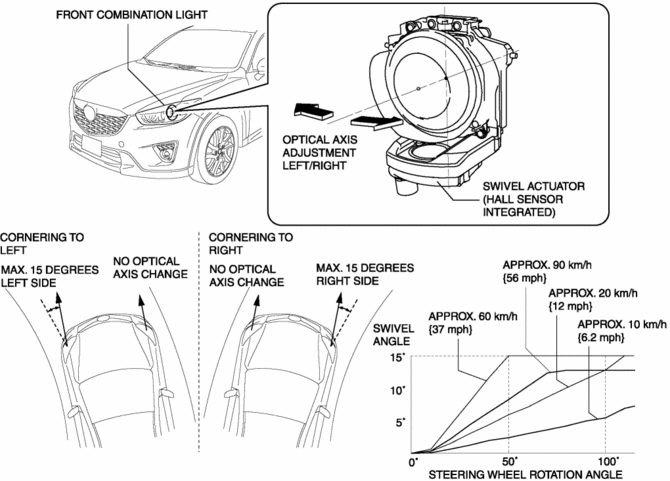
The swivel actuator for adjusting the optical axis is built into the front combination light, and it is an integrated construction with the headlights.
-
The swivel actuator has an internal Hall sensor and inputs the current position of the headlight to the AFS control module.
-
The variation (swivel angle) of the optical axis of the headlights is 15 degrees for the right and left.
-
Changes in the headlight optical axis (swivel angle) are controlled freely (non-step) based on the vehicle speed and the steering angle, and the swivel angle differs for each of the conditions.
-
The steering wheel angle amount changes according to the vehicle speed until reaching the maximum value of the swivel angle (15 degrees).
Operation
Swivel function
-
When the ignition is switched ON (engine off or on), the AFS control module constantly calculates the swivel actuator control amount based on the steering angle signal and vehicle speed signal.
-
If the following operation conditions are met, the AFS control module controls the swivel actuator based on the calculated amount of control, and adjusts the headlight optical axis.
|
Item |
Condition |
|
Initial position learning |
After normal completion |
|
Headlight |
ON (illumination) |
|
AFS OFF switch |
OFF (control status) |
|
Gear position signal |
Except reverse position |
|
Vehicle speed |
Control start: 2 km/h {1 mph} or more |
-
The swivel actuator drives the motor based on the signal from the AFS control module.
-
Changes in the swivel angle of the headlights are detected by the Hall sensor and input to the AFS control module.
 Adaptive Front Lighting System (Afs) Control Module Removal/Installation
NOTE:
The AFS control module prior to replacement stores the vehicle specification
information.
A new AFS control module does not store any vehicle specification information.
...
 Afs (Adaptive Front Lighting System) Control Module
Purpose
The AFS control module calculates the target optical axis based on the vehicle
height signal and outputs the target optical axis signal to the headlight leveling
actuator.
F ...
Other materials:
Front ABS Wheel Speed Sensor Inspection
Sensor Output Value Inspection
CAUTION:
Resistance inspection using other testers may cause damage to the ABS wheel-speed
sensor internal circuit. Be sure to use the M-MDS to inspect the ABS wheel-speed
sensor.
1. Switch the ignition to off.
2. Connect the M-MDS to the DLC-2. ...
Engine Oil Level Inspection
1. Position the vehicle on level ground.
2. Warm up the engine.
3. Stop the engine and allow at least 5 min before continuing.
4. Remove the dipstick, wipe it cleanly, and reinstall it fully.
5. Remove the dipstick and verify that the oil level is between the F and L marks
on the dipstick. ...
Scheduled Maintenance (U.S.A., Canada, and Puerto Rico)
Follow Schedule 1 if the vehicle is operated mainly where none of the following
conditions apply.
• Repeated short-distance driving
• Driving in dusty conditions
• Driving with extended use of brakes
• Driving in areas where salt or other corrosive
materials are used
• Driving on ...
