
Mazda CX-5 Service & Repair Manual: Center Accessory Socket Inspection
1. Remove the center accessory socket..
2. Connect the tester probe to the position shown in the figure and verify that there is continuity.
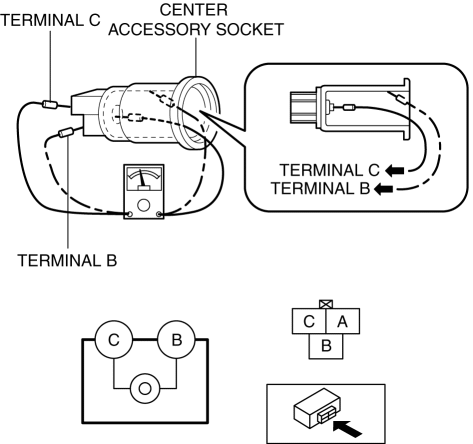
-
If it cannot be verified, replace the center accessory socket..
 Accessory Socket
Purpose
By inserting the plug of an electrical device, 12 V (maximum 120 W) of power
is supplied enabling use of the electrical device in the vehicle.
Function
Front accessory socket
...
 Center Accessory Socket Removal/Installation
1. Disconnect the negative battery cable..
2. Remove the upper console..
3. Insert a tape-wrapped flathead screwdriver into the gap between the cap tab
and socket.
4. Move the flathead scr ...
Other materials:
Drive Belt [Skyactiv G 2.0]
Purpose, Function
The drive belt transmits rotation force of the crankshaft pulley to the pulley
for the auxiliary parts.
Construction
The drive belt is installed to the front of the engine.
A V-ribbed belt has been adopted for the drive belt.
The wat ...
Passenger Compartment Temperature Sensor Removal/Installation [Full Auto Air
Conditioner]
1. Disconnect the negative battery cable..
2. Remove the following parts:
a. Front scuff plate (driver-side).
b. Front side trim (driver-side).
c. Switch panel.
d. Decoration panel.
e. Shift lever knob (MTX).
f. Front console box.
g. Shift panel.
h. Upper panel.
i. Rear console. ...
Thermostat Inspection
1. Remove the thermostat..
2. Visually check that the thermostat valve is closed.
3. Place the thermostat in water.
WARNING:
During inspection, the thermostat and water are extremely hot and can cause
severe burns. Do not touch the thermostat and water.
4. Heat the water and c ...
