
Mazda CX-5 Service & Repair Manual: Cabin Side Frame Straight Line Dimensions [Dimensions]
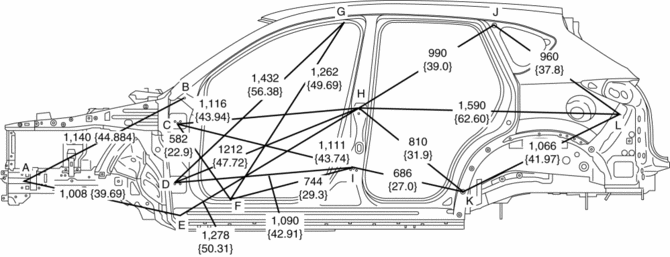
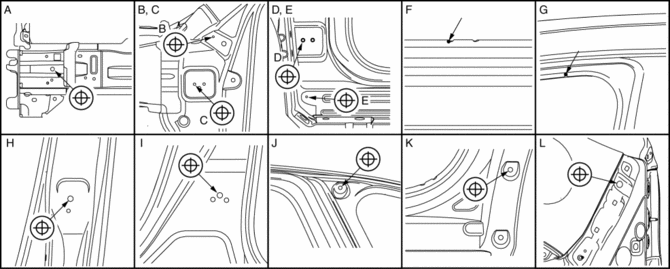
|
Point symbol |
Designation |
Hole diameter or bolt or nut size mm {in} |
|
A |
Front side frame outer datum hole |
?12 {0.47} |
|
B |
Front fender panel installation hole |
?10 {0.39} |
|
C |
Front door hinge installation hole |
?12 {0.47} |
|
D |
Front door hinge installation hole |
?12 {0.47} |
|
E |
Front fender panel installation hole |
?11 {0.43} |
|
F |
Cabin side frame (outer) notch |
- |
|
G |
Cabin side frame (outer) notch |
- |
|
H |
Rear door hinge installation hole |
?12 {0.47} |
|
I |
Rear door hinge installation hole |
?12 {0.47} |
|
J |
Quarter window glass installation hole |
?8 {0.3} |
|
K |
Rear over fender installation hole |
?10 {0.39} |
|
L |
Rear bumper slider installation hole |
?16 {0.63} |
 Body Sealing [Water Proof And Rust Preventive]
Sealant is applied to the parts where the panels meet and to the hemmed parts
of the door panel and hood panel to provide water proofing and rust proofing.
...
 Center Pillar Installation [Panel Replacement]
Symbol Mark
Installation Procedure
1. When installing new parts, measure and adjust the body as necessary to conform
with standard dimensions.
2. Drill holes for the plug welding before inst ...
Other materials:
Magnetic Clutch Adjustment [Full Auto Air Conditioner]
1. Measure the clearance around the entire circumference between the pressure
plate and A/C compressor pulley using a thickness gauge.
2. Verify the clearance.
If not within the specification, remove the pressure plate and adjust the
clearance by changing the shim (0.2 mm {0.008 i ...
Exterior Care
The paintwork on your Mazda represents the latest technical developments in composition
and methods of application.
Environmental hazards, however, can harm the paint's protective properties, if
proper care is not taken.
Here are some examples of possible damage, with tips on how to preven ...
Blind Spot Monitoring (Bsm) Off Switch Inspection
1. Disconnect the negative battery cable..
2. Remove the BSM OFF switch..
3. Verify that the resistance between BSM OFF switches B and C is as indicated
in the table.
If the resistance cannot be verified as indicated in the table, replace the
cluster switch.
4. Apply batte ...
