
Mazda CX-5 Service & Repair Manual: Bumper Bracket Installation [Panel Replacement]
Symbol Mark

Installation Procedure
1. When installing new parts, measure and adjust the body as necessary to conform with standard dimensions.
2. Drill holes for the plug welding 6 locations indicated by (A) and 3 locations indicated by (C) shown in the figure, before installing the new parts.
3. After temporarily installing new parts, make sure the related parts fit properly.
4. Plug weld the 6 locations indicated by (A) shown in the figure.
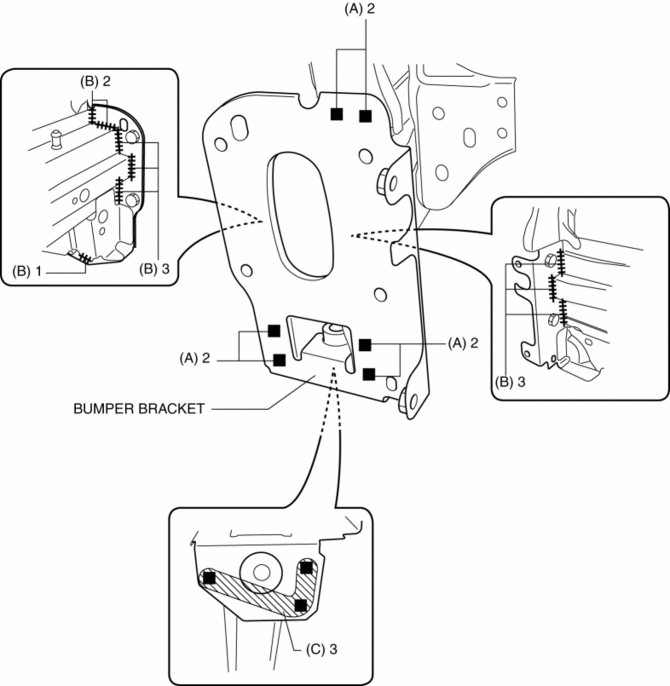
5. Continuos weld the 9 locations indicated by (B) shown in the figure from the front wheel housing and engine room.
NOTE:
-
A flange part is fixed by a hand vise, and where a welded area is press-fitted, welding is performed so that a clearance does not open in the part welded.
6. Plug weld the 3 locations indicated by (C) shown in the figure, then install the bumper bracket.
 Body Panel
Outline
The multi-load path and triple H-shaped structure of distributing the power
absorbed at the collision were used for the body shell.
A ring structure has been adopted for the ...
 Bumper Bracket Removal [Panel Replacement]
Symbol Mark
Removal Procedure
1. Rough cut area locations indicated by (A).
2. Grind the 6 locations indicated by (B) shown in the figure.
CAUTION:
When grinding 6 locations indi ...
Other materials:
Synchronizer Mechanism [C66 M R]
Purpose, Function
For smooth gear changes, the synchronizer mechanism synchronizes the rotation
of the engaging area and engages gears.
Construction
Detent ball-type synchronizer key
A detent ball-type synchronizer key has been adopted for the synchronizer
mechanism ex ...
Turn And Hazard Indicator Alarm
Purpose
The turn and hazard indicator alarm notifies the driver that a turn light
or the hazard warning lights are flashing.
Function
When the instrument cluster receives the turn signal/hazard warning indicator
light illumination request signal sent from the front body con ...
Rear Wiper And Washer Switch Inspection
1. Disconnect the negative battery cable..
2. Remove the following parts:
a. Column cover.
b. Wiper and washer switch.
3. Use a tester to measure and verify that the continuity between the rear wiper
and washer switch terminals is as indicated in the table.
If the continuity is ...
