
Mazda CX-5 Service & Repair Manual: Quick Release Connector (Emission System)
Purpose, Function
-
Serviceability has been improved by the easy disconnection/connection.
Construction
-
The following types of quick release connectors are used.
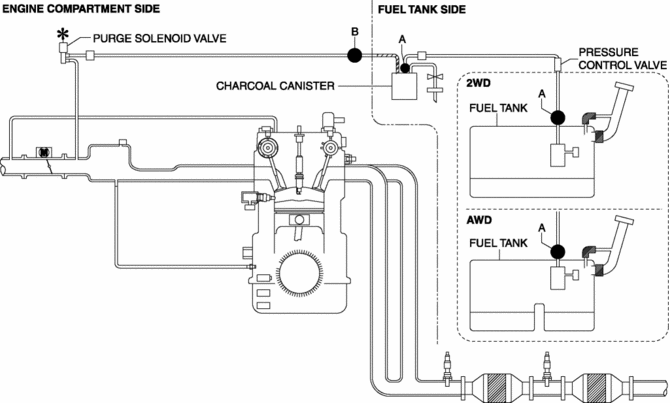
U.S.A. and CANADA
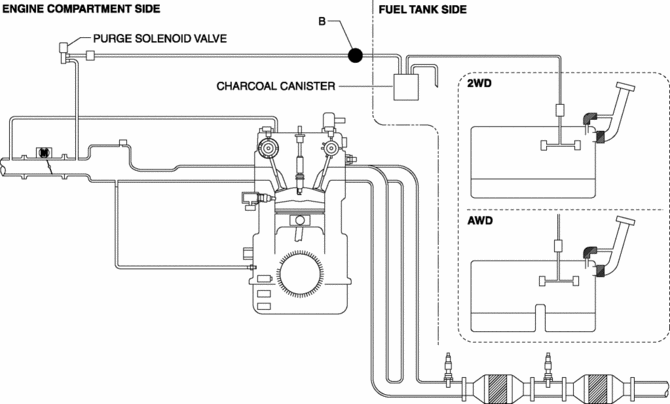
Except U.S.A and CANADA
Type A
-
An SST is not used with this type.
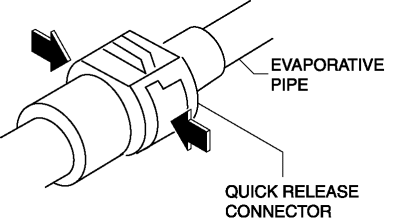
-
Consists of a retainer and O-ring. The quick release connector is integrated with the evaporative hose and therefore cannot be disassembled.
-
To connect the quick release connector properly, push it into the evaporative pipe until a click sound is heard.
-
New quick release connectors are fitted with a checker tab that prevent improper installation. This checker tab cannot normally be removed. When the quick release connector is properly connected to the evaporative pipe, the lock is released and the checker tab comes off. Due to this, it can be verified that the quick release connector is completely connected.
Type B
-
An SST is not used with this type.
-
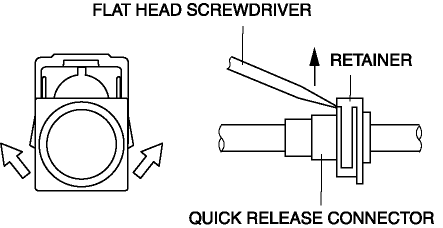
Mainly consists of a retainer and O-ring. The quick release connector is integrated with the evaporative hose and therefore cannot be disassembled.
-
When the quick release connector is connected, the evaporative pipe projection is locked at the clamp lock point. To release the quick connector lock for each type, follow the procedure in the order shown in each figure.
 Quick Release Connector (Emission System) Removal/Installation
Quick Release Connector Type and Position
CAUTION:
Verify the type and location, and install/remove properly.
U.S.A. and CANADA
Except U.S.A. and CANADA
Type A Removal
CAUTIO ...
 Rollover Valve
Purpose, Function
Prevents fuel from flowing into the evaporative gas passage during sudden
cornering or vehicle rollover.
Construction
The rollover valve is built into the fuel ...
Other materials:
Front Door Key Cylinder Switch Inspection
1. Perform the front door glass preparation..
2. Disconnect the negative battery cable..
3. Remove the following parts:
a. Inner garnish.
b. Front door trim.
c. Front door key cylinder.
d. Front door glass.
e. Front door module panel.
f. Front door latch and lock actuator.
Front Do ...
Power Window System
Outline
A power window system that enables automatic opening/closing of the door
glass has been adopted.
The driver's side door glass can be opened/closed automatically or manually
by operating the power window main switch.
All the door glass can be opened/closed man ...
Precaution
Intermittent Concern Troubleshooting
Vibration method
If a malfunction occurs or becomes worse while driving on a rough road or
when the engine is vibrating, perform the following steps.
NOTE:
There are several reasons why vehicle or engine vibration could cause an
electr ...
