
Mazda CX-5 Service & Repair Manual: Magnet Clutch [Full Auto Air Conditioner]
Purpose
-
The magnetic clutch transmits the rotation force from the engine to the shaft in the A/C compressor.
Function
-
The magnetic clutch engages or disengages the magnetic clutch and the A/C turns on or off by switching the power transmission from the engine.
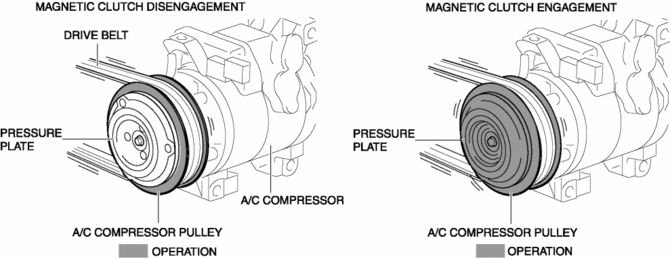
Construction
-
The magnetic clutch is installed to the A/C compressor.
-
The magnetic clutch consists of the following parts:
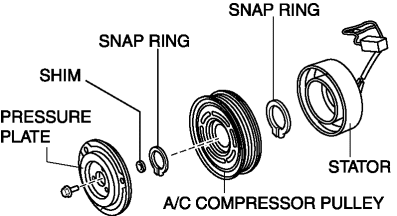
-
Pressure plate
-
A/C compressor pulley
-
Stator
-
Snap ring
-
Shim
Operation
Magnetic clutch disengagement
1. If there is no energization in the magnetic clutch stator from the A/C relay, the pressure plate cannot be engaged with the A/C compressor pulley because the magnetic clutch stator does not operate.
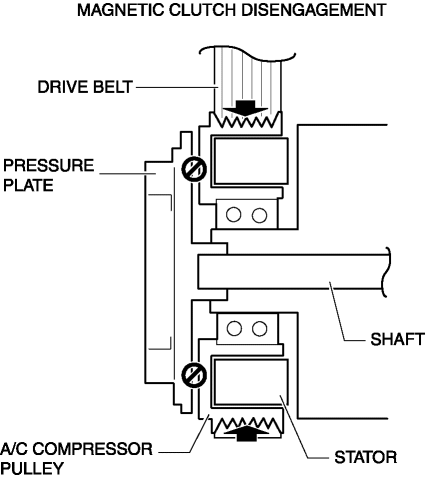
2. The rotation force from the drive belt is only transmitted to the A/C compressor pulley and the pulley spins.
Magnetic clutch engagement
1. If there is energization in the magnetic clutch stator from the A/C relay, the magnetic clutch stator operates and the pressure plate is engaged with the A/C compressor pulley.
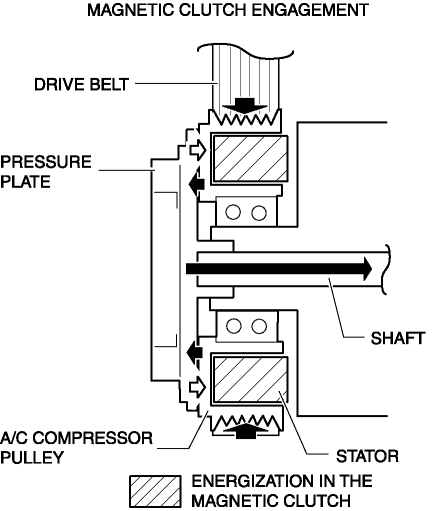
2. The rotation force from the drive belt is transmitted to the compressor shaft through the pressure plate from the A/C compressor pulley.
Fail-safe
-
Function not equipped.
 Low Clutch [Fw6 A EL, Fw6 Ax EL]
Purpose/Function
The low clutch operates in 1GR, 2GR, 3GR and 4GR and intermittently operates
the sun gear by drive force from the turbine shaft.
For the low clutch, a centrifugal ba ...
 Magnet Clutch [Manual Air Conditioner]
Purpose
The magnetic clutch transmits the rotation force from the engine to the shaft
in the A/C compressor.
Function
The magnetic clutch engages or disengages the magnetic clut ...
Other materials:
Brake System/ABS Warning Light
Purpose/Function
The brake system/ABS warning light is built into the instrument cluster.
If a malfunction is detected in the system with the parking brake released,
the warning light illuminates to notify the driver.
Construction/Operation
When the DSC system and CAN l ...
Fuel Distributor [Skyactiv G 2.0]
Purpose, Function
Distributes fuel pumped from the high pressure fuel pump to each fuel injector.
Construction
The fuel distributor is installed to the cylinder head.
The fuel distributor is integrated with the fuel pressure sensor.
...
Master Warning Light
Purpose
The master warning light warns the driver that any of the following malfunctions
is occurring.
Brake switch malfunction
Engine oil solenoid valve malfunction
Automatic configuration malfunction
Function
The instrument cluster i ...
