
Mazda CX-5 Service & Repair Manual: Light Switch Removal/Installation
NOTE:
-
When removing the light switch, it is necessary to rotate the steering wheel. If the ignition is switched off from ON (engine on) with the driver's door closed, the steering wheel is locked. Therefore, perform the procedure in Steps 1 to 3 so that the steering wheel is not locked.
1. Switch the ignition ON (engine on).
2. Open the driver's door.
3. Switch the ignition to off.
4. Disconnect the negative battery cable..
5. Remove the column cover..
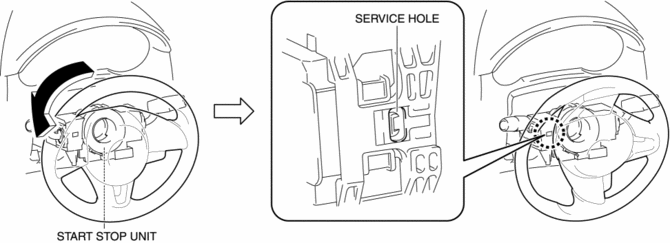
6. Rotate the steering wheel until the service hole in the position shown in the figure is visible.
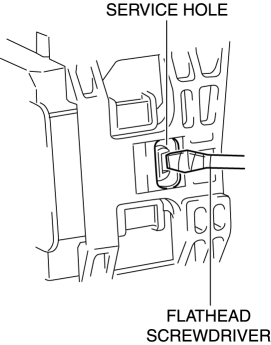
7. Insert a tape-wrapped flathead screwdriver into the service hole in the position shown in the figure.
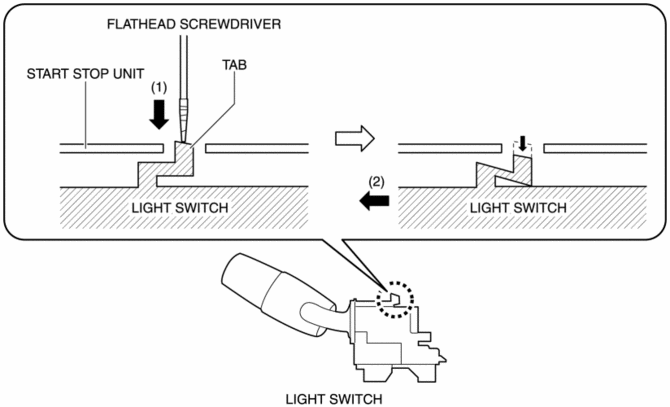
8. While pressing the light switch tab in the direction of the arrow (1) shown in the figure using a flathead screwdriver, pull out the light switch in the direction of the arrow (2) shown in the figure to detach the light switch tab and the start stop unit.
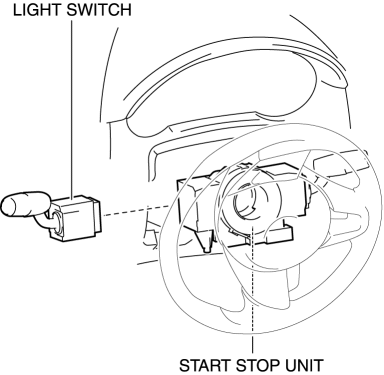
9. Remove the light switch.
10. Install in the reverse order of removal.
 Light Switch Inspection
Light Switch
1. Disconnect the negative battery cable..
2. Remove the column cover..
3. Remove the light switch..
4. Verify that the continuity between the light switch terminals is as indicate ...
 Exterior
...
Other materials:
Replace Electrical Battery
If the buttons on the transmitter are inoperable and the operation indicator
light does not flash, the battery may be dead.
Replace with a new battery before the transmitter becomes unusable.
CAUTION
● Make sure the battery is installed correctly.
Battery leakage could occur if it is no ...
Thermostat
Purpose, Function
When the engine coolant temperature is low, the thermostat blocks the engine
coolant passage between the radiator and engine. As a result, because engine
coolant cycles without passing through the radiator, warming is promoted.
Construction
The thermostat ...
Push-Starting
Do not push-start your Mazda.
WARNING
Never tow a vehicle to start it:
Towing a vehicle to start it is dangerous. The vehicle being towed could surge
forward when its engine starts, causing the two vehicles to collide. The occupants
could be injured.
CAUTION
Do not push-start a vehicle that ...
