
Mazda CX-5 Service & Repair Manual: Front Fog Light Switch Inspection
1. Disconnect the negative battery cable..
2. Remove the column cover..
3. Remove the light switch..
4. Verify that the continuity between the light switch terminals is as indicated in the table.
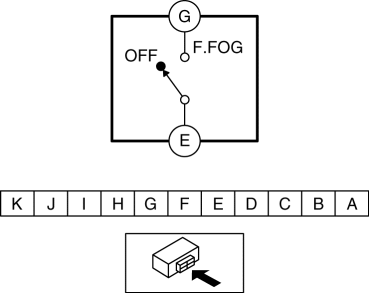
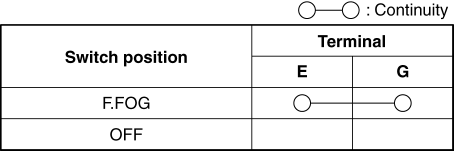
-
If not as indicated in the table, replace the light switch.
 Bsm Indicator Light Flashes While Not Under Bsm Indicator Light Flashing Conditions
(No Combination Switch Operation (Turn Signal Switch)) [Blind Spot Monitoring (Bsm)]
Bsm Indicator Light Flashes While Not Under Bsm Indicator Light Flashing Conditions
(No Combination Switch Operation (Turn Signal Switch)) [Blind Spot Monitoring (Bsm)]
Description
BSM indicator light flashes while not under BSM indicator light-flashing
conditions (no combination switch operation (turn signal switch)
...
 Hazard Warning Switch Inspection
1. Disconnect the negative battery cable..
2. Remove the decoration panel..
3. Verify that the continuity between the hazard warning switch terminals is
as indicated in the table.
...
Other materials:
Headliner Removal/Installation
1. Disconnect the negative battery cable..
2. Remove the following parts:
a. Sunroof seaming welt (with sunroof system).
b. A-pillar trim.
c. Front map light.
d. Sunvisor.
e. Front scuff plate.
f. Rear scuff plate.
g. B-pillar lower trim.
h. Adjust anchor cover.
i. Upper anchor i ...
Front Body Control Module (Fbcm) Removal/Installation
CAUTION:
If configuration is not performed when the front body control module (FBCM)
is replaced with a new one, the vehicle specification information is not stored
in the front body control module (FBCM) and the system will not operate normally.
When performing configuration, ...
Windshield Wiper And Washer Switch Inspection
1. Disconnect the negative battery cable..
2. Remove the following parts:
a. Column cover.
b. Wiper and washer switch.
3. Use a tester to measure and verify that the continuity between the windshield
wiper and washer switch terminals is as indicated in the table.
If the continu ...
