
Mazda CX-5 Service & Repair Manual: Adaptive Front Lighting System (Afs) Control Module Removal/Installation
NOTE:
-
The AFS control module prior to replacement stores the vehicle specification information.
-
A new AFS control module does not store any vehicle specification information.
-
When the ignition is switched ON after the AFS control module is replaced, the AFS control module reads the vehicle specification information sent via CAN transmission from the instrument cluster using the automatic configuration function, and stores it.
-
The AFS control module records the vehicle height while it is unoccupied.
-
The new AFS control module does not record the vehicle height while it is unoccupied.
1. Disconnect the negative battery cable..
2. Remove the front scuff plate (LH)..
3. Remove the front side trim (LH)..
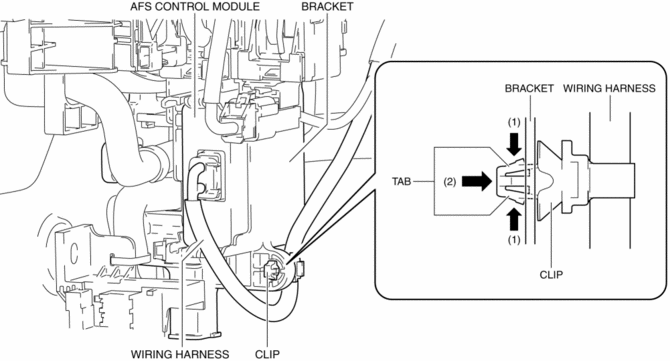
4. While pressing the clip tab in the direction of arrows (1) shown in the figure, press the clip in the direction of arrow (2) to detach the clip tab and the bracket.
NOTE:
-
Because the AFS control module cannot be removed with the clip installed to the bracket, remove the clip from the bracket to allow for a margin length in the wiring harness.
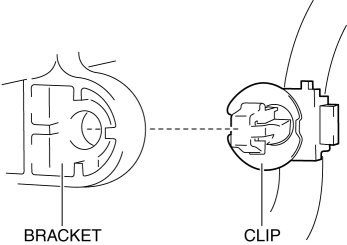
5. Remove the clip.
6. While pressing the bracket tab in the direction of the arrows (3) shown in the figure using a tape-wrapped flathead screwdriver, hold the connector, pull out the AFS control module in the direction of the arrow (4) shown in the figure to detach the bracket tab and AFS control module.
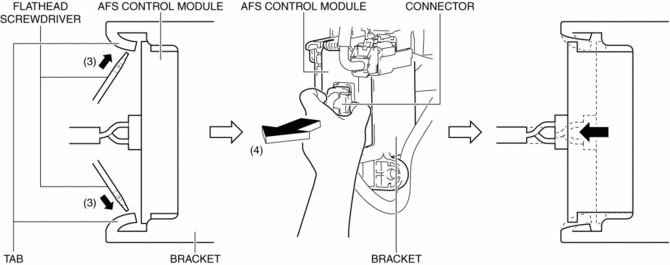
7. Remove the AFS control module.
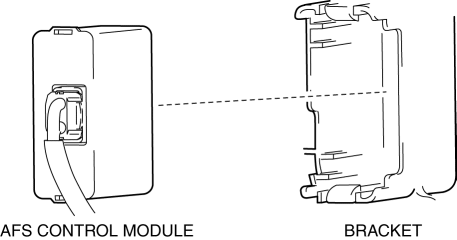
8. Disconnect the connector.
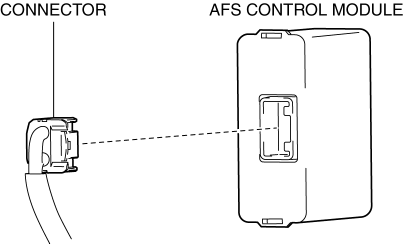
9. Install in the reverse order of removal.
10. Switch the ignition ON and perform the AFS control module automatic configuration.
11. Clear the DTCs.
12. If the AFS control module is replaced with a new one, perform the auto leveling system initial setting..
 Exterior
...
 Afs (Adaptive Front Lighting System)
Outline
The AFS is a system which enhances the range of visibility when the headlights
are turned on by pointing the optical axis of the headlights in the direction
in which the vehicle i ...
Other materials:
Shift Lock System [Fw6 A EL, Fw6 Ax EL]
Purpose, Function
The shift-lock system operates when the ignition is switched to ON and the
brake pedal is not depressed, and inhibits the selector lever from being shifted
from the P position to other positions.
If the shift-lock cannot be released by the normal operation, it ...
Tire Pressure Monitoring System (TPMS)
Purpose, Outline
The tire pressure monitoring system monitors the tire pressure of all 4 tires.
If the tire pressure of 1 tire or more becomes excessively low, the driver is
notified.
A tire pressure monitoring system has been adopted which indirectly inspects
the tire pres ...
Water Pump
Purpose, Function
The water pump operates by obtaining drive force from the engine via the
drive belt to pump engine coolant.
Construction
The water pump is installed to the engine front.
The water pump consists of the following parts:
A hard plasti ...
