
Mazda CX-5 Service & Repair Manual: Wheel Apron Component Removal [Panel Replacement]
Symbol Mark

Removal Procedure
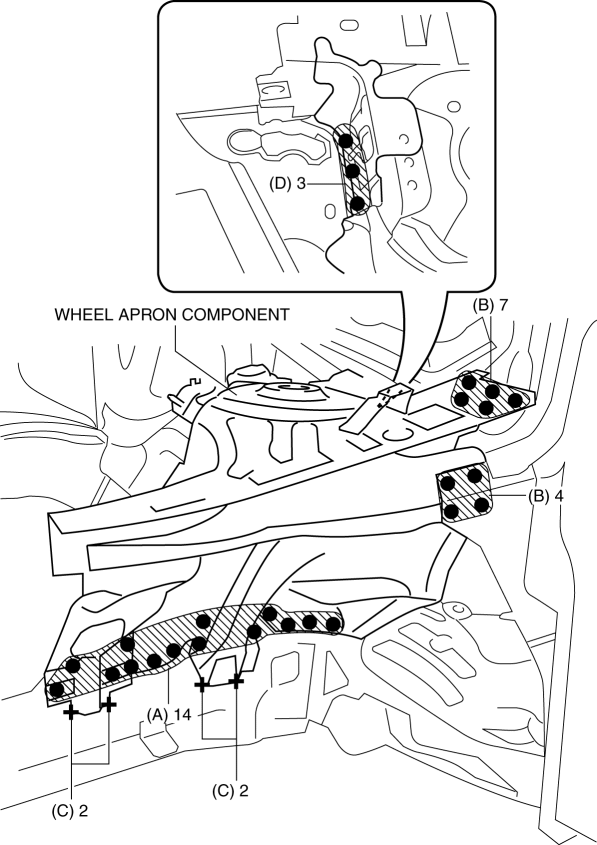
1. Drill the 14 locations indicated by (A) from the front wheel housing side shown in the figure.
2. Drill the 11 locations indicated by (B) shown in the figure.
3. Drill the 4 locations indicated by (C) shown in the figure.
NOTE:
-
When drilling the 14 locations indicated by (A) and 4 locations indicated by (C) shown in the figure, do not drill a hole all the way through or there could be a problem when installing the new part.
4. Drill the 3 locations indicated by (D) shown in the figure.
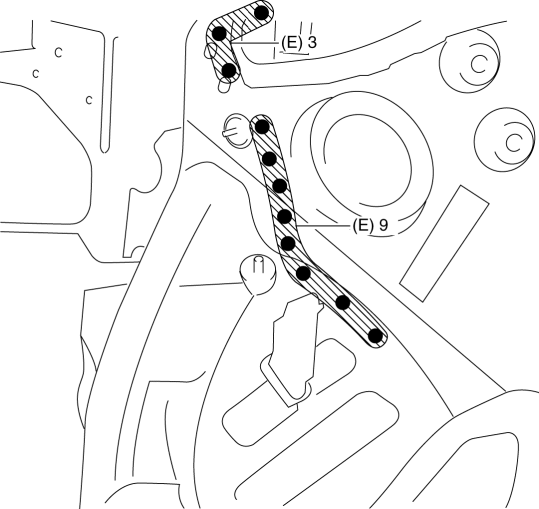
5. Drill the 12 locations indicated by (E) from the inside shown in the figure.
6. Remove the wheel apron component.
 Wheel Apron Component Installation [Panel Replacement]
Symbol Mark
Installation Procedure
1. When installing new parts, measure and adjust the body as necessary to conform
with standard dimensions.
2. Drill holes for the plug welding before inst ...
 Wheel Balance Adjustment (Aluminum Alloy Wheel)
CAUTION:
Adjust the outer wheel balance first, then the inner wheel balance.
Be careful not to scratch the wheels.
Adhesive-type Balance Weight (Outer)
1. Remove the old bal ...
Other materials:
Front Drive Shaft Inspection
1. Inspect the connections for any looseness.
If there is any malfunction, tighten or replace the applicable part.
2. Inspect the dust boot for damage and cracks.
If there is any malfunction, replace the applicable part.
3. Move the spline and joint up and down, left ...
Air Bag System [Standard Deployment Control System]
Outline
The air bag system is a device that supplements the passenger restraint function
of the seat belts. The air bag system will not have the designed effect if the
seat belts are not worn properly.
The air bag system is composed of the following parts:
...
Climate Control Unit Removal/Installation [Manual Air Conditioner]
Removal
1. Disconnect the negative battery cable..
2. Remove the following parts:
a. Shift lever knob (MTX).
b. Glove compartment.
c. Front console box.
d. Shift panel.
e. Upper panel.
f. Rear console.
g. Side wall.
h. Decoration panel.
i. Front console.
3. Press the tab down, ...
