
Mazda CX-5 Service & Repair Manual: Transfer Oil Replacement [Fw6 Ax EL]
1. Remove the front under cover No.2..
2. Remove the drain plug with the washer.
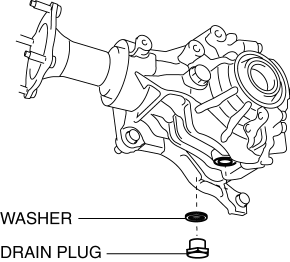
3. Drain the oil into a suitable container.
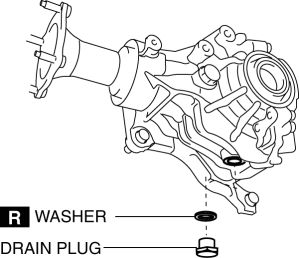
4. Tighten the drain plug with a new washer.
-
Tightening torque
-
40—58 N·m {4.1—5.9 kgf·m, 30—42 ft·lbf}
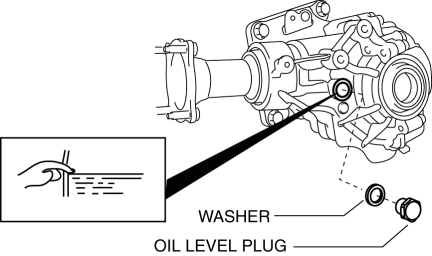
5. Remove the oil level plug with the washer and add the specified amount and type of oil through the oil level plug hole until the level reaches the bottom of the oil level plug hole.
-
Transfer oil
-
Specified oil grade: API Service GL?5
-
Specified oil viscosity: SAE 80W-90
-
Capacity (approx quantity): 0.45 L {0.48 US qt, 0.40 lmp qt}
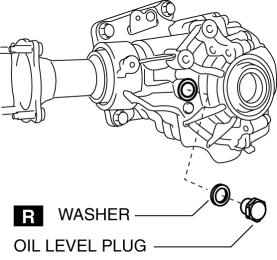
6. Tighten the oil level plug with a new washer.
-
Tightening torque
-
40—58 N·m {4.1—5.9 kgf·m, 30—42 ft·lbf}
7. Install the front under cover No.2..
 Transfer Oil Inspection [Fw6 Ax EL]
1. Park the vehicle on level ground.
2. Remove the oil level plug with the washer.
3. Checking by hand, verify that the oil is near the brim of the plug hole.
If the oil level is low, ...
 Transfer Oil Seal Replacement [Fw6 Ax EL]
Transfer oil seal (LH)
1. Drain the transfer oil..
2. Remove the transfer from the vehicle..
3. Insert a tape-wrapped flathead screwdriver into the lip area of the oil seal
(LH) as shown in the ...
Other materials:
Headlight High Beam Indicator Light
Purpose
Notifies the user that the headlights (HI) are illuminated.
Function
Illuminates when the headlight (HI) or parking illumination conditions are
met.
Construction
Displayed in the instrument cluster.
Operation
1. When the light switch is operat ...
Brake Fluid Pressure Sensor
Purpose/Function
The brake fluid pressure sensor detects the fluid pressure from the master
cylinder and transmits it to the DSC HU/CM.
Construction
The brake fluid pressure sensor is built into the DSC HU/CM. Therefore if
there is any malfunction of the brake fluid pressur ...
Upper Cowl Side Reinforcement Installation [Panel Replacement]
Symbol Mark
Installation Procedure
1. When installing new parts, measure and adjust the body as necessary to conform
with standard dimensions.
2. Drill holes for the plug welding before installing the new parts.
3. After temporarily installing new parts, make sure the related parts fit p ...
