
Mazda CX-5 Service & Repair Manual: Steering Switch
Purpose, Function
-
Operation of the audio system and change of the instrument cluster display can be changed are possible without a change in driving posture.
Construction
-
The steering switch is located on the spoke of the steering wheel.
-
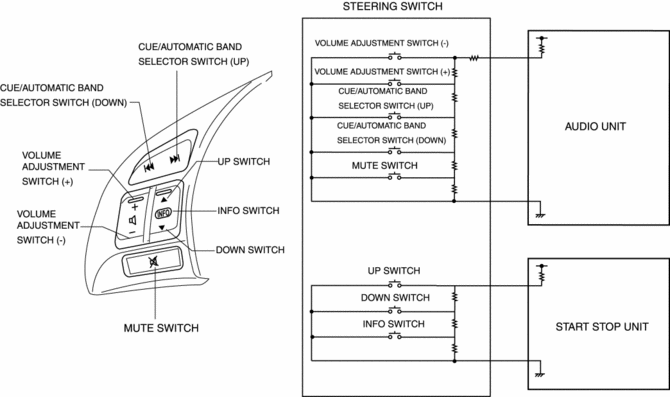
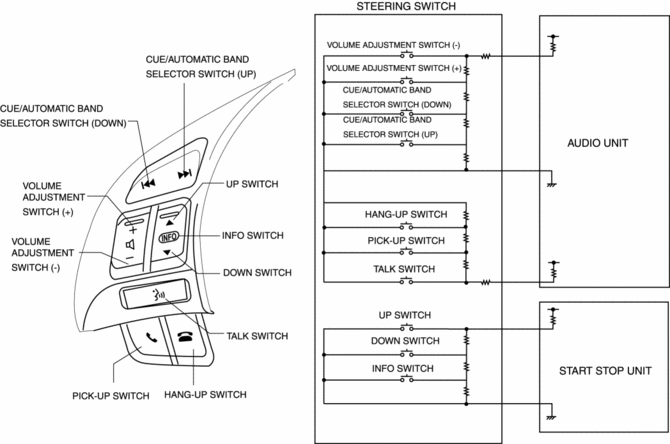
The resistance is built into each switch.
Without Bluetooth system
-
The steering switch consists of a volume adjustment (+) or (-) switch, cue/automatic band selector (up) or (down) switch, INFO switch, up switch, down switch, and mute switch.
With Bluetooth system
-
The steering switch consists of a volume adjustment (+) or (-) switch, cue/automatic band selector (up) or (down) switch, INFO switch, up switch, down switch, TALK switch, PICK-UP switch, and HANG-UP switch.
Operation
|
Switch name |
Operation |
|
Volume adjustment switch |
Audio volume can be adjusted. |
|
Cue/Automatic band selector switch |
Cue of CD tracks and selection of radio band are possible. |
|
Mute switch (Without Bluetooth system) |
Audio volume can be muted. Pressing again after muting returns to previous volume level. |
|
INFO switch |
Instrument cluster display can be changed. Refer to LIQUID CRYSTAL DISPLAY (LCD) for display content. |
|
Up/down switch |
Instrument cluster display can be changed. Refer to LIQUID CRYSTAL DISPLAY (LCD) for display content. |
|
TALK switch (With Bluetooth system) |
Launches the Bluetooth system. |
|
Pick-up switch (With Bluetooth system) |
Receives a phone call. |
|
Hang-up switch (With Bluetooth system) |
Hangs up a phone call. |
Fail-safe
-
Function not equipped.
 Steering SST
49 T028 3A0
Ball joint puller set
49 T025 001
Boot clamp crimpers
49 B032 317
Bearing & oil seal remover
...
 Steering Switch Inspection
Without Bluetooth system
WARNING:
Handling the driver-side air bag module improperly can accidentally operate
(deploy) the air bag module, which may seriously injure you. Read the service ...
Other materials:
Service Publications
Service Publications
Factory-authorized Mazda service publications are available for owners who wish
to do some of their own maintenance and repair.
When requesting any of our publications through an Authorized Mazda Dealer, refer
to the chart below.
If they do not have what you need in stock ...
Master Cylinder
Purpose/Function
With the adoption of the master cylinder having an enlarged diameter (20.64
mm {0.8126 in}), brake pedal operability has been improved.
For vehicles with DSC, the diameter of the pipe between the master cylinder
and the DSC HU/CM has been increased, improving re ...
Driveline/Axle Abbreviations
AAS
Active Adaptive Shift
ABS
Antilock Brake System
ABDC
After Bottom Dead Center
ACC
Accessories
AFS
Adaptive Front Lighting System
ALC
...
