
Mazda CX-5 Service & Repair Manual: Side Step Molding Removal/Installation
1. Set the rear over fender aside..
2. Insert a tape-wrapped flathead screwdriver shown in the figure and remove the clip A in the direction of arrow (1).
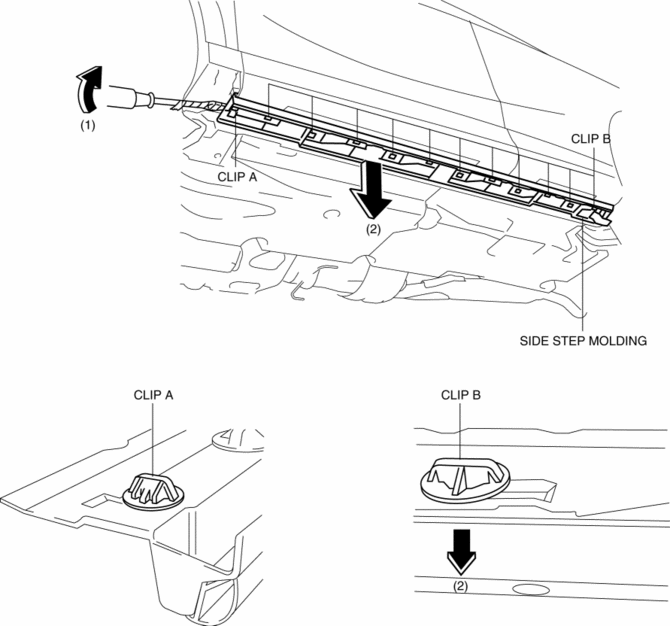
3. Slide the side step molding in the direction of the arrow (2) shown in the figure and remove clips B from side step molding.
4. After removing the side step molding, remove clip A, clips B from the body using a fastener remover.
5. Install clip A, clips B to the side step molding.
6. Install in the reverse order of removal.
 Side Sill Panel Removal [Panel Replacement]
Symbol Mark
Removal Procedure
Side sill (front side)
1. Rough cut the 2 locations indicated by (A) shown in the figure.
2. Drill the 18 locations indicated by (B) shown in the figure.
3 ...
 Speaker Grille Removal/Installation
Center Speaker Grille
1. Insert a tape-wrapped flathead screwdriver into shown in the figure and remove
hooks A in the direction of arrow (1).
2. Take the shaded area shown in the figure, and ...
Other materials:
Sae Standards
In accordance with new regulations, SAE (Society of Automotive Engineers)
standard names and abbreviations are now used in this manual. The table below
lists the names and abbreviations that have been used in Mazda manuals up to
now and their SAE equivalents.
...
Front Door Latch Switch
Purpose, Function
Switches on/off in conjunction with the latch lever rotation, and detects
the front door open/closed condition by the voltage which is changed by the
rear body control module (RBCM).
Construction
The switch is turned on/off by the rotation of the latch lev ...
Refrigerant Pressure Sensor Removal/Installation [Full Auto Air Conditioner]
1. Disconnect the negative battery cable..
2. Discharge the refrigerant..
3. Disconnect the refrigerant pressure sensor connector.
CAUTION:
If moisture or foreign material enters the refrigeration cycle, cooling ability
will be lowered and abnormal noise will occur. Always immediate ...
