
Mazda CX-5 Service & Repair Manual: Side Member Removal [Panel Replacement]
Symbol Mark

Removal Procedure
1. Drill the 45 locations shown in the figure.
NOTE:
-
When drilling, do not drill a hole all the way through or there could be a problem when installing the new part.
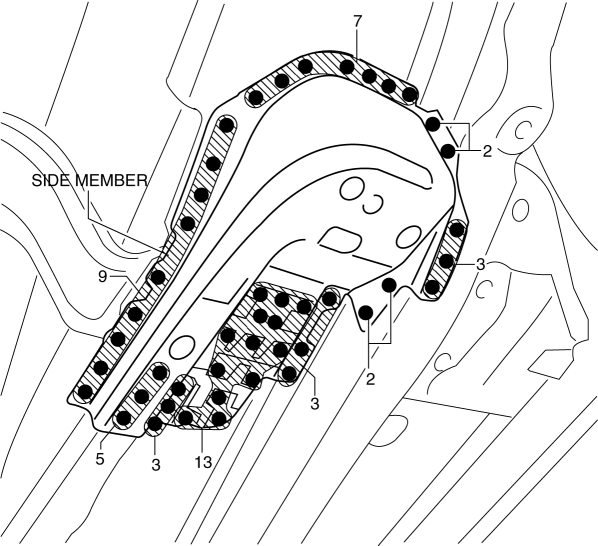
2. Remove the side member.
 Side Member Installation [Panel Replacement]
Symbol Mark
Installation Procedure
1. When installing new parts, measure and adjust the body as necessary to conform
with standard dimensions.
2. Drill holes for the plug welding before inst ...
 Torque Box Installation [Panel Replacement]
Symbol Mark
Installation Procedure
1. When installing new parts, measure and adjust the body as necessary to conform
with standard dimensions.
2. Drill holes for the plug welding before inst ...
Other materials:
Aerodynamic
Purpose/Function
For improved aerodynamics, under covers are installed to the under-surface
of the vehicle.
Construction
The vehicle is equipped with the following (3) under covers.
Front under cover No.1
Front under cover No.2
Floor under co ...
Front Lower Arm Inspection
1. Remove the front lower arm..
2. Inspect the front lower arm for bending or damage, and the front lower arm
ball joint for excessive looseness.
If there is any malfunction, replace the front lower arm.
3. Rotate the front lower arm ball joint stud 5 times. Install the
SST ...
Glass Antenna
Purpose, Function
The RDS (Radio Data System) converts radio broadcast waves to electric signals
and sends the signals to the audio unit.
Construction
An antenna with excellent noise resistance has been adopted to the rear window
glass.
Fail-safe
Function n ...
