
Mazda CX-5 Service & Repair Manual: Rear Upper Arm Removal/Installation [2 Wd]
WARNING:
-
Verify that the crossmember is securely supported by a jack. If the rear crossmember falls off, it can cause serious injury or death, and damage to the vehicle.
CAUTION:
-
Performing the following procedures without first removing the rear ABS wheel-speed sensor may possibly cause an open circuit in the harness if it is pulled by mistake. Before performing the following procedures, disconnect the rear ABS wheel-speed sensor (axle side) and fix it to an appropriate place where the sensor will not be pulled by mistake while servicing the vehicle.
NOTE:
-
Mark the position before removing the rear upper arm.
-
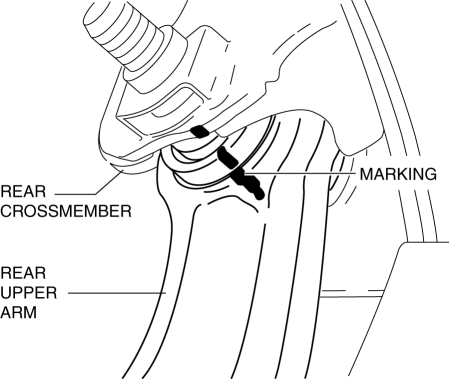
Align the rear crossmember and rear upper arm markings when installing the rear upper arm.
-
Tighten the rear upper arm inner bolt completely before installing the rear crossmember component to the vehicle.
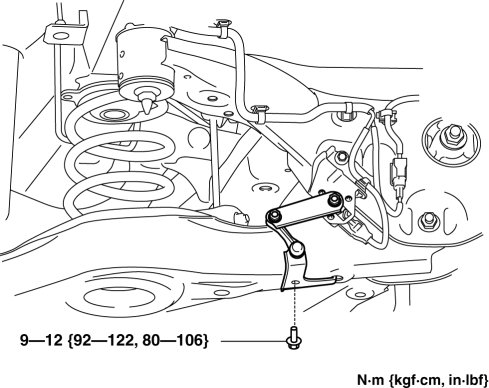
1. Disconnect the auto leveling sensor link. (With auto leveling sensor).
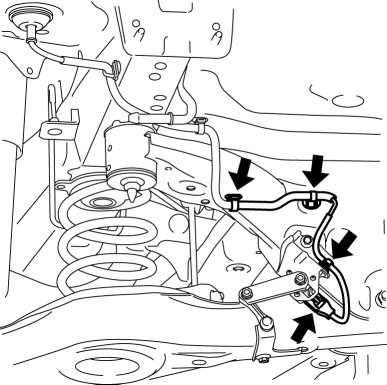
2. Disconnect the wiring harness clips and connector installed to the rear crossmember. (With auto leveling sensor)
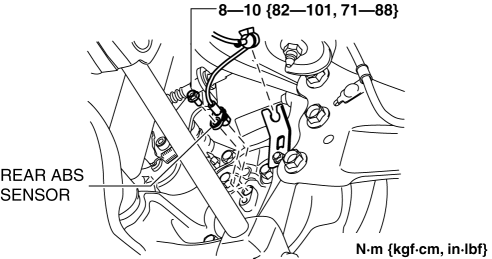
3. Disconnect the rear ABS wheel-speed sensor wiring harness installed to the hub support and set it aside..
4. Remove the TWC..
5. Remove the rear coil spring..
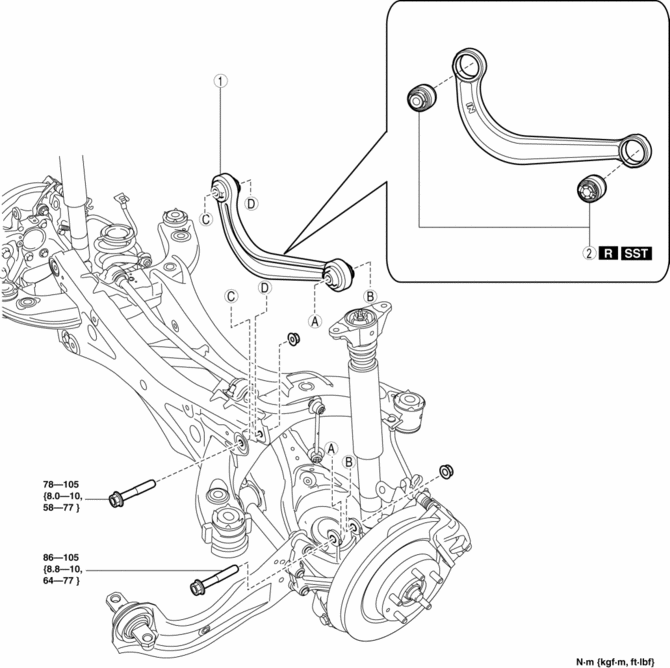
6. Remove in the order indicated in the table.
7. Install in the reverse order of removal.
8. Inspect the wheel alignment and adjust it if necessary..
|
1 |
Rear upper arm (See Rear Upper Arm Removal Note.) (See Rear Upper Arm Installation Note.) |
|
2 |
Rear upper arm bushing (See Rear Upper Arm Bushing Removal Note.) (See Rear Upper Arm Bushing Installation Note.) |
Rear Upper Arm Removal Note
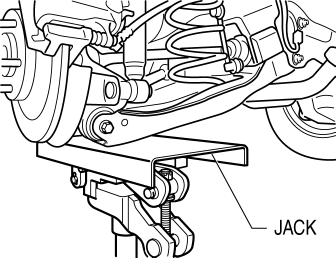
1. Jack up the vehicle to the unloaded condition, and support the rear trailing link component using a jack.
2. Align the rear crossmember component and rear upper arm and mark them.
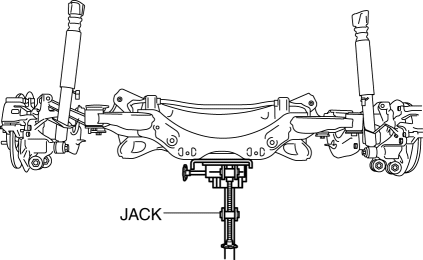
3. Support the rear crossmember component with a jack and remove the rear crossmember installation nuts.
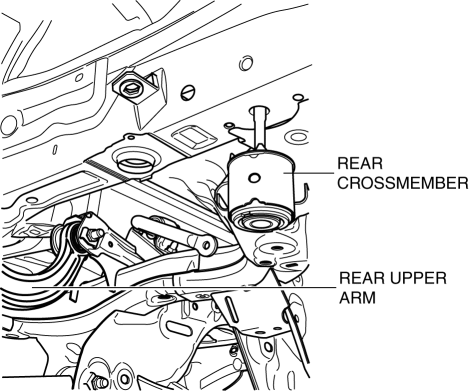
4. Press down on the rear crossmember component slowly until the rear upper arm inside installation bolts can be removed using a jack.
5. Remove the rear upper arm.
Rear Upper Arm Bushing Removal Note
1. Mark the rear upper arm as shown in the figure.
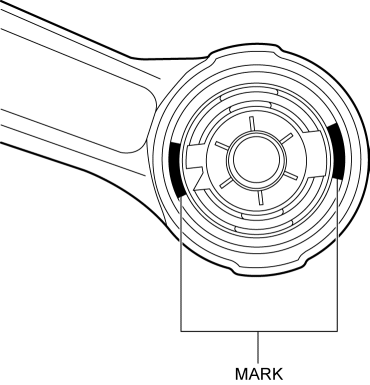
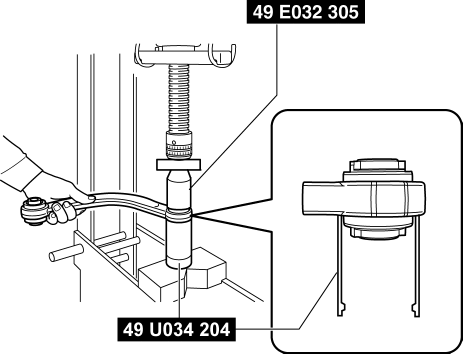
2. Press the rear upper arm bushing out using the SSTs
.
CAUTION:
-
Set using the SST
(49 U034 204)
as shown in the figure to prevent damaging the rear upper arm and rear upper arm bushing and remove the rear upper arm bushing.
Rear Upper Arm Bushing Installation Note
1. Mark the new rear upper arm bushing as shown in the figure.
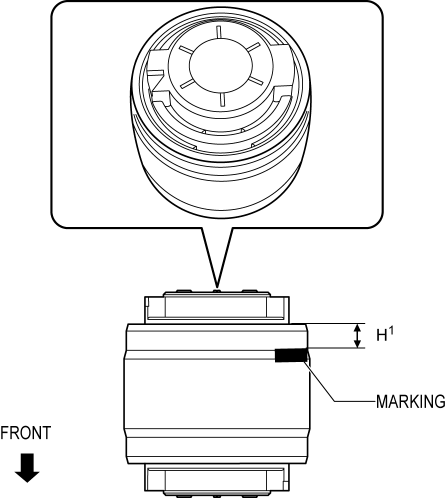
H1: 6.0 mm {0.24 in}
2. Align the projection of a new rear upper arm bushing with the marks placed during removal.
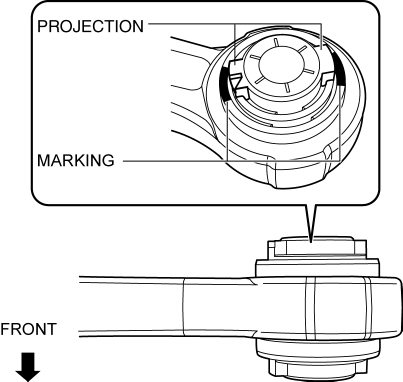
3. Press fit the rear upper arm bushing until the marks placed in Step 1 cannot be seen using the SSTs.
CAUTION:
-
Set using the SST
(49 U034 204)
as shown in the figure to prevent damaging the rear upper arm and rear upper arm bushing and install the rear upper arm bushing.
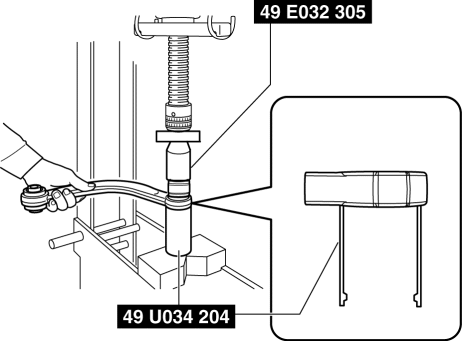
NOTE:
-
Be careful when press-fitting the rear upper arm bushing because the bushing height of the inner and outer sides differs.
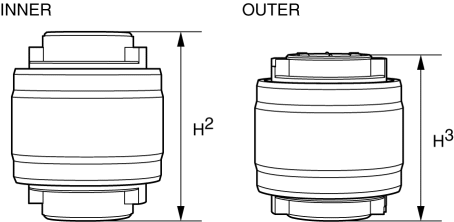
H2: 49.5 mm {1.95 in} H3: 44.5 mm {1.75 in}
4. After installing the rear upper arm bushing, verify that it is installed to the position shown in the figure.
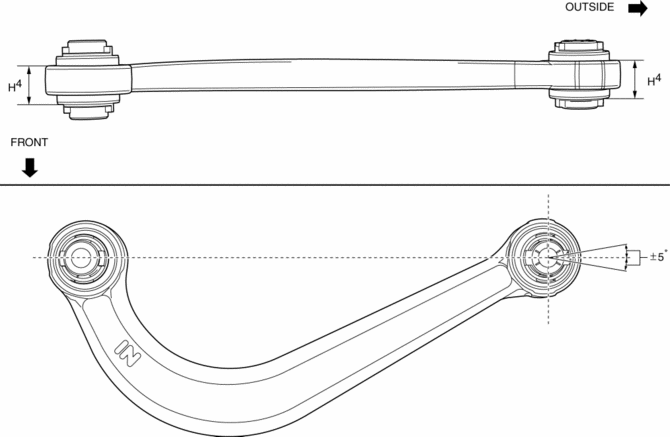
H4: 24.0±0.6 mm {0.945±0.02 in}
Rear Upper Arm Installation Note
1. Place alignment mark on the new rear upper arm in the same positions as the removed rear upper arm.
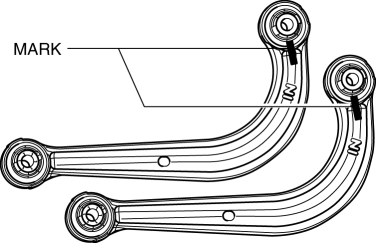
2. Install the rear upper arm.
3. Lift up the rear crossmember component using a jack and install the rear crossmember installation nuts.
-
Tightening torque
-
91—111 N·m {9.3—11 kgf·m, 68—81 ft·lbf}
 Rear Suspension
Outline
E-type multi-link rear suspension has been adopted.
The longitudinal span of the rear crossmember was extended and the longitudinal
offset of the rear lateral link ...
 Rear Upper Arm Removal/Installation [Awd]
WARNING:
Verify that the crossmember is securely supported by a jack. If the rear
crossmember falls off, it can cause serious injury or death, and damage to the
vehicle.
CAUTIO ...
Other materials:
Powertrain System [C66 M R]
Purpose, Function
The powertrain mechanism changes the gear combination by engaging or releasing
the clutch hub and gear, and changes the power transmission route. Because of
the change in the power transmission route, the drive force (speed, torque,
rotation direction) input from th ...
Front Seat Cushion Trim Removal/Installation
WARNING:
Handling a side air bag improperly can accidentally operate (deploy) the
air bag, which may seriously injure you. Read the service warnings/cautions
in the Workshop Manual before handling the front seat (side air bag integrated)..
If the sliding mechanisms on both side ...
Rear ABS Wheel Speed Sensor Inspection [Awd]
Installation Visual Inspection
1. Inspect the following items:
If there is any malfunction, replace the applicable part.
a. Excessive play of the ABS wheel-speed sensor
b. Deformation of the ABS wheel-speed sensor
c. Deformation or damage of the ABS sensor rotor
Clearance Inspec ...
