
Mazda CX-5 Service & Repair Manual: Rear Seat Cushion Trim Removal/Installation
CAUTION:
-
When removing or putting in the rear seat cushion, contact with the surrounding areas of the vehicle could cause scratches and damage. When removing or putting in the rear seat cushion, always use two or more persons to perform the work and be careful not to scratch or damage the rear seat cushion and the surrounding area of the vehicle.
-
When performing the procedure with a rear seat cushion removed from the vehicle, perform the procedure on a clean cloth so as not to damage or soil the seat.
6:4 Split Type
1. Remove the rear seat cushion.
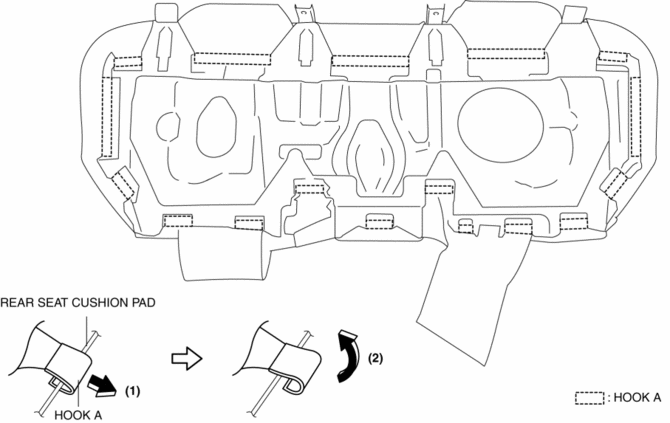
2. Slide hooks A in the order of (1), (2) shown in the figure to detach it from the rear seat cushion pad.
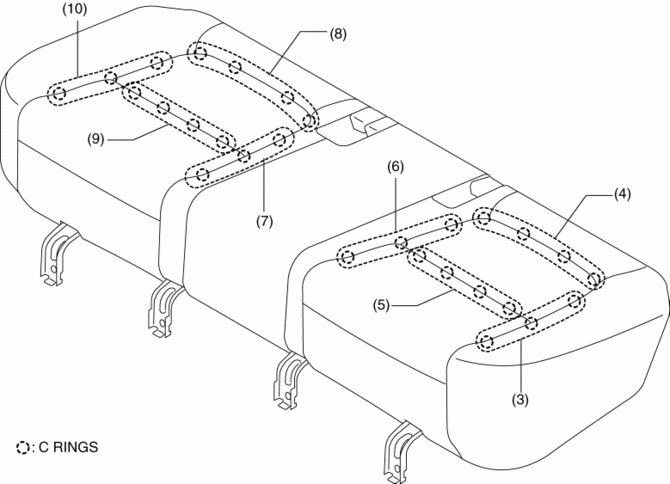
3. Partially peal back the rear seat cushion trim from the rear seat cushion pad, remove C rings in the order of (3), (4), (5), (6), (7), (8), (9), (10) shown in the figure,
CAUTION:
-
If a damaged C rings are reused, it may not be possible to install the rear seat cushion trim and rear seat cushion pad correctly. When removing and installing C rings, be careful not to damage them.
-
If a C rings are damaged, replace the C rings with a new one.
4. Install in the reverse order of removal.
4:2:4 Split Type
1. Remove the trunk board..
2. Remove the rear seat..
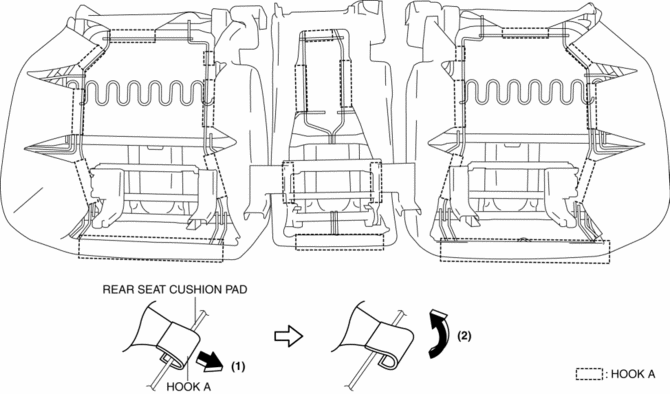
3. Slide hooks A in the order of (1), (2) shown in the figure to detach it from the rear seat cushion pad.
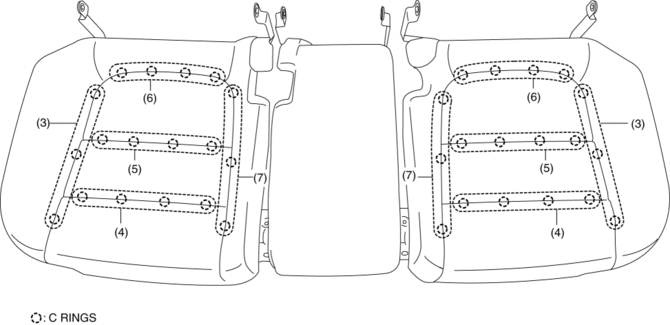
4. Partially peal back the rear seat cushion trim from the rear seat cushion pad, remove C rings in the order of (3), (4), (5), (6), (7) shown in the figure,
CAUTION:
-
If a damaged C rings are reused, it may not be possible to install the rear seat cushion trim and rear seat cushion pad correctly. When removing and installing C rings, be careful not to damage them.
-
If a C rings are damaged, replace the C rings with a new one.
5. Install in the reverse order of removal.
 Rear Seat Cushion Removal/Installation
CAUTION:
When removing or putting in the rear seat cushion, contact with the surrounding
areas of the vehicle could cause scratches and damage. When removing or putting
in the rear seat ...
 Rear Seat Removal/Installation
CAUTION:
When removing or putting in the rear seat, contact with the surrounding areas
of the vehicle could cause scratches and damage. When removing or putting in
the rear seat, always ...
Other materials:
Electric Variable Valve Timing Actuator Inspection
WARNING:
A hot engine can cause severe burns. Turn off the engine and wait until it
is cool before servicing.
CAUTION:
Do not disassemble the electric variable valve timing actuator because it
is a precision unit.
1. Disconnect the negative battery cable..
2. Remo ...
Active Command Modes Inspection [Front Body Control Module (Fbcm)]
1. Connect the M-MDS to the DLC-2.
2. After the vehicle is identified, select the following items from the initialization
screen of the M-MDS.
a. Select “DataLogger”.
b. Select “Modules”.
c. Select “F_BCM”.
3. Select the active command modes from the PID table.
4. Perform t ...
Charging System [Skyactiv G 2.0]
Outline
Regulator-less generator (built-in power transistor) has been adopted.
A generator using two delta connection type stator coils has been adopted.
Structural View
Structure
Consists of the following parts:
Battery
(See B ...
