
Mazda CX-5 Service & Repair Manual: Rear Door Trim Disassembly/Assembly
1. Disassemble in the order shown in the figure.
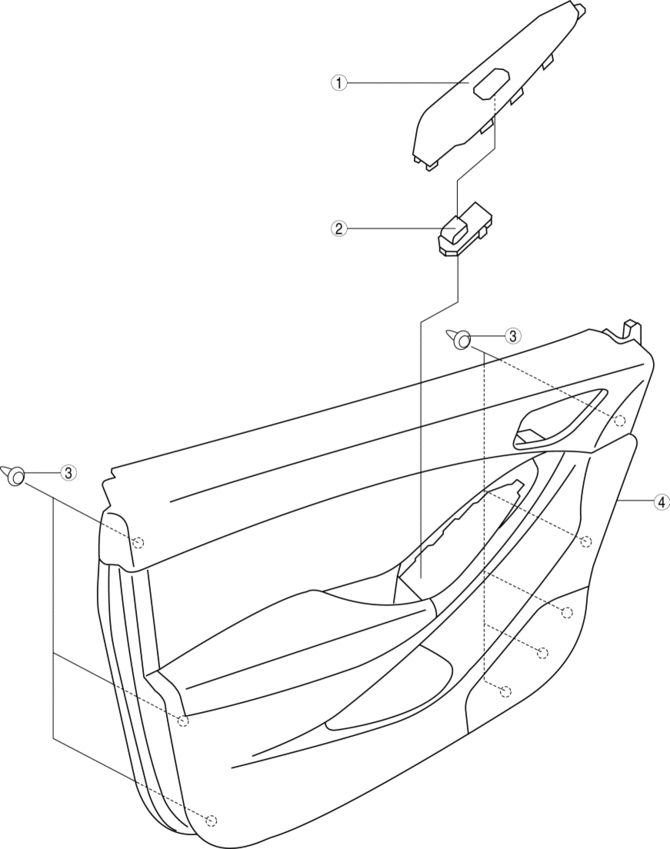
|
1 |
Switch panel cover |
|
2 |
Power window subswitch. |
|
3 |
Fastener |
|
4 |
Rear door trim |
2. Assemble in the reverse order of disassembly.
Power Window Subswitch Removal Note
1. Pull the edge of power window subswitch cover in the direction of arrow (1) and detach the tab.
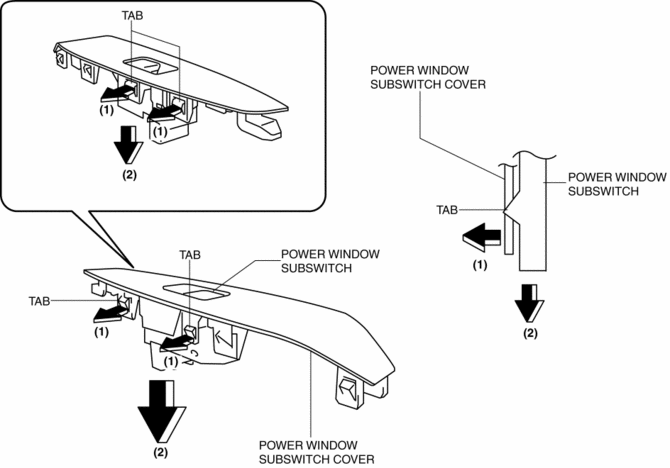
2. Remove the power window subswitch in the direction of arrow (2) shown in the figure.
 Front Sash Molding Removal
WARNING:
Using a utility knife with bare hands can cause injury. Always wear gloves
when using a utility knife.
1. Using a utility knife, carefully remove the double-sided adhesive ta ...
 Rear Door Trim Removal/Installation
1. Insert a tape-wrapped flathead screwdriver in the position indicated by the
arrow (1) in the figure and remove the inner handle cover while detach tabs A, pin
B.
2. Remove the screw C.
...
Other materials:
Solar Radiation Sensor Inspection [Full Auto Air Conditioner]
1. Shine a fluorescent light or expose the solar radiation sensor to natural
sunlight.
2. Connect the positive (+) lead to terminals B, C and negative (-) lead to terminal
A of the solar radiation sensor, and verify that the voltage value is output.
If the voltage is 0 V, replace ...
Rear Washer Nozzle Adjustment
CAUTION:
If the nozzle angle is adjusted with excessive force by strongly inserting
a needle or similar thin tool into the injection nozzle of rear washer nozzle,
it could damage the nozzle internally. When adjusting the nozzle, be careful
not to apply excessive force.
1. Inse ...
Active Command Modes Inspection [Blind Spot Monitoring (Bsm)]
1. Connect the M-MDS to the DLC-2.
2. After the vehicle is identified, select the following items from the initialization
screen of the M-MDS.
a. Select “DataLogger”.
b. Select “Modules”.
c. Select “BSML” or “BSMR”.
3. Select the simulation items from the PID table.
4. ...
