
Mazda CX-5 Service & Repair Manual: Rear Door Garnish Removal/Installation
WARNING:
-
Using a utility knife with bare hands can cause injury. Always wear gloves when using a utility knife.
Front
1. Using a tape-wrapped fastener remover, remove clips A in the direction of arrow (1), (2) shown in the figure.
2. Remove the double-sided adhesive tape in the position shown in the figure using the utility knife, remove the rear door garnish from the rear door sash.
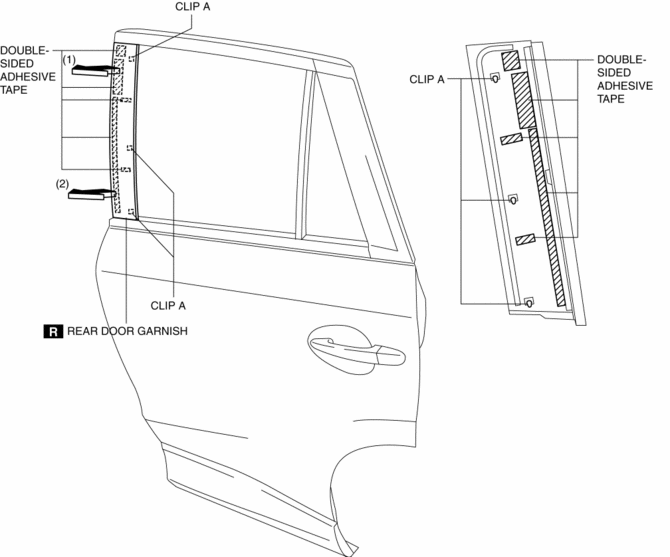
3. Install in the reverse order of removal.
Rear
1. Using a tape-wrapped fastener remover, remove clips B in the direction of arrow (1), (2) shown in the figure.
2. Remove the double-sided adhesive tape in the position shown in the figure using the utility knife, remove the rear door garnish from the rear door sash.
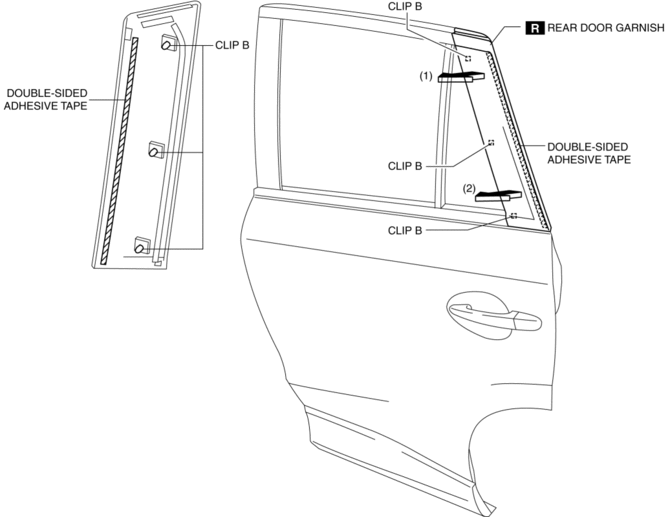
3. Install in the reverse order of removal.
 Rear Door Checker Removal/Installation
1. Fully close the rear door glass.
2. Disconnect the negative battery cable..
3. Remove the rear door trim..
4. Remove the rear door speaker..
5. Remove bolt.
6. Remove nuts.
7. P ...
 Rear Door Hinge Removal/Installation
1. Disconnect the negative battery cable..
2. Remove the following parts:
a. Rear door.
b. Front scuff plate.
c. Rear scuff plate.
d. B-pillar lower trim.
3. Remove in the order shown in t ...
Other materials:
Front Door Key Cylinder Removal/Installation
1. Disconnect the negative battery cable..
2. Remove the service hole cover.
3. Detach the screw from the front door key cylinder.
NOTE:
The screw cannot be removed because the front outer handle bracket has a
stopper which prevents the screw from falling.
4. While pre ...
Pressure Control Valve Inspection [Skyactiv G 2.0]
1. Remove the pressure control valve assembly..
CAUTION:
Do not apply a pressure 36 kPa {0.37 kgf/cm2, 5.2 psi} or more. Doing so
will damage the pressure control valve and evaporative hose.
2. Apply a pressure of 36 kPa {0.37 kgf/cm2, 5.2 psi} to port A.
3. Verify that ther ...
Main Relay Control [Skyactiv G 2.0]
Outline
Supplies power to each part by switching the main relay on/off at the optimal
timing according to the vehicle conditions.
Block Diagram
Operation
When the ignition is switched ON, the main relay turns on and electrical
power is supplied to each sensor and devic ...
