
Mazda CX-5 Service & Repair Manual: Rear Console Removal/Installation
1. Disconnect the negative battery cable..
2. Remove the following parts:
a. Front console box.
b. Shift lever knob (MTX).
c. Shift panel.
d. Upper panel.
3. Remove screws A.
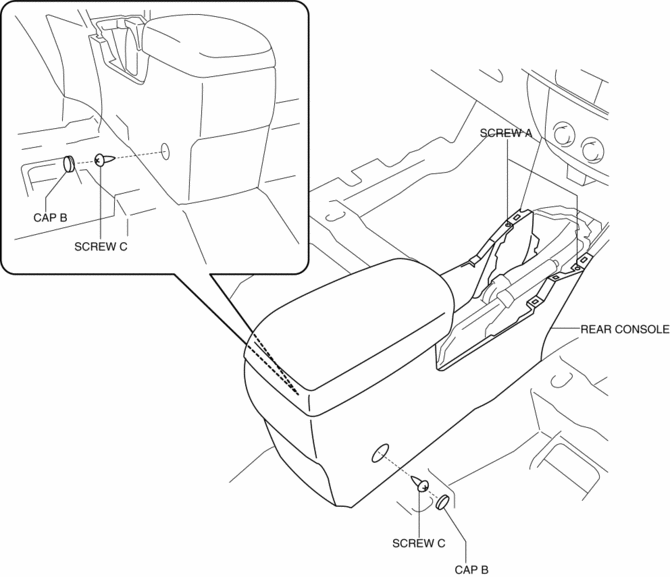
4. Remove caps B, then remove screws C.
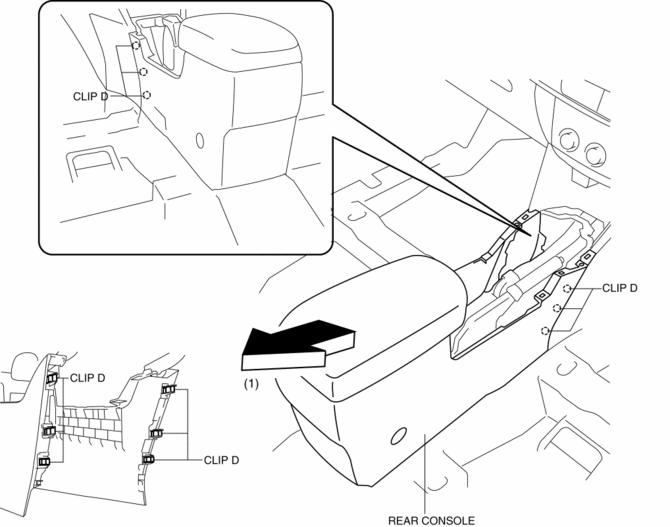
5. Pull the rear console in the direction of the arrow (1) while detaching clips D.
6. Disconnect the center accessory socket connector and auxiliary jack / USB port connector.
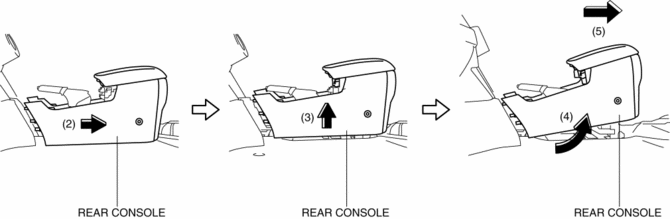
7. Remove the rear console in the direction of the arrow in the order of (2), (3), (4), (5) shown in the figure.
8. Install in the reverse order of removal.
 Rear Console Disassembly/Assembly
1. Disassemble in the order indicated in the table.
1
Screw A
2
Rear console bracket
3
Screw B
4
...
 Rear Seat Center Armrest Removal/Installation
1. Operate the push knob (RH) and lower the rear seat back (RH).
2. Remove screw A.
3. Remove the rear seat center armrest hinge cover (RH) in the direction of the
arrow (1) shown in the fig ...
Other materials:
Passenger Side Air Bag Module [Two Step Deployment Control System]
Purpose
When the passenger-side air bag module receives an impact from a frontal
or frontal offset collision, the operation (deployment) of the air bag mediates
the impact to the head and face of the front passenger.
Function
When the passenger-side air bag module receives ...
Air Bag System [Standard Deployment Control System]
Outline
The air bag system is a device that supplements the passenger restraint function
of the seat belts. The air bag system will not have the designed effect if the
seat belts are not worn properly.
The air bag system is composed of the following parts:
...
Engine Tune Up
Engine Tune-up Preparation
NOTE:
If the accelerator pedal is depressed continuously for a specified time,
the engine speed may decrease to the idle speed. This is due to the fuel cut
control operation, which prevents overheating, and it does not indicate a malfunction.
The engine s ...
