
Mazda CX-5 Service & Repair Manual: Rear Body Straight Line Dimensions (1) [Dimensions]
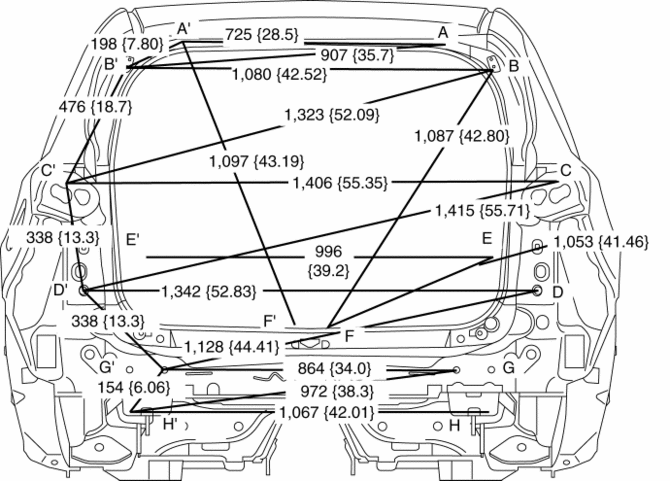
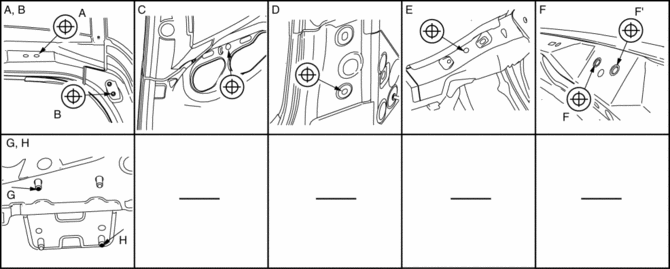
|
Point symbol |
Designation |
Hole diameter or bolt or nut size mm {in} |
|
A |
Liftgate hinge installation hole |
?12 {0.47} |
|
B |
Liftgate stay damper installation hole |
?10 {0.39} |
|
C |
Rear combination light installation slot |
?10 {0.39} |
|
D |
Rear end panel datum bolt |
?12 {0.347 |
|
E |
Brace bracket datum hole |
?10 {0.39} |
|
F |
Liftgate striker installation hole |
?14 {0.55} |
|
G |
Rear bumper reinforcement installation bolt |
M10 |
|
H |
Rear bumper reinforcement installation bolt |
M10 |
 Front Side Frame Removal [Panel Replacement]
Symbol Mark
Removal Procedure
1. Drill the 15 locations indicated by (A) shown in the figure.
2. Drill the 4 locations indicated by (B) shown in the figure.
NOTE:
When drilling the 4 ...
 Rear Crossmember Removal/Installation [2 Wd]
WARNING:
Verify that the rear crossmember is securely supported by a jack. If the
rear crossmember falls off, it can cause serious injury or death, and damage
to the vehicle.
CAUTI ...
Other materials:
Front Lower Arm Removal/Installation
1. Remove the front under cover No.2..
2. Remove in the order indicated in the table.
3. Install in the reverse order of removal.
4. Inspect the wheel alignment and adjust it if necessary..
1
Front lower arm ball joint
2
Front lower arm ...
Vacuum Pump Inspection
1. Pinch open the clamp using pliers and disconnect the vacuum hose from the
vacuum pump..
2. Install the vacuum gauge as shown in the figure, then check the vacuum.
3. Warn up the engine.
If the pressure is less than the specification, inspect for the following.
Malf ...
Transaxle Fluid Temperature (Tft) Sensor [Fw6 A EL, Fw6 Ax EL]
Purpose/Function
The transaxle fluid temperature (TFT) sensor detects the ATF temperature
in the oil pan.
The transaxle fluid temperature (TFT) sensor signal is used for automatic
shift control, TCC control, line pressure control, direct electric shift control,
learning contr ...
