
Mazda CX-5 Service & Repair Manual: Power Brake Unit Removal/Installation
CAUTION:
-
Once the brake switch clearance has automatically been adjusted, it cannot be adjusted again. Therefore, replace the switch with a new one when replacing the power brake unit or performing any procedure that changes the pedal stroke.
1. Remove the battery and battery tray..
2. Remove the windshield wiper arm and blade..
3. Remove the cowl grille..
4. Remove the windshield wiper motor and link..
5. Remove the cowl panel..
6. Remove the master cylinder..
7. Remove in the order indicated in the table.
8. Install in the reverse order of removal.
9. After installation, add brake fluid, bleed the air, and inspect for fluid leakage..
10. Remove the brake switch..
11. Inspect the brake pedal..
12. Install a new brake switch..
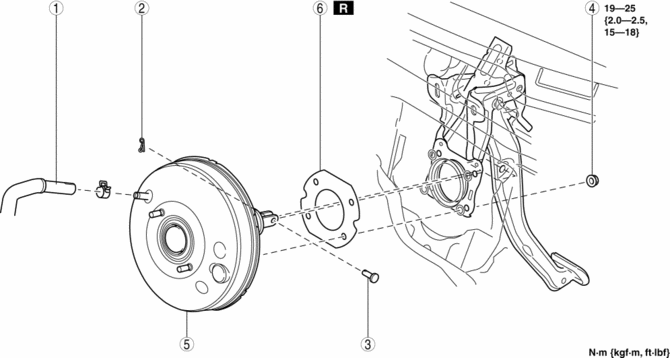
|
1 |
Vacuum hose |
|
2 |
Snap pin |
|
3 |
Clevis pin |
|
4 |
Nut |
|
5 |
Power brake unit |
|
6 |
Gasket |
 Power Brake Unit Inspection
NOTE:
The following inspection methods are simple inspection methods to judge the
function of the power brake unit.
If there is any malfunction in the power brake unit, replace the ...
 R 3 5 Brake [Fw6 A EL, Fw6 Ax EL]
Purpose/Function
The R-3-5 brake operates in 3GR, 5GR and in reverse to lock the reduction
internal gear against rotation.
Construction
The R-3-5 brake consists of the following ...
Other materials:
Accelerator Pedal Removal/Installation
1. Disconnect the negative battery cable..
2. Remove in the order indicated in the table.
1
APP sensor connector
2
Accelerator pedal
3. Install in the reverse order of removal. ...
Turbine/Input Shaft Speed Sensor, Output Shaft Speed Sensor [Fw6 A EL, Fw6 Ax
EL]
Purpose/Function
The turbine/input shaft speed sensor detects the rotation speed of the input
shaft (low clutch drum).
The output shaft speed sensor detects the rotation speed of the output shaft
(primary gear).
The turbine/input shaft speed sensor and output shaft speed ...
Refrigerant Charging
CAUTION:
Do not use a different type of refrigerant or charge beyond the specified
level. Otherwise, cooling ability will be lowered and the A/C compressor could
be damaged.
Charging Recycled HFC-134a Refrigerant
1. Connect an HFC-134a recovery/recycling/recharging device to the ...
