
Mazda CX-5 Service & Repair Manual: Outer Mirror Garnish Removal/Installation
1. Disconnect the negative battery cable..
2. Remove the outer mirror glass..
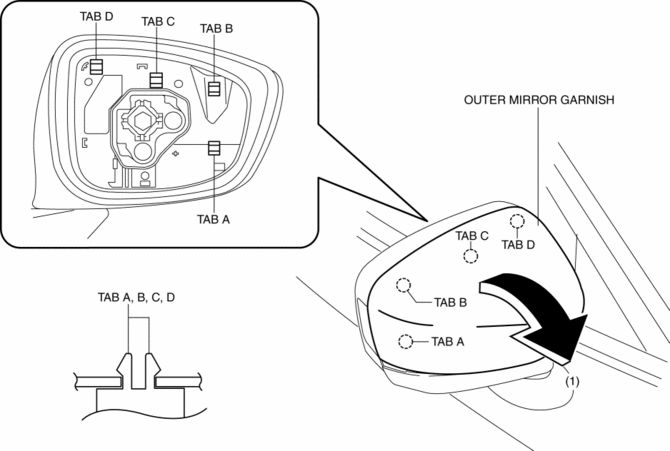
3. Insert a tape-wrapped flathead screwdriver into the upper outer mirror garnish and remove tab A, B, C, D in the direction of arrow (1).
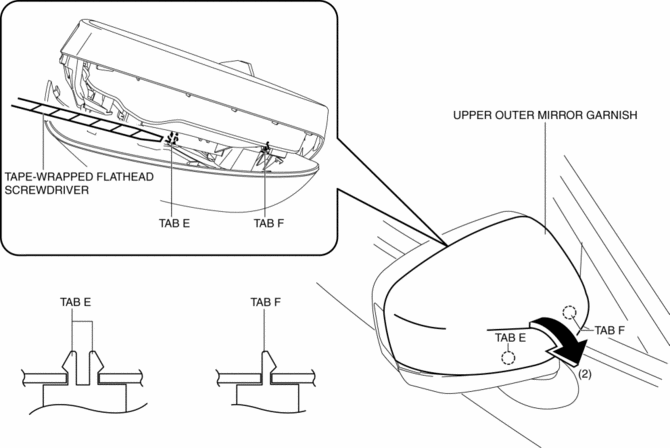
4. Insert a tape-wrapped flathead screwdriver into the upper outer mirror garnish and remove tab F, G in the direction of arrow (2).
5. Install in the reverse order of removal.
 Mirror Base Removal
1. Disconnect the negative battery cable..
2. Remove the rearview mirror. (without auto-dimming mirror).
3. Remove the auto-dimming mirror. (with auto-dimming mirror).
4. Wind each end of a wire ...
 Outer Mirror Glass Inspection
Heated Outer Mirror
1. Disconnect the negative battery cable..
2. Remove the outer mirror glass..
3. Verify that the resistance and continuity between the heated outer mirror
terminals is as in ...
Other materials:
Battery [Skyactiv G 2.0]
Purpose, Function
The battery stores electricity generated by the generator. In addition, it
supplies power to electronic devices if necessary.
Construction
The battery is installed in the engine compartment. (vehicle left)
Fail-safe
Function not equipped.
...
Drive Belt Removal/Installation
WARNING:
A hot engine can cause severe burns. Turn off the engine and wait until it
is cool before servicing.
NOTE:
Remove/install the drive belt from the underside of the vehicle.
Generator Drive Belt Removal/Installation
CAUTION:
To prevent damage to the dri ...
Oil Pump Removal/Installation
WARNING:
Hot engines and engine oil can cause severe burns. Turn off the engine and
wait until it and the engine oil have cooled.
A vehicle that is lifted but not securely supported on safety stands is dangerous.
It can slip or fall, causing death or serious injury. Never work ...
