
Mazda CX-5 Service & Repair Manual: Oil Control Valve (OCV) Inspection
Coil Resistance Inspection
1. Disconnect the negative battery cable..
2. Remove the plug hole plate..
3. Disconnect the OCV connector.
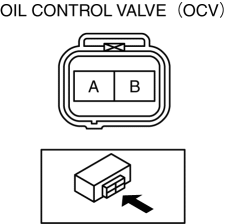
4. Measure the resistance between terminals A and B using an ohmmeter.
-
OCV coil resistance
-
6.9—7.5 ohms [20°C {68°F}]
-
If not as specified, replace the OCV..
5. Install in the reverse order of removal.
Spool Valve Operation Inspection
1. Disconnect the negative battery cable..
2. Remove the OCV..
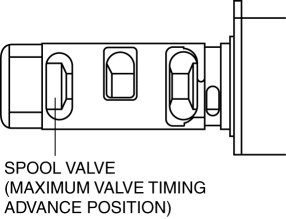
3. Verify that the spool valve in the OCV is in the maximum valve timing advance position as indicated in the figure.
-
If not as specified, replace the OCV..
4. Verify that the battery is fully charged..
-
If not as specified, recharge the battery..
NOTE:
-
When applying battery positive voltage between the OCV terminals, the connection can be either of the following:
-
Positive battery cable to terminal A, negative battery cable to terminal B
-
Positive battery cable to terminal B, negative battery cable to terminal A
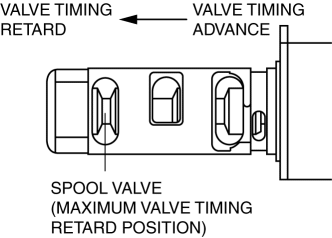
5. Apply battery positive voltage between the OCV terminals and verify that the spool valve operates and moves to the maximum valve timing retard position.
-
If not as specified, replace the OCV..
6. Stop applying battery positive voltage and verify that the spool valve returns to the maximum valve timing advance position.
-
If not as specified, replace the OCV..
7. Install the OCV..
 Lubrication System
Outline
Pressure loss is reduced by optimizing the oil passage.
With the adoption of the chain drive type oil pump, oil pump drive force
has been reduced.
With the adoption o ...
 Oil Control Valve (OCV) Removal/Installation
WARNING:
A hot engine can cause severe burns. Turn off the engine and wait until it
is cool before servicing.
1. Disconnect the negative battery cable..
2. Remove the plug hole plat ...
Other materials:
Clock
Purpose
The clock displays the current time, the passenger and rear seat belt status,
the passenger air bag deactivation (PAD) switch status, and the seat warmer
operation status to notify the user.
Function
Stores the time set by the user and displays the current time.
...
Front Brake (Disc) Inspection
Brake Judder Repair Hints
Description
1. Brake judder concern has the following 3 characteristics:
Steering wheel vibration
1. The steering wheel vibrates in the rotation direction. This characteristic
is most noticeable when applying brakes at a vehicle speed of 100—140 km/h {62.2—86.9
...
Cylinder Block
Purpose, Function
The cylinder block forms the cylinder and crankcase.
Construction
The cylinder block consists of the upper cylinder block and lower cylinder
block.
The cylinder block is an open deck type with excellent cooling performance.
The lightweight cyl ...
