
Mazda CX-5 Service & Repair Manual: Heated Oxygen Sensor (HO2 S) Heater Control [Skyactiv G 2.0]
Outline
-
Based on the control of the HO2S heater, a stabilized oxygen concentration is detected even at low exhaust temperatures, and feedback control of fuel injection even at cold engine start is made possible for improved cold temperature exhaust emission performance.
-
Both emission performance and sensor protection have been improved by duty control of the heater according to engine operation conditions (exhaust gas temperature)
Block Diagram
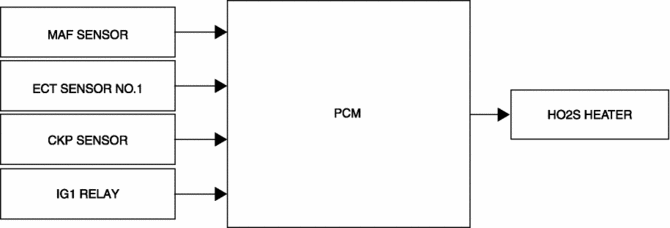
Operation
-
The PCM operates the HO2S heater based on the following control conditions.
|
Output duty ratio |
Control condition |
|
0% |
|
|
30% |
|
|
0?100% (Determined by engine speed and charging efficiency) |
|
 Front Heat Duct Removal/Installation
1. Disconnect the negative battery cable..
2. Remove the following parts:
a. Dashboard under cover.
b. Side wall.
c. Glove compartment.
3. Detach the tab and remove the front heat duct.
LH ...
 Heater Core
Purpose
The heater core heats passing air.
Function
A portion of the engine coolant is taken into the heater core to heat the
air passing through the heater core.
Co ...
Other materials:
Instrument Cluster
Outline
The instrument cluster centrally controls the speedometer, tachometer, odometer/tachometer,
fuel gauge, warning/indicator lights, trip computer, warning sounds and panel
lights.
Function
The instrument cluster displays the following information to notify the user
...
Seat Weight Sensor Control Module Removal/Installation [Two Step Deployment
Control System]
CAUTION:
When the seat weight sensor control module is replaced with a new one, perform
the seat weight sensor calibration using the M?MDS..
1. Switch the ignition to off.
2. Disconnect the negative battery cable and wait for 1 min or more..
3. Disconnect the connectors.
...
Roof Molding Removal
1. Insert a tape-wrapped flathead screwdriver in the position shown in the figure.
2. Rotate a tape-wrapped flathead screwdriver in the direction of the arrow in
the order of (1), (2) shown in the figure and remove the roof molding from the front
T-stud.
3. Rotate the roof molding in th ...
