
Mazda CX-5 Service & Repair Manual: Discharge Headlight Bulb
Purpose, Function
-
Charges the internal metallic element and emits white light resembling sunlight.
Construction
-
A mercury-free bulb has been adopted for the discharge headlight bulb.
-
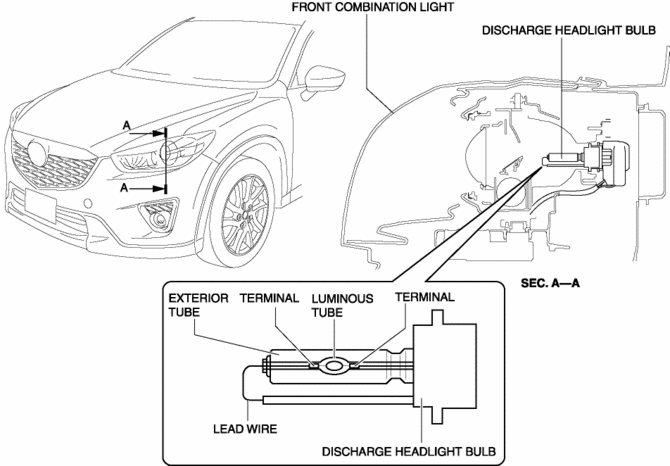
The discharge headlight bulb is assembled to the front combination light.
-
The discharge headlight bulb consists of xenon gas, a luminous tube in which metallic iodide is enclosed, a lead wire and electrodes which pass electricity, and an exterior tube.
Operation
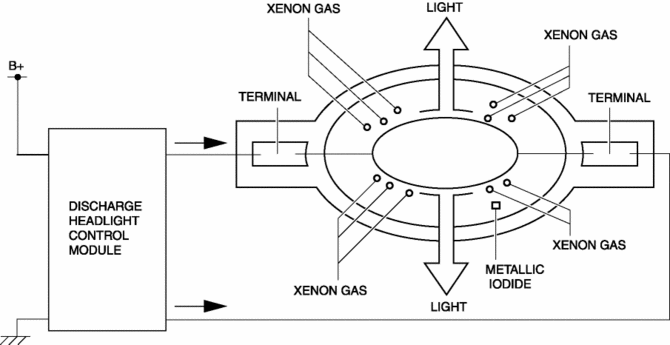
1. When high DC voltage (approx. 25,000 V) from the discharge headlight control module is input to the electrodes, the insulation between the electrodes is broken down and electrical current flows between the electrodes.
2. When electrical current flows between the electrodes of the discharge headlight bulb, the xenon gas is energized and emits light.
3. When the xenon gas emits light, temperature inside the discharge headlight bulb rises, the metallic iodide vaporizes/separates, and the metallic element discharges and emits light.
Fail-safe
-
Function not equipped.
 DRL (Daytime Running Light) System
Outline
The DRL system automatically switches the headlights to HI beams (50% dim)
or illuminates the DRL bulb when the ignition is switched ON (engine on), the
parking brake is released, ...
 Discharge Headlight Control Module
Purpose
Converts DC voltage from the battery to AC voltage and outputs the stabilized
voltage to the discharge headlight.
Function
The discharge headlight control module control ...
Other materials:
Bsm Indicator Light Does Not Flash While Under Bsm Indicator Light Flashing
Conditions (With Combination Switch Operation (Turn Signal Switch)) [Blind Spot
Monitoring (Bsm)]
Description
BSM indicator light does not flash while under BSM indicator light-flashing
conditions (with combination switch operation (turn signal switch))
The BSM indicator light does not flash or illuminate continuously,
but the cond ...
Adaptive Front Lighting System (Afs) Control Module Removal/Installation
NOTE:
The AFS control module prior to replacement stores the vehicle specification
information.
A new AFS control module does not store any vehicle specification information.
When the ignition is switched ON after the AFS control module is replaced,
the AFS control modu ...
Steering Wheel
Steering Wheel
WARNING
Never adjust the steering wheel while the vehicle is moving: Adjusting the steering
wheel while the vehicle is moving is dangerous.
Moving it can very easily cause the driver to abruptly turn to the left or right.
This can lead to loss of control or an accident.
Steeri ...
