
Mazda CX-5 Service & Repair Manual: D Pillar Speaker Removal/Installation
1. Disconnect the negative battery cable..
2. Remove the following parts:
a. Trunk board.
b. Trunk end trim.
c. Rear scuff plate.
d. Trunk side trim.
e. D-pillar trim.
3. Disconnect the connector.
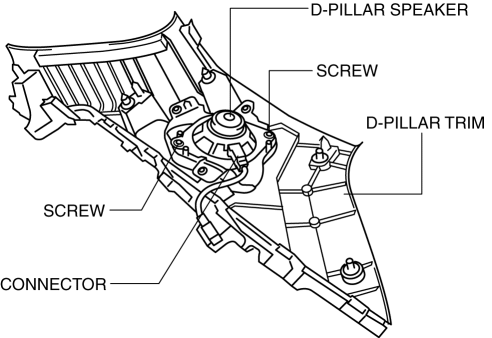
4. Remove the screws.
5. Remove the D-pillar speaker.
6. While pressing the tabs of the clip in the direction of the arrow (1) shown in the figure, press it in the direction of the arrow (2) to detach the short-cord clip from the D-pillar trim.
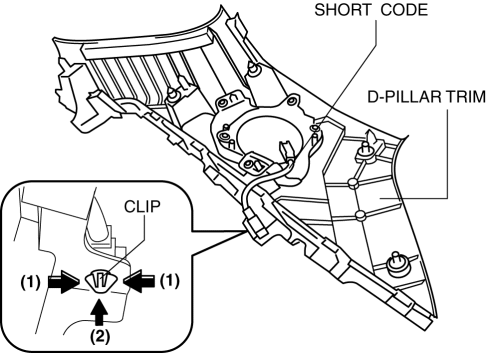
7. Remove the short cord.
8. Install in the reverse order of removal.
 D Pillar Speaker Inspection
D-pillar speaker
1. Disconnect the negative battery cable..
2. Remove the following parts:
a. Trunk board.
b. Trunk end trim.
c. Rear scuff plate.
d. Trunk side trim.
e. D-pillar trim.
...
 Entertainment System
Outline
The following entertainment system has been adopted.
Audio system (with audio system)
Car-navigation system (with car-navigation system)
Park assist s ...
Other materials:
Start Stop Unit Configuration (Using Read/Write Function)
NOTE:
When performing configuration, it is necessary to read the vehicle specification
information from the start stop unit before replacing it. Connect the M-MDS
to the vehicle and perform vehicle identification before removing the start
stop unit. The vehicle specification informa ...
Front Shock Absorber And Coil Spring Removal/Installation
CAUTION:
Performing the following procedures without first removing the front ABS
wheel-speed sensor may possibly cause an open circuit in the wiring harness
if it is pulled by mistake. Before performing the following procedures, disconnect
the front ABS wheel-speed sensor wiring ...
Power Steering Malfunction Indicator Light
Purpose
The power steering malfunction indicator light warns the driver that there
is a malfunction with the electric power steering (EPS) system.
Function
If there is a malfunction in the EPS system, the power steering malfunction
indicator light illuminates.
If th ...
