
Mazda CX-5 Service & Repair Manual: Cooling System Cap Inspection
WARNING:
-
Never remove the cooling system cap or loosen the radiator drain plug while the engine is running, or when the engine and radiator are hot. Scalding engine coolant and steam may shoot out and cause serious injury. It may also damage the engine and cooling system.
-
Turn off the engine and wait until it is cool. Even then, be very careful when removing the cap. Wrap a thick cloth around it and slowly turn it counterclockwise to the first stop. Step back while the pressure escapes.
-
When you are sure all the pressure is gone, press down on the cap using the cloth, turn it, and remove it.
1. Clean the cooling system cap and the sealed part.
2. Inspect the cooling system cap for cracks or everted seal.
-
If there is any malfunction, replace the cooling system cap.
3. Attach the cooling system cap to the radiator cap tester.
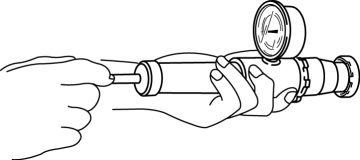
4. Hold the cooling system cap downward and apply pressure gradually. Verify that the pressure is held stable for 10 s.
-
If the pressure is not held stable, replace the cooling system cap.
-
Cooling system cap valve opening pressure
-
93.2—122.6 kPa {0.951—1.250 kgf/cm2, 13.6—17.7 psi}
 Cooling Fan Motor Removal/Installation
WARNING:
Never remove the cooling system cap or loosen the radiator drain plug while
the engine is running, or when the engine and radiator are hot. Scalding engine
coolant and steam may ...
 Cooling System Cap
Purpose, Function
The cooling system cap maintains appropriate pressure in the engine coolant
passage. In addition, cooling efficiency has been improved by increasing the
engine coolant b ...
Other materials:
Refrigerant Charging
CAUTION:
Do not use a different type of refrigerant or charge beyond the specified
level. Otherwise, cooling ability will be lowered and the A/C compressor could
be damaged.
Charging Recycled HFC-134a Refrigerant
1. Connect an HFC-134a recovery/recycling/recharging device to the ...
Outer Mirror Glass Inspection
Heated Outer Mirror
1. Disconnect the negative battery cable..
2. Remove the outer mirror glass..
3. Verify that the resistance and continuity between the heated outer mirror
terminals is as indicated in the table.
If not as indicated in the table, or if the resistance is not with ...
Synchronizer Mechanism [C66 M R]
Purpose, Function
For smooth gear changes, the synchronizer mechanism synchronizes the rotation
of the engaging area and engages gears.
Construction
Detent ball-type synchronizer key
A detent ball-type synchronizer key has been adopted for the synchronizer
mechanism ex ...
