
Mazda CX-5 Service & Repair Manual: Cooling Fan Motor Inspection
Part Inspection
1. Verify that the battery is fully charged..
2. Disconnect the cooling fan motor connector (2 terminals).
3. Install a tester and battery to the cooling fan motor connector (2 terminals) as shown in the figure.
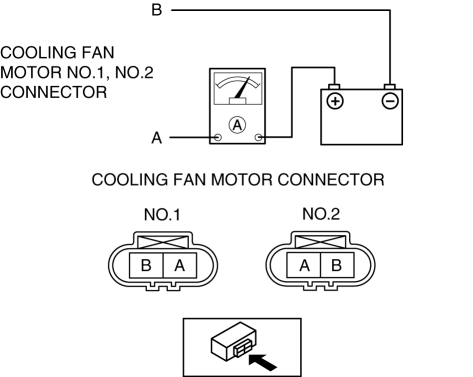
4. Verify that each cooling fan motors operate smoothly at the standard current.
-
If there is any malfunction, replace the applicable part.
-
Cooling fan motor No.1, No.2 standard current
-
4.5—8.5 A [12 V]
 Cooling Fan Component
Purpose, Function
The cooling fan rotates according to vehicle conditions and enhances the
cooling efficiency of the radiator.
Structural View
Operation
For the ...
 Cooling Fan Motor Removal/Installation
WARNING:
Never remove the cooling system cap or loosen the radiator drain plug while
the engine is running, or when the engine and radiator are hot. Scalding engine
coolant and steam may ...
Other materials:
Airflow Mode Main Link Removal/Installation
Full-auto Air Conditioner
1. The airflow mode main link is installed to the airflow mode actuator. When
removing the airflow mode main link, refer to the airflow mode actuator removal/installation..
Manual Air Conditioner
1. Disconnect the negative battery cable..
2. Remove the glove compar ...
Instrument Cluster Configuration (Using Read/Write Function)
NOTE:
When performing configuration, it is necessary to read the vehicle specification
information from the instrument cluster before replacing it. Connect the M-MDS
to the vehicle and perform vehicle identification before removing the instrument
cluster. The vehicle specification i ...
Engine Tune Up
Engine Tune-up Preparation
NOTE:
If the accelerator pedal is depressed continuously for a specified time,
the engine speed may decrease to the idle speed. This is due to the fuel cut
control operation, which prevents overheating, and it does not indicate a malfunction.
The engine s ...
