
Mazda CX-5 Service & Repair Manual: Column Cover Removal/Installation
1. Pull down the steering wheel.
2. Press the shaded area shown in the figure using your thumb, and lift the upper column cover in the direction of arrow (1).
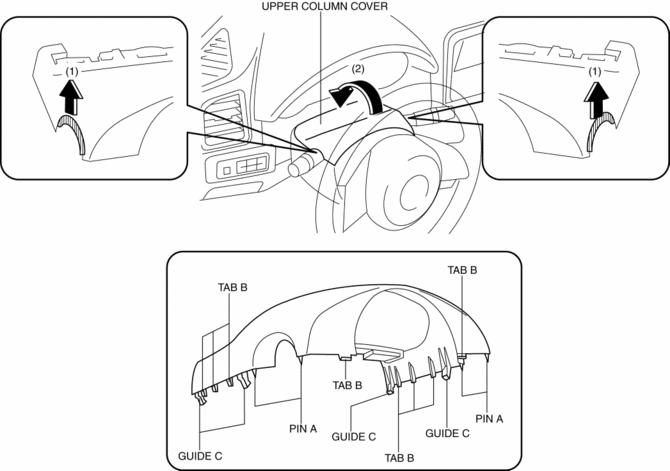
3. Pull the upper column cover in the direction of the arrow (2) and remove it while detaching pins A, tabs B and guides C.
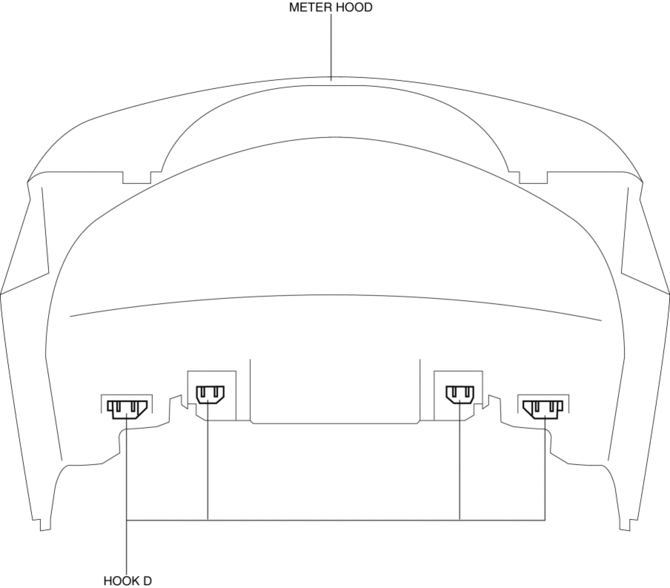
4. Remove hooks D from the meter hood.
CAUTION:
-
If the cover of the meter hood is deformed, it may not return to its original condition. When removing the cover of the meter hood, detach hooks D one by one from the upper column cover.
5. Pull up the steering wheel.
6. Remove screws E.
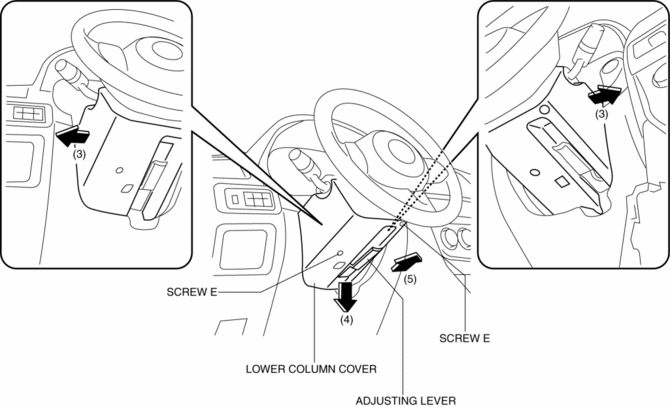
7. Remove the lower column cover in the direction of the arrow (4), (5) set the adjusting lever aside while keeping it open in the direction of the arrow (3) shown in the figure.
8. Install in the reverse order of removal.
 Center Panel Removal/Installation
1. Disconnect the negative battery cable..
2. Remove the decoration panel.
3. Take the shaded area shown in the figure, and pull the center panel in the
direction of the arrow in the order of (1 ...
 D Pillar Trim Removal/Installation
1. Disconnect the negative battery cable..
2. Remove the following parts:
a. Trunk board.
b. Trunk end trim.
c. Rear scuff plate.
d. Trunk side trim.
3. Take the shaded area shown in the f ...
Other materials:
Refrigerant Pressure Sensor [Full Auto Air Conditioner]
Purpose
The refrigerant pressure sensor detects the refrigerant pressure in the refrigerant
cycle.
Function
The refrigerant pressure sensor converts the detected refrigerant pressure
to an electric signal and sends it to the PCM.
Construction
The refriger ...
Front Seat
Seat Operation
1 Seat Slide
(Manual Seat) To move a seat forward or backward, raise the lever and slide
the seat to the desired position and release the lever.
Make sure the lever returns to its original position and the seat is locked in
place by attempting to push it forward and backward. ...
Knock Sensor (Ks) Removal/Installation
1. Disconnect the negative battery cable..
2. Remove the plug hole plate..
3. Remove the intake manifold..
4. Disconnect the KS connector.
5. Remove the KS..
6. Install in the reverse order of removal.
KS Installation Note
Verify that there is no foreign matter caught between ...
